
TRENDnet TPE-115GI Manual
PDF manual · 4 Pages
English



Quick check
Incorrect answer, please try again.
Chat with your TRENDnet TPE-115GI manual using AI
Get instant AI answers from your TRENDnet TPE-115GI manual
Ask anything about the TRENDnet TPE-115GI. Answers come from this manual, with the pages they are based on.
Ask a Question
Do you recommend TPE-115GI?
Yes NoFrequently Asked Questions
The injector is suitable for PoE and PoE+ devices such as IP cameras, VoIP phones, wireless access points, and other network devices that accept IEEE 802.3af/at power over Ethernet. Verify the device's power class and requirements before connecting.
Is this answer helpful?
Yes. The TRENDnet Desktop Gigabit PoE Injector supports Gigabit (10/100/1000 Mbps) Ethernet to ensure full data throughput for high-bandwidth applications like HD video streaming.
Is this answer helpful?
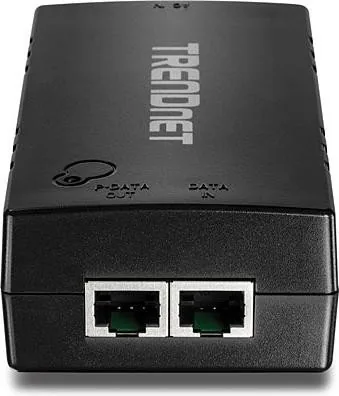
Installation is plug-and-play: connect your network uplink to the DATA IN port, connect the PoE-capable device to the P+DATA OUT port, and plug in the power adapter. Check LED indicators to confirm link and power status. No configuration is required.
Is this answer helpful?
The unit is designed to follow IEEE power pairing and typically prevents accidental power to non-PoE devices. However, always confirm wiring and compatibility to avoid risk—do not connect unfamiliar or proprietary equipment without verification.
Is this answer helpful?
TRENDnet provides a multi-year limited warranty for this product, with coverage details and exceptions (such as a separate shorter warranty for power adapters) available on TRENDnet.com. Online resources include documentation, firmware updates, registration, and technical support.
Is this answer helpful?
Yes, but each injector powers only one device. For multiple devices or centralized management, consider deploying a PoE switch or managed PoE solution to reduce cabling and simplify power distribution and monitoring.
Is this answer helpful?
The device complies with applicable FCC rules and other standards. Electronic waste should not be disposed of with household trash; follow local recycling and disposal regulations. Check the product documentation for full compliance statements.
Is this answer helpful?
Advantages and Disadvantages
Advantages

- Delivers PoE+ (802.3at) power and Gigabit data over one RJ-45 cable for bandwidth-heavy devices.
- Compact desktop design with plug-and-play setup and LED status indicators for easy deployment.
- Ideal for powering single devices without installing a PoE switch—useful for small offices and installers.
- Protects non-PoE equipment from accidental power injection and follows standard power pairing.
- Backed by TRENDnet support, documentation, and a multi-year limited warranty for peace of mind.
Disadvantages

- Single-port injector limits use to one device per unit—multiple devices require multiple injectors or a PoE switch.
- Requires external power adapter which may add clutter and has a separate warranty period.
- No advanced management features—unsuitable for networks needing centralized PoE monitoring or scheduling.
- Not a replacement for high-density deployments; scalability requires additional hardware purchases.
- Must verify device power draw against injector capability to avoid underpowering PoE devices.
Product Specification
Function
PoE Injector (1x Data, 1x Data/PoE+)
Type
Standalone, Wall mount
Network ports
1x RJ-45
Speeds
1x RJ-45 (10/100/1000Base-T)
PoE
1x RJ-45 PoE+ (1x 30W), total: 30W
Backplane
N/A
Officially supported standards
802.3, 802.3ab, 802.3af, 802.3at, 802.3u
Configuration
unmanaged
Cooling
passive
Dimensions (WxHxD)
2.48x1.38x5.24 in
Weight
0.36 lb
Color
black
Product Description
TRENDnet Desktop Gigabit PoE Injector, 1x RJ-45, PoE+ Manual
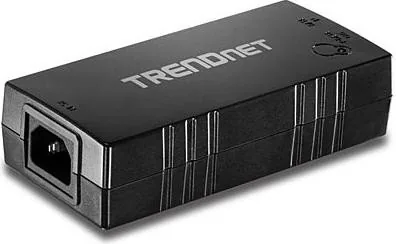
The TRENDnet Desktop Gigabit PoE Injector, 1x RJ-45, PoE+ is a compact, single-port power injector designed to deliver both data and up to PoE+ (802.3at) power over a single Cat5e/Cat6 Ethernet cable. Built for simplicity and reliability, this desktop injector is ideal for powering PoE devices such as IP cameras, VoIP phones, wireless access points, and small network devices where inline power is required but PoE switches are not available.
Designed with small offices, home offices, and installers in mind, the injector combines a GbE RJ-45 data pass-through with a dedicated PoE+ output. The sturdy desktop form factor and included power adapter make deployment fast — just connect your network uplink to the DATA IN port and the powered device to the P+DATA OUT port. LED indicators provide quick status checks so you can confirm power and link activity at a glance.
Performance-wise, the injector supports Gigabit Ethernet speeds to ensure no data bottleneck for bandwidth-sensitive applications like high-definition video streams. The device adheres to industry safety and regulatory standards, and TRENDnet backs it with a multi-year limited warranty and support resources. Documentation and firmware updates are available online, and registering the product helps streamline support interactions.
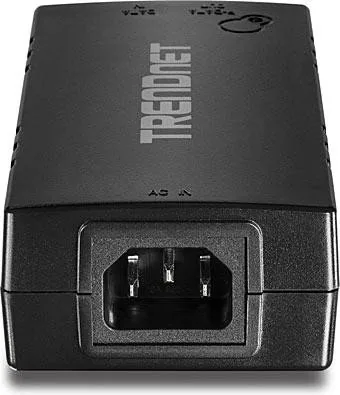
Beyond the essentials, the injector is engineered to protect non-PoE devices from accidental power injection and to follow power pairing standards so compatible devices receive stable, reliable power. Its simple plug-and-play nature eliminates the need for complex configuration, making it a practical addition for technicians who need a dependable, portable PoE solution during installations or for augmenting existing networks.
Whether you’re powering a remote IP camera, deploying a single AP in a satellite office, or testing PoE devices on the bench, this TRENDnet injector provides a straightforward way to add PoE+ without changing network infrastructure. Its compact footprint and clear labeling reduce installation errors and the device’s compliance statements and disposal guidance ensure environmentally responsible handling.
Notes:
- Supports 802.3at PoE+ power delivery and Gigabit Ethernet speeds.
- Single-port injector; useful for point deployments and troubleshooting.
- Check power budget and device compatibility before use.
- TRENDnet provides online documentation, warranty details, and product registration.
Search for 67,732 Manuals online


Type-in Brand or Model