
TRENDnet TPE-1016L/TPE-1026L Manual
PDF manual · 8 Pages
English



Quick check
Incorrect answer, please try again.
Chat with your TRENDnet TPE-1016L/TPE-1026L manual using AI
Get instant AI answers from your TRENDnet TPE-1016L/TPE-1026L manual
Ask anything about the TRENDnet TPE-1016L/TPE-1026L. Answers come from this manual, with the pages they are based on.
Ask a Question
Do you recommend TPE-1016L/TPE-1026L?
Yes NoFrequently Asked Questions
It is used to connect multiple network devices in a rack-based setup while supplying PoE+ power to compatible endpoints such as cameras, access points, and phones. It is a practical fit for AV and managed network installations.
Is this answer helpful?
Yes. The 2 combo RJ-45/SFP ports provide flexible uplink options, allowing installers to use standard Ethernet or add fiber connectivity when the network design requires it.
Is this answer helpful?
Check the front-panel LEDs for Power, PoE, and Link/ACT status. The display also helps show PoE allocation and consumption, making it easier to verify that devices are connected and powered properly.
Is this answer helpful?
The package typically includes the switch itself, a power cord, a rack mount kit, and a quick installation guide. Those items support a fast setup in a standard rack environment.
Is this answer helpful?
PoE+ lets the switch deliver data and electrical power over the same cable. This reduces adapter clutter, simplifies installation, and makes it easier to deploy powered devices in hard-to-reach locations.
Is this answer helpful?
Make sure the switch is powered on, network cables are seated correctly, and the PoE load stays within available capacity. It is also important to confirm that connected devices are suitable for PoE operation.
Is this answer helpful?
Advantages and Disadvantages
Advantages

- 24 RJ-45 ports plus 2 combo RJ-45/SFP uplinks provide flexible expansion and uplink choices.
- PoE+ support reduces cable clutter by powering compatible devices through Ethernet.
- Front-panel LEDs and the 7-segment display make status checks and troubleshooting faster.
- Rackmount design fits organized installations and helps keep equipment closets tidy.
Disadvantages

- PoE capacity must be monitored carefully when many powered devices are connected.
- Best suited to rack-based setups, so it is less convenient for casual desktop use.
- Some deployments may need additional planning for uplinks, especially if fiber is required.
Product Specification
Function
Switch
Type
Standalone, Rackmount (via mounting brackets)
Network ports
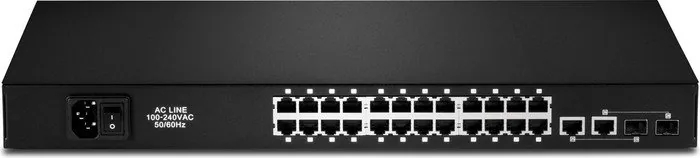
24x RJ-45 (rear), 2x RJ-45/SFP (rear)
Speeds
24x RJ-45 (10/100Base-T), 2x RJ-45 (10/100/1000Base-T), 2x SFP (1Gb/s)
PoE
24x RJ-45 PoE+ (24x 30W), total: 400W
Backplane
8.8Gb/s, 6.5Mp/s, 4k MAC addresses
Officially supported standards
802.3, 802.3ab, 802.3af, 802.3at, 802.3u, 802.3x, 802.3z
Dimensions (WxHxD)
17.32x1.73x11.02in, 1U
Weight
7.72 lb
Color
black
Special features
Metal housing, Display, removable mounting brackets
Manufacturer warranty
three years
Product Description
TRENDnet TPE Rackmount AV Switch for Clean, Scalable PoE+ Deployments
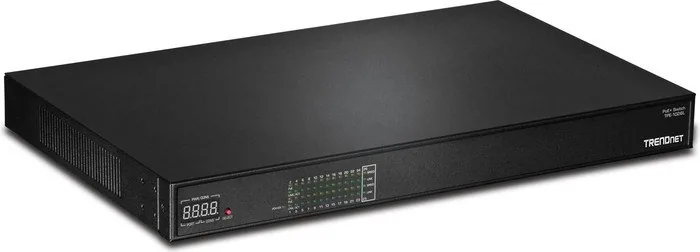
The TRENDnet TPE Rackmount AV Switch, 24x RJ-45, 2x RJ-45/SFP, PoE+ Manual points to a network switch built for practical, organized installations. It is designed for rack environments where a dense port count, dependable power delivery, and easy status checks all matter. For AV systems, surveillance setups, and office networks, that combination can simplify deployment while keeping the wiring neat and centralized.
With 24 RJ-45 ports and two combo RJ-45/SFP uplinks, the switch offers flexibility for both short-run copper connections and longer-distance uplink options. That makes it a useful choice when a project needs room to grow without replacing the core switching hardware. PoE+ support adds even more value by letting compatible devices receive both data and power over a single Ethernet cable, reducing clutter and lowering installation complexity.
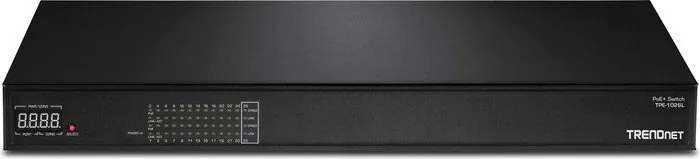
The quick installation approach is another practical advantage. The guide focuses on the essentials: connect power, attach network and PoE devices, and confirm the LEDs. Front-panel indicators provide a fast way to check Power, PoE, and Link/ACT status, while the 7-segment display helps show power allocation and PoE consumption. For installers and technicians, this visible feedback can save time during setup and troubleshooting.
In real-world use, that means fewer guesswork moments and more confidence during deployment. The switch is especially helpful in rooms where multiple powered endpoints are expected to run at once, since managing PoE load becomes part of the daily workflow. Instead of relying on separate power adapters for every device, the network can stay cleaner, easier to service, and more professional in appearance.
Reliability is another theme reflected in the product information. The documentation emphasizes proper installation, power verification, and compliance details, which reinforces the idea that this is a switch made for structured, long-term use. If you are building a rack-mounted AV or PoE network, this model offers a balanced mix of capacity, visibility, and convenience.
Notes
- Ideal for rack-mounted environments where cable management matters.
- LED and display feedback make PoE status easier to monitor.
- Plan PoE usage carefully when connecting multiple powered devices.
- Use standard rack and network preparation for the smoothest installation.
Search for 67,732 Manuals online


Type-in Brand or Model