

TRENDnet TI-G80 Manual
PDF manual · 8 Pages
English



Quick check
Incorrect answer, please try again.
Chat with your TRENDnet TI-G80 manual using AI
Get instant AI answers from your TRENDnet TI-G80 manual
Ask anything about the TRENDnet TI-G80. Answers come from this manual, with the pages they are based on.
Ask a Question
Do you recommend TI-G80?
Yes NoFrequently Asked Questions
The switch requires a DC power supply between 12 and 56 volts. It is crucial to verify your power source matches this range to prevent hardware damage.
Is this answer helpful?
Yes, the device supports DIN rail mounting. You attach a bracket, hook it over the rail, and rotate it down until it clicks into a secure position.
Is this answer helpful?
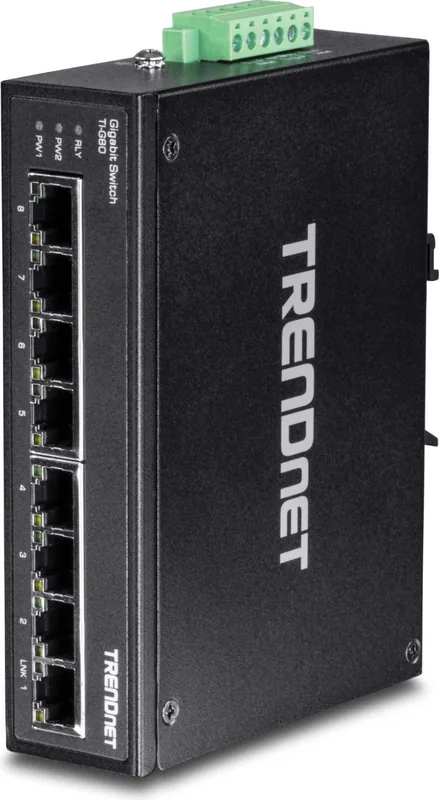
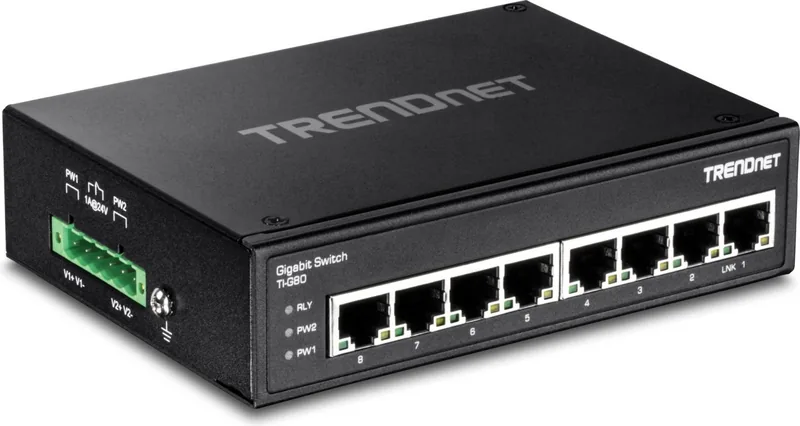
The TRENDnet TI Hardened Industrial Railmount Gigabit Switch comes equipped with eight RJ-45 ports capable of gigabit speeds.
Is this answer helpful?
No, the power adapter is not included. You must purchase a compatible power supply that meets the 12-56V DC requirement separately.
Is this answer helpful?
Using voltage higher than 56V DC can cause the internal wires to overheat, potentially leading to severe damage to the device and connected equipment.
Is this answer helpful?
You can check the status LEDs located on the front panel. They light up to indicate active connections and proper functionality for each port.
Is this answer helpful?
Advantages and Disadvantages
Advantages

- Supports versatile mounting options including DIN rail, wall, and desktop
- Provides eight gigabit Ethernet ports for high-speed connectivity
- Designed for hardened industrial environments with durable construction
- Features clear status LEDs for easy troubleshooting and monitoring
- Includes a convenient terminal block for secure power connections
Disadvantages

- Requires strict adherence to specific voltage ranges to avoid damage
- Power adapter is sold separately which adds to initial setup cost
- DIN rail installation requires specific tools and physical effort
- Limited information on PoE capabilities compared to other models
- No advanced management software mentioned for basic configuration
Product Specification
Function
Switch
Type
Standalone, DIN rail (TS 35), Wall mount (via mounting bracket)
Network Connections
8x RJ-45
Speeds
8x RJ-45 (10/100/1000Base-T)
PoE
N/A
Backplane
16Gb/s, 11.9Mpps, 8k MAC addresses
Officially Supported Standards
802.3, 802.3ab, 802.3u, 802.3x
Configuration
unmanaged
Cooling
passive
Dimensions (WxDxH)
1.42x5.63x4.10 in
Weight
1.13 lb
Color
black
Features
Metal housing, removable mounting brackets, screw terminals (12-56V), redundant power supply, power only via remote powering, extended operating range (temperature: -40F to 167F, humidity: up to 95%)
Manufacturer Warranty
three years
Product Description
TRENDnet TI Hardened Industrial Railmount Gigabit Switch, 8x RJ-45 Manual
The TRENDnet TI Hardened Industrial Railmount Gigabit Switch, 8x RJ-45 Manual represents a robust solution designed for demanding industrial environments where reliability is paramount. This switch offers eight gigabit ports, ensuring high-speed data transmission essential for modern automated systems and surveillance networks. The device is engineered to withstand harsh conditions, making it ideal for factories, warehouses, and outdoor applications.
One of the standout features of this unit is its versatile mounting capability. It can be installed on a desktop, mounted on a wall, or secured onto a standard DIN rail. The DIN rail installation process is straightforward, involving attaching a mounting bracket to the switch, hooking it over the top of the rail, and rotating it down until it clicks securely into place. This flexibility allows system integrators to optimize space and layout according to specific site requirements.
Powering the TI-G80 requires careful attention to voltage specifications. The unit operates within a DC voltage range of 12 to 56 volts. Users must verify their power source matches these requirements exactly to prevent damage. The manual emphasizes safety by advising users to cut power before connecting any cables or modules. Proper wire gauge calculations are also critical to avoid overheating and potential equipment failure.
Installation is completed by connecting network sources and end devices to the RJ-45 ports. Status LEDs provide immediate visual feedback, confirming that connections are active and functioning correctly. The included terminal block simplifies power connections, allowing for secure wiring with clear polarity markings. TRENDnet stands behind this product with a limited warranty covering defects in material and workmanship under normal use.
Key Notes
Ensure all electrical connections comply with local codes. Always register your product online to activate full support services. Check the LED indicators frequently during initial setup to confirm network integrity.
Search for 67,732 Manuals online


Type-in Brand or Model