
TRENDnet TI-F11SFP Manual
PDF manual · 8 Pages
English



Quick check
Incorrect answer, please try again.
Chat with your TRENDnet TI-F11SFP manual using AI
Get instant AI answers from your TRENDnet TI-F11SFP manual
Ask anything about the TRENDnet TI-F11SFP. Answers come from this manual, with the pages they are based on.
Ask a Question
Do you recommend TI-F11SFP?
Yes NoFrequently Asked Questions
It converts a 100/1000Base-T Ethernet connection to an SFP fiber connection. This helps extend networks, connect mixed media devices, and improve link distance or electrical isolation.
Is this answer helpful?
Yes. It supports desktop placement, wall mounting, and DIN-rail mounting. That flexibility makes it suitable for cabinets, racks, and industrial installations.
Is this answer helpful?
It supports 12–56 V DC or 18–36 V AC input. The correct voltage must match the product label, and polarity should be connected correctly.
Is this answer helpful?
Yes. The DIP switch lets you choose between 100M and 1000M speed modes, depending on the network requirement and connected equipment.
Is this answer helpful?
LFP helps propagate link failures between the copper and fiber sides. This can make faults easier to detect and reduce hidden connectivity problems in the network.
Is this answer helpful?
No. The power supply is sold separately, so you need to use a compatible external supply before installation.
Is this answer helpful?
Advantages and Disadvantages
Advantages

- Industrial design supports desktop, wall, and DIN-rail mounting for flexible deployment.
- Dual power support (12–56 V DC / 18–36 V AC) suits a variety of industrial setups.
- DIP switch options allow speed selection, mode changes, and LFP control.
- LED indicators help confirm link status and simplify troubleshooting.
Disadvantages

- Power supply is sold separately, so the full setup may require an extra purchase.
- Installation requires careful voltage and polarity matching to avoid damage.
- Configuration options may be more than needed for very simple home networks.
- Best suited for industrial or professional use, not a basic plug-and-play consumer adapter.
Product Specification
Connection
SFP
Product Description
TRENDnet TI-F11SFP: Industrial Copper-to-Fiber Conversion Made Practical
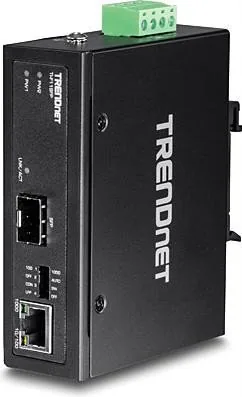
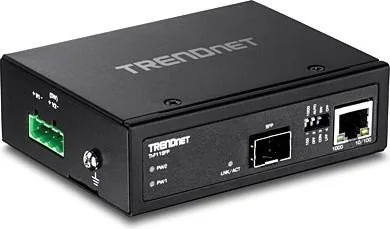
The TRENDnet TI-F11SFP, 1000Base-T to SFP media converter is built for situations where a standard copper Ethernet connection needs to be extended, isolated, or converted into fiber. Designed for industrial environments, it helps bridge legacy network equipment and modern fiber links in a compact form factor that fits into a wide range of installations.
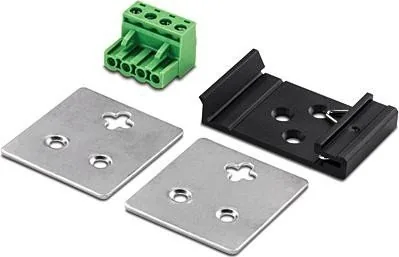
What makes this unit appealing is its flexibility. It can be placed on a desktop, mounted to a wall, or locked onto a DIN rail, which makes it a convenient choice for control cabinets, network closets, and factory setups. The included mounting accessories simplify deployment, while the removable terminal block helps with cleaner power wiring. If you are looking for a reliable way to connect an Ethernet device to an SFP-based fiber network, this converter keeps the setup straightforward.
Powering the device also reflects its industrial focus. It supports 12–56 V DC or 18–36 V AC, and the terminal block connection is designed for secure attachment. The guide stresses matching polarity and verifying the supply voltage before installation, which is especially important in demanding environments. LED status indicators help confirm that the copper and fiber links are active, reducing guesswork during setup and troubleshooting.
Another useful detail is the DIP switch configuration. Users can select 100M or 1000M operation, choose between converter and switch modes, and enable Link Fault Pass Through (LFP) for better link monitoring. These options make the TI-F11SFP more adaptable than a basic converter, especially when network reliability matters and downtime is costly.
From a practical standpoint, this device is a solid fit for industrial networking projects, long-distance fiber runs, and applications where electrical noise or distance makes copper less ideal. It also carries regulatory and safety compliance references, reinforcing its role as a professional-grade networking component.
Notes
- Turn off power before connecting wires or modules.
- Use the correct input range and observe wiring limits to avoid overheating.
- Check LEDs after installation to confirm successful copper and fiber links.
- Recycle the unit through proper e-waste channels at end of life.
Search for 67,732 Manuals online


Type-in Brand or Model