
TRENDnet TEW-WLC100 Manual
PDF manual · 55 Pages
English



Quick check
Incorrect answer, please try again.
Chat with your TRENDnet TEW-WLC100 manual using AI
Get instant AI answers from your TRENDnet TEW-WLC100 manual
Ask anything about the TRENDnet TEW-WLC100. Answers come from this manual, with the pages they are based on.
Ask a Question
Do you recommend TEW-WLC100?
Yes NoFrequently Asked Questions
The default IP address is 192.168.10.200. This must be configured on the PC for initial access before changing network settings to avoid connection issues during setup.
Is this answer helpful?
The controller manages up to 128 access points. This number includes both 2.4GHz and 5GHz radios depending on the dual band configuration of each unit.
Is this answer helpful?
Compatible models are TEW-755AP, TEW-821DAP, and TEW-825DAP with specific minimum firmware versions. Ensure all units are updated before adding them to the system.
Is this answer helpful?
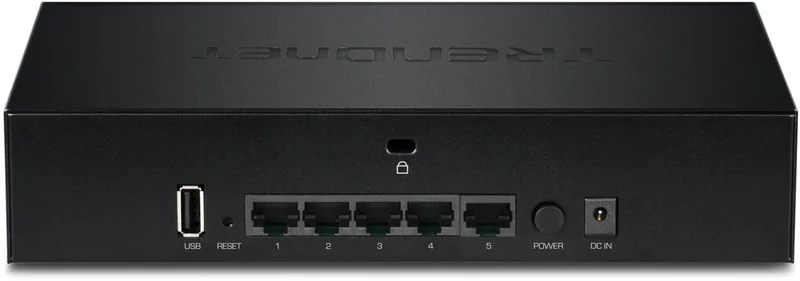
Press and hold the reset button on the rear panel for 15 seconds. This restores factory settings and sets the IP back to 192.168.10.200 with admin login.
Is this answer helpful?
Yes, you can upload firmware via a USB storage device formatted as FAT32. This ensures the controller can be updated without relying on an online connection.
Is this answer helpful?
Yes, it includes a rack mount kit and fits into a standard 1U rack unit. The metal housing protects components during operation in typical server environments.
Is this answer helpful?
Yes, it supports 802.1q VLAN tags for assigning specific network identifiers to wireless profiles. This helps isolate traffic between different departments or guest users.
Is this answer helpful?
Advantages and Disadvantages
Advantages

- Manage up to 128 access points centrally for efficient network control and monitoring.
- Supports seamless roaming with 802.11r and OKC for better client transitions.
- Includes batch firmware upgrades to maintain security and performance across all units.
- Web GUI allows easy configuration without specialized CLI knowledge for setup tasks.
- Physical rack mount kit included for professional deployment in standard equipment racks.
Disadvantages

- Limited compatibility requires specific firmware versions on supported access point models only.
- Online firmware upgrade feature depends on controller firmware version being 2.02 or higher.
- Default IP address configuration may conflict with other devices on the 192.168.10 subnet.
- USB storage device required for backup must be formatted FAT32 for compatibility.
- Reset button requires manual intervention and may lose settings if not backed up first.
Product Specification
Connections
5x 100Base-TX
Management
up to 128 Access Points
Product Description
TRENDnet TEW-WLC100 Overview
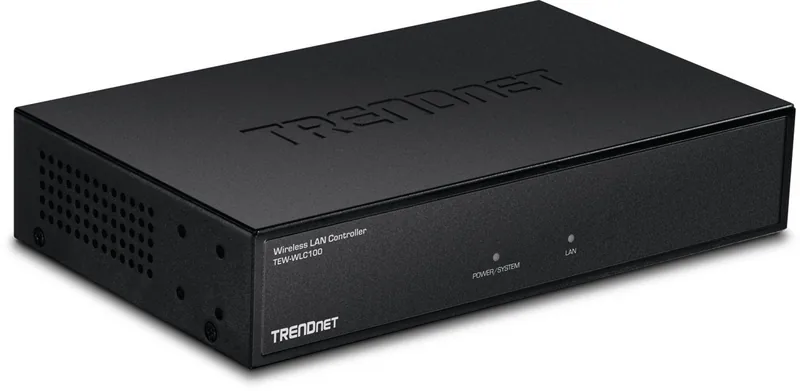
The TRENDnet TEW-WLC100 WLAN Controller Manual keyword search often leads to this robust networking device designed for small business environments requiring scalable wireless solutions. This controller simplifies management for up to one hundred twenty eight access points across a wireless local area network efficiently. Seamless WiFi roaming capabilities ensure uninterrupted connectivity as clients transition between different access points within the building structure dynamically. Fast BSS Transition protocols along with Opportunistic Key Caching optimize the roaming environment for mobile devices seeking stable connections. Administrators gain centralized control through a web based graphical user interface accessible via standard internet browsers like Firefox or Chrome. Security options include WPA2 Personal encryption modes and a customizable captive portal for guest authentication requirements in hotels or cafes. Wireless profiles allow segmentation of SSIDs and security settings to meet various departmental needs within a single organization. Firmware upgrades can be deployed simultaneously to multiple units ensuring network consistency and security patches are applied efficiently across the infrastructure. The hardware features a sturdy metal housing suitable for rack mounting or desktop placement in cool and dry areas away from dust. Physical installation requires avoiding strong electromagnetic interference sources to maintain signal integrity and consistent performance levels without disruption.
Core Features
Backup and restore functions protect configuration settings against accidental loss during troubleshooting or critical maintenance windows for business continuity. Monitoring access clients provides detailed statistics on data usage and connection duration times for comprehensive network analysis and capacity planning. User management allows creation of read only accounts for staff members who need access without full administrative privileges or risk. Setting idle timeouts enhances security by automatically logging out inactive sessions from the management portal to prevent unauthorized access. Troubleshooting steps include checking cable connections and verifying static IP address settings on client computers if the management page fails to load. Compatible access point models like TEW-755AP require specific firmware versions listed in the documentation before pairing with the controller system properly. The device operates within standard industrial temperature ranges and consumes minimal power during continuous operation cycles to reduce electricity costs. Network administrators benefit from VLAN assignment capabilities to isolate traffic between different wireless groups effectively for better security.
Setup and Management
Floor plan uploads enable visual mapping of access point locations for improved deployment planning and accurate heat map generation for coverage. Reset procedures are available if the administrative password is forgotten or the system requires a hard re initialization to factory default settings. System logs can be viewed to track admin activities and wireless client connection events for auditing and security compliance purposes. Five Gigabit ports offer flexibility for connecting to switches routers or additional network devices without bandwidth bottlenecks. Dimensions fit standard rack units making it suitable for dedicated server closets or compact wiring cabinets in tight spaces. Weight and power adapter specifications ensure easy transport and reliable power delivery during initial setup and installation procedures. Overall this controller offers essential features for organizations scaling their wireless infrastructure with reliability and ease of use. *Note: Ensure all firmware is updated for compatibility.
Search for 67,732 Manuals online


Type-in Brand or Model