
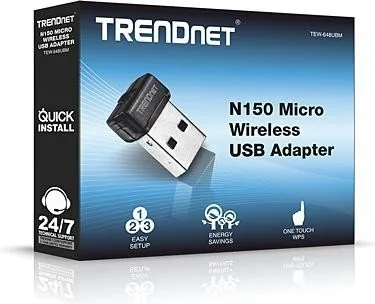
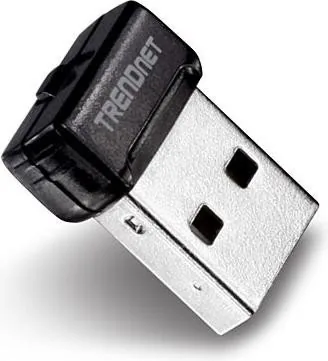
TRENDnet TEW-648UBM Manual
PDF manual · 28 Pages
English



Quick check
Incorrect answer, please try again.
Chat with your TRENDnet TEW-648UBM manual using AI
Get instant AI answers from your TRENDnet TEW-648UBM manual
Ask anything about the TRENDnet TEW-648UBM. Answers come from this manual, with the pages they are based on.
Ask a Question
Do you recommend TEW-648UBM?
Yes NoFrequently Asked Questions
It adds wireless networking to a desktop or laptop through a USB-A 2.0 connection. It is meant for basic internet access, streaming, downloads, and other everyday online tasks on 2.4GHz Wi-Fi.
Is this answer helpful?
Yes. The adapter includes a WPS button for one-touch pairing with compatible routers or access points. You can also use PIN-based WPS through the utility software if your network supports it.
Is this answer helpful?
The manual lists support for many Windows versions, including older and newer releases, plus several Mac OS X versions. Exact compatibility depends on the software package and the operating system edition.
Is this answer helpful?
No. It is a 2.4GHz wireless adapter, so it is designed for 2.4GHz networks only. It does not provide dual-band 5GHz support.
Is this answer helpful?
Walls, furniture, metal objects, RF noise, and other 2.4GHz devices can all reduce performance. Placement, antenna orientation, and distance from interference sources can make a big difference.
Is this answer helpful?
It includes WMM QoS support, which helps prioritize important traffic like video, audio, and gaming. That said, real-world performance still depends on signal strength and network congestion.
Is this answer helpful?
Advantages and Disadvantages
Advantages

- Ultra-compact design keeps the adapter barely visible on a laptop or desktop.
- Up to 150 Mbps wireless N performance suits everyday browsing and streaming.
- One-touch WPS pairing makes network setup faster and easier.
- Broad OS support helps it work with many Windows and Mac systems.
Disadvantages

- Only supports 2.4GHz Wi-Fi, so it lacks 5GHz dual-band flexibility.
- Performance can drop in crowded environments with interference or obstacles.
- Driver and utility installation is required for full configuration features.
- Older security and network modes may feel less modern than newer adapters.
Product Specification
Type
WLAN Adapter
Form Factor
1x USB Stick
Connection
1x USB-A 2.0 (Male)
Connectivity
1x WLAN 802.11b/g/n (1x 2.4GHz, WPS button), 1x Transmit amplifier (14dBm), 1x Antenna (integrated, not alignable)
Transmission
1x 2.4GHz WLAN (150Mbps, 1x1)
Power Supply
Power supply only via connection
Dimensions
0.59x0.28x0.79in (WxHxD)
Weight
0.04 oz
Compatibility
universal
Manufacturer Warranty
three years
USB Notation
Link
Product Description
TRENDnet N150 Micro: Compact Wireless Convenience for Everyday Connections
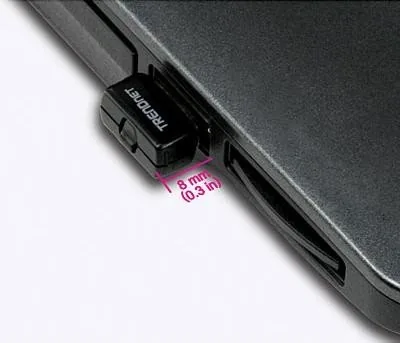
The TRENDnet N150 Micro, 2.4GHz Wi-Fi, USB-A 2.0 Plug Manual describes a tiny wireless adapter built for simple upgrades and everyday networking. Designed in a micro form factor, it extends only a few millimeters from a laptop or desktop, making it a neat choice for users who want wireless capability without adding bulk. Despite its small size, it offers practical wireless N performance for browsing, streaming, downloads, and light gaming.
This adapter supports speeds of up to 150 Mbps on the 2.4GHz band, which is more than enough for common home and office tasks. It is made to connect quickly to wireless routers and access points, and its built-in WPS button makes setup easier for users who prefer a one-touch pairing experience. The included utility also gives access to profile management, available networks, connection status, statistics, and security settings, so the adapter can be adjusted to different environments with minimal effort.
One of the strongest advantages of this model is its balance of simplicity and functionality. It supports common wireless security options, including WEP, WPA-PSK, WPA2-PSK, and enterprise-style authentication methods, helping users protect data while staying connected. The device also includes WMM QoS support, which helps prioritize voice, video, and gaming traffic when the network is busy. That makes it a sensible option for households where more than one type of online activity happens at the same time.
Compatibility is another useful feature. The adapter works with a wide range of Windows and Mac operating systems, making it flexible for mixed-device homes or small workplaces. Installation is straightforward, although it does require drivers and utility software for full configuration. The manual also highlights key wireless performance tips, such as avoiding thick walls, reducing interference from other 2.4GHz devices, and positioning the adapter for the best signal path.
In short, this TRENDnet micro adapter is best seen as a compact, dependable upgrade for older systems or for users who need wireless networking in a small, portable package. It is not designed for the latest dual-band speeds, but it excels at being easy to install, easy to use, and efficient for everyday wireless access.
Notes
- Best suited for 2.4GHz wireless networks
- WPS can speed up setup on compatible routers
- Signal quality depends heavily on placement and interference
- Micro design helps keep USB ports unobstructed
Search for 67,732 Manuals online


Type-in Brand or Model
Lena Fischer
7 months ago
Is the USB drive setup really easy for beginners?
Manual.ly
7 months ago
Yes. Based on customer feedback, the setup is straightforward and quick, even for beginners. After plugging it in, it is typically ready to use right away without complicated steps.