


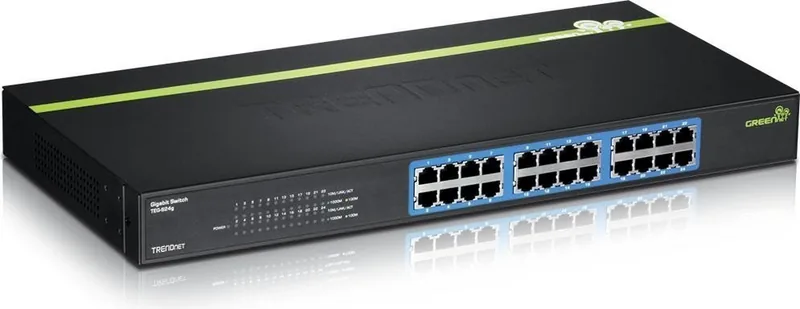
TRENDnet TEG-S16g/TEG-S24g Manual
PDF manual · 7 Pages
English



Quick check
Incorrect answer, please try again.
Chat with your TRENDnet TEG-S16g/TEG-S24g manual using AI
Get instant AI answers from your TRENDnet TEG-S16g/TEG-S24g manual
Ask anything about the TRENDnet TEG-S16g/TEG-S24g. Answers come from this manual, with the pages they are based on.
Ask a Question
Do you recommend TEG-S16g/TEG-S24g?
Yes NoFrequently Asked Questions
The series includes the TEG-S16g with 16 ports and the TEG-S24g with 24 ports to suit different network size needs.
Is this answer helpful?
Solid green typically indicates power or active links at specific speeds. Blinking green means activity. Amber may indicate specific link states or duplex modes depending on the port configuration.
Is this answer helpful?
Yes, TRENDnet offers a limited warranty against defects in materials and workmanship under normal use conditions according to their official policy.
Is this answer helpful?
PoE models must be connected to PoE networks only. They cannot route to the outside plant to maintain network integrity and safety.
Is this answer helpful?
You can contact technical support via the toll-free number or visit the support section on the TRENDnet website for regional assistance.
Is this answer helpful?
Yes, the device complies with Part 15 of the FCC Rules provided it is assembled in exact accordance with the instructions provided with this kit.
Is this answer helpful?
Different LED states correspond to speeds. Connected without data is distinct from transmitting. Speeds from 10 to 1000 Mbps are monitored via color and blink patterns.
Is this answer helpful?
Advantages and Disadvantages
Advantages

- High-speed Gigabit Ethernet ports for reliable network throughput and data transfer capabilities.
- Energy efficient GREENnet technology reduces power consumption during device idle times.
- Clear LED status indicators allow for quick visual troubleshooting and connection monitoring.
- Rackmount design saves space and fits into standard equipment cabinet configurations easily.
- Limited warranty coverage provides protection against defects in materials and workmanship.
Disadvantages

- PoE models require specific network setup without routing to the outside plant infrastructure.
- Fixed port configurations limit flexibility compared to modular switch options available.
- LED color coding and duplex modes may be confusing for inexperienced network users.
- Warranty terms depend on normal use conditions and require online registration for validation.
- FCC compliance requires careful assembly to prevent harmful radio interference issues.
Product Specification
Function
Switch
Type
Standalone, Rackmount (via mounting brackets)
Network Ports
24x RJ-45
Speeds
24x RJ-45 (10/100/1000Base-T)
PoE
N/A
Backplane
48Gb/s, 35.7Mpps, 10KB Jumbo Frames, 8k MAC addresses
Official Standards
802.3, 802.3ab, 802.3az, 802.3u, 802.3x
Configuration
unmanaged
Cooling
Passive
Dimensions (WxHxD)
17.32x1.77x8.27in, 1U
Weight
5.07lbs
Color
Black
Features
Metal housing, removable mounting brackets
Manufacturer Warranty
3 years
Note
Various revisions available.
Product Description
Enhancing Network Performance with Advanced Switching Technology
Setting up a reliable network infrastructure requires robust hardware that balances performance with energy efficiency. The TRENDnet TEG-S GREENnet Rackmount Gigabit Switch is designed specifically for modern businesses seeking high-speed connectivity without excessive power consumption. This device serves as a cornerstone for local area networks, providing stable connections across multiple nodes simultaneously. The inclusion of varying port counts ensures scalability for growing organizations needing expansion capabilities across different departments.
One of the standout features of this switch is its versatile LED indicator system designed for quick diagnostics. Users can easily monitor the status of each connection through detailed color-coded lights associated with speed and activity. Solid green lights indicate power status, ensuring the device is fully operational for continuous use. Blinking green signals active data transmission and specific speed ranges like 100 or 1000 Mbps for optimal throughput. Amber lights may denote specific link states or half-duplex modes depending on configuration settings. Understanding these indicators allows IT administrators to troubleshoot issues quickly without opening complex software menus or tools. The TRENDnet TEG-S GREENnet Rackmount Gigabit Switch, 24x RJ-45 Manual provides essential visual cues for setup clarity.
GREEN Technology is integrated into the design to minimize environmental impact significantly. By optimizing power usage during idle times, the device contributes to lower operational costs and a smaller carbon footprint for large data centers. This efficiency is crucial for modern enterprises aiming to meet sustainability goals while maintaining peak performance levels throughout the entire working day. The rackmount form factor fits standard server cabinets perfectly, saving valuable space in equipment rooms where physical storage is often very limited.
Reliability remains a top priority for all network equipment purchases and ongoing maintenance schedules. TRENDnet offers a limited warranty that covers defects in materials and workmanship under normal use conditions within the service period. This protection provides peace of mind for purchasers who need long-term stability for their critical business operations and daily tasks. Technical support is also available via phone or website for installation questions, troubleshooting steps, or recurring connectivity issues. The warranty registration process is simple and can be completed online shortly after purchase to validate coverage terms.
Compliance with international standards ensures safe operation within diverse global environments and regulatory zones. The device adheres to FCC Part 15 regulations regarding radio interference and electronics handling standards strictly in all cases. Proper installation prevents unintended disruptions to other sensitive electronic devices nearby. It is important to note that PoE models must connect strictly to PoE networks without routing to the outside plant infrastructure to ensure safety always. This restriction maintains network integrity and protects connected endpoints from potential power issues or damage during transit or setup phases.
Overall, this hardware solution represents a solid choice for small to medium enterprises looking for value and performance consistently. The combination of speed, efficiency, and support makes it a valuable asset for any network topology upgrade project planned. Whether upgrading an existing setup or building a new network from scratch, the TEG-S series delivers consistent results every time you check connectivity. Careful attention to the guidelines provided during initial installation will maximize the lifespan and performance of the equipment over many years of active use. Ensuring proper ventilation around the unit is also recommended for sustained high performance levels. Investing in quality networking hardware ultimately saves money and reduces downtime in the long run for everyone involved in the project.
Important Note
Verify all LED indicators function correctly according to the provided table before finalizing installation to ensure accurate status monitoring.
Search for 67,732 Manuals online


Type-in Brand or Model