
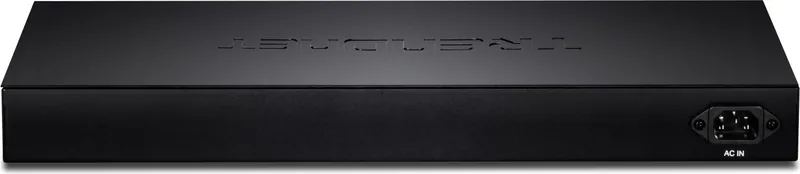
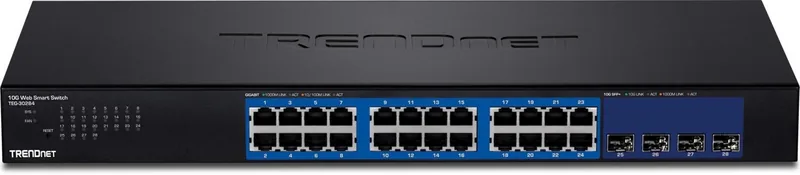
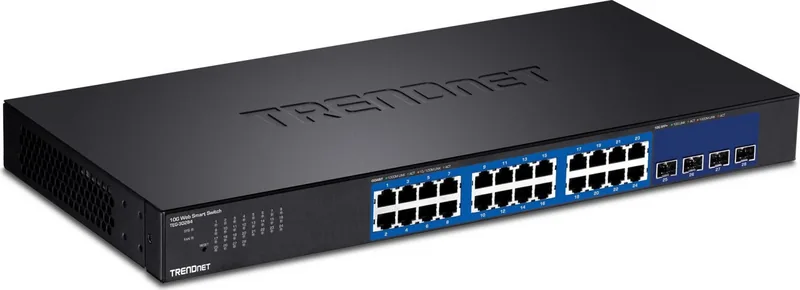
TRENDnet TEG-30284 Manual
PDF manual · 103 Pages
English



Quick check
Incorrect answer, please try again.
Chat with your TRENDnet TEG-30284 manual using AI
Get instant AI answers from your TRENDnet TEG-30284 manual
Ask anything about the TRENDnet TEG-30284. Answers come from this manual, with the pages they are based on.
Ask a Question
Do you recommend TEG-30284?
Yes NoFrequently Asked Questions
It is best suited for small to midsize business networks, server rooms, and expanding office environments that need reliable access ports plus faster uplinks. It works well when you want more control than an unmanaged switch can provide.
Is this answer helpful?
The 24 RJ-45 ports connect standard Ethernet devices such as PCs, printers, cameras, and access points. The 4 SFP+ slots are ideal for high-speed uplinks, server connections, or fiber-based links that need more bandwidth and longer reach.
Is this answer helpful?
Yes. It supports VLANs, link aggregation, QoS, IGMP snooping, Spanning Tree modes, Voice VLAN, and LLDP. These tools help organize traffic, reduce congestion, and improve performance in mixed-device networks.
Is this answer helpful?
It is managed through a web browser and also supports SNMP and monitoring tools. Administrators can change IP settings, configure security, view statistics, and perform maintenance tasks like firmware updates and backup or restore operations.
Is this answer helpful?
The switch includes ACLs, MAC and port filtering, DoS protection, 802.1X support, RADIUS, TACACS+, DHCP snooping, and SSL management access. These features help protect the network and limit unauthorized access.
Is this answer helpful?
Yes. The switch includes smart fan behavior and IEEE 802.3az energy-saving support. These features help reduce power use and cooling noise when traffic levels are lower while still keeping the network active.
Is this answer helpful?
Advantages and Disadvantages
Advantages

- 24 Gigabit RJ-45 ports plus 4 SFP+ slots provide flexible access and high-speed uplinks.
- Rich management tools include VLANs, QoS, link aggregation, STP, IGMP snooping, and LLDP.
- Strong security options such as ACLs, 802.1X, RADIUS, TACACS+, DHCP snooping, and SSL.
- Web-based management, SNMP, RMON, syslog, and diagnostics improve visibility and troubleshooting.
- Rackmount design and smart fan control suit organized, energy-conscious network installations.
Disadvantages

- Advanced feature set may feel complex for users who only need simple plug-and-play switching.
- SFP+ transceivers are typically separate purchases, adding to total deployment cost.
- Configuration requires careful saving and planning to ensure changes persist after reboot.
- Some options are aimed at administrators, so the learning curve is higher than with unmanaged switches.
Product Specification
Function
Switch
Type
Standalone, Rackmount (via mounting brackets)
Network ports
24x RJ-45, 4x SFP+
Speeds
24x RJ-45 (10/100/1000Base-T), 4x SFP+ (10Gb/s)
PoE
N/A
Backplane
128Gb/s, 95.2Mp/s, 10kB Jumboframes, 16k MAC addresses
Officially supported standards
802.1AX, 802.1D, 802.1Q, 802.1X, 802.1AB, 802.1p, 802.1s, 802.1w, 802.3, 802.3ab, 802.3ae, 802.3az, 802.3u, 802.3x, 802.3z, IGMPv3
Configuration
Web interface, Configuration software (Windows)
Cooling
active, 1x fan
Dimensions (WxHxD)
17.32x1.73x8.27in, 1U
Weight
5.83 lb
Color
black
Features
Metal housing, removable mounting brackets, firmware updates possible
Manufacturer warranty
three years
Note
For this device, "link aggregation" was officially specified with the obsolete standard IEEE802.3ad. Since 2008, the function is no longer managed by the IEEE "Working Group 3" (IEEE 802.3, CSMA/CD - Ethernet), but by "Working Group 1" (IEEE 802.1, High Level Interface - Internetworking) and is technically defined unchanged via IEEE 802.1AX.
Product Description
TRENDnet TEG Rackmount Gigabit Smart Switch, 24x RJ-45, 4x SFP+ Manual
The TRENDnet TEG-30284 is a smart rackmount switch designed for networks that need dependable port density and stronger uplink capacity. With 24 Gigabit RJ-45 ports and 4 high-speed SFP+ slots, it gives small and midsize businesses a simple way to connect users, servers, access points, and storage without sacrificing speed. Its 1U rackmount design also makes it easy to integrate into a clean, organized network cabinet.
A practical blend of speed and control
This switch is more than a basic traffic distributor. It includes a wide set of management tools such as VLANs, link aggregation, Spanning Tree, QoS, IGMP snooping, Voice VLAN, LLDP, and loopback protection. That combination helps networks stay efficient as traffic grows, especially when several departments, devices, or services share the same infrastructure. For teams handling VoIP, surveillance, or virtualized workloads, the ability to prioritize and segment traffic can make a noticeable difference.
Built for administrators who want visibility
The web-based interface is a major advantage because it keeps configuration accessible from a browser while still offering deep control. Administrators can adjust IPv4 and IPv6 settings, manage SNMP and RMON monitoring, enable syslog, mirror ports for analysis, and run cable diagnostics when trouble appears. The switch also supports secure management through SSL, which is useful when access needs to extend beyond a local room or office. Even routine tasks like firmware updates, configuration backup, and restoring settings are clearly supported.
Security and stability matter
TRENDnet also gives this model a strong security toolkit. ACLs, port and MAC filtering, DoS protection, 802.1X support, RADIUS, TACACS+, DHCP snooping, and IP access restrictions help reduce risk and keep management under control. On the hardware side, smart fans and IEEE 802.3az energy-saving support help balance performance with efficiency. That makes the switch appealing for environments that want reliable operation without unnecessary power draw or noise.
Notes
- A strong fit for SMB networks, branch offices, and server closets.
- Use the SFP+ ports for faster uplinks or longer-distance fiber links.
- Save changes to flash after setup so settings remain after a reboot.
- Many advanced features are available, so planning before deployment is helpful.
Search for 67,732 Manuals online


Type-in Brand or Model
Lukas Meier
10 months ago
Is this 10G switch loud in a living room, and can I replace the fan with a quieter Noctua or similar model?
Manual.ly
10 months ago
It is a rack-mount style switch, so some fan noise is expected. Based on user reports, the installed fan uses a specific tachometer signal and the fan control is tuned to it, so many common 3- or 4-pin replacements may not spin at all or not regulate correctly. A quiet switch is therefore not guaranteed with a simple fan swap, and changing hardware can affect warranty. If you want to reduce noise, the safest options are to use the original fan, improve placement (e.g., not in the same room), add sound insulation around the rack, or verify that your cooling setup preserves airflow and temperatures. If you tell us your exact model and current fan part number, support can advise on compatible replacement options.