
TRENDnet TE100-S5/TE100-S8 Manual
PDF manual · 9 Pages
English



Quick check
Incorrect answer, please try again.
Chat with your TRENDnet TE100-S5/TE100-S8 manual using AI
Get instant AI answers from your TRENDnet TE100-S5/TE100-S8 manual
Ask anything about the TRENDnet TE100-S5/TE100-S8. Answers come from this manual, with the pages they are based on.
Ask a Question
Do you recommend TE100-S5/TE100-S8?
Yes NoFrequently Asked Questions
Connect the power adapter to the switch and plug it into a power outlet. Then connect network cables from your computer to the RJ-45 ports on the device. Ensure adequate ventilation around the unit.
Is this answer helpful?
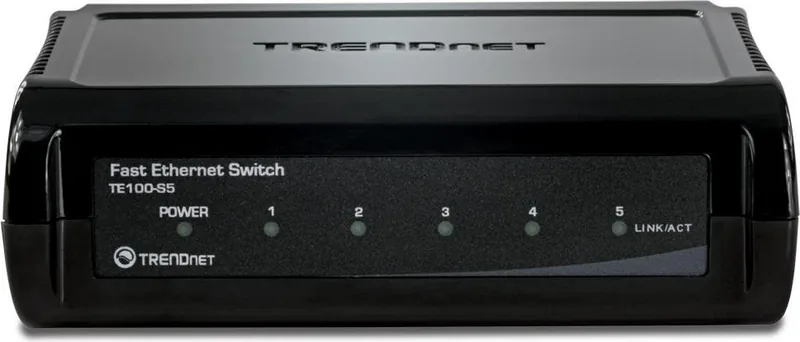
The power LED shows if the switch is powered on. The link/act LED indicates connection status and activity. Solid means connected, blinking means data transfer.
Is this answer helpful?
No, the switch was not designed to share internet between multiple computers. You need to get an internet router such as the TW100-S4W1CA for this purpose.
Is this answer helpful?
The switch has a three-year limited warranty, but the power adapter carries a one-year limited warranty from the date of purchase.
Is this answer helpful?
Yes, you must use Cat.5, Cat.5e, or Cat.6 network cables for optimal performance with the Ethernet and Fast Ethernet standards.
Is this answer helpful?
The power outlet should be within 1.82m or 6 ft of the switch to ensure proper connection and safety.
Is this answer helpful?
Since all ports are Auto-MDIX, any of the ports can be used as an uplink port without special configuration.
Is this answer helpful?
Advantages and Disadvantages
Advantages

- Supports Auto-MDIX technology for flexible cabling
- Plug and play installation setup
- Visual LED indicators for status monitoring
- Low power consumption rating
- Compact desktop footprint design
Disadvantages

- Does not support Gigabit Ethernet speeds
- External power adapter included
- No user serviceable parts inside unit
- Warranty void if device is modified
- Not designed for internet sharing capabilities
Product Specification
Function
Switch
Type
Standalone
Network Ports
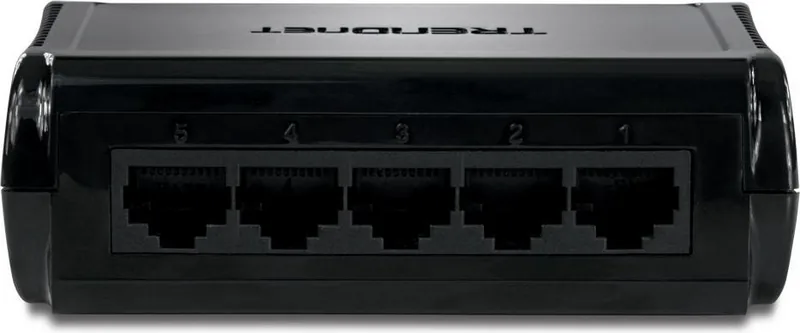
5x RJ-45 (Rear)
Speed
5x RJ-45 (10/100Base-T)
PoE
N/A
Backplane
1Gb/s, 2K MAC Addresses
Officially Supported Standards
802.3, 802.3u, 802.3x
Configuration
unmanaged
Cooling
passive
Dimensions (W x H x D)
3.94 x 1.22 x 3.07 in
Weight
0.28 lbs
Color
Black
Features
External Power Supply
Manufacturer Warranty
3 years
Product Description
Revolutionize Your Home Network with TRENDnet TE100
Expanding your local area network no longer requires complex configurations or expensive upgrades. The TRENDnet TE100 Desktop Switch offers a reliable solution for connecting multiple devices seamlessly. Whether you work from home or manage a small office, this hardware ensures stable connections across your wired infrastructure. Many users rely on the TRENDnet TE100 Desktop Switch, 5x RJ-45 Manual to understand the full capabilities of this compact networking device. It simplifies the process of adding PCs, printers, or gaming consoles to a shared environment efficiently.
Understanding Fast Ethernet Connections
This device supports standard 10/100Mbps Fast Ethernet speeds reliably. It features Auto-MDIX technology, which eliminates the need for crossover cables during setup. You can plug any standard network cable directly into the ports without worrying about correct wiring configurations. The unit includes green LED indicators that provide visual feedback on power status and link activity. A solid light typically indicates a connection is established, while blinking signals active data transfer. This visual aid helps technicians and home users alike diagnose issues quickly without specialized software tools. The switch fabric capacity varies slightly between models, supporting up to 1.22 Gbps forwarding capacity in specific configurations.
Installation and Maintenance Requirements
Setting up the switch is designed to be plug-and-play for most users. Simply connect the power adapter to the unit and place it on a stable surface. Ensure adequate ventilation around the device to prevent overheating during extended operation. The minimum weight requirement for the surface is 225 grams to support the switch safely. Cables used must be Cat.5, Cat.5e, or Cat.6 standards for optimal performance. Maximum cable length is capped at 100 meters for reliability over distance. If connection issues arise, checking the LEDs is the first recommended step in the troubleshooting guide. You must verify that software firewalls are not blocking local access. Additionally, file sharing must be enabled within your operating system settings.
Power and Warranty Details
Power consumption is minimal, drawing approximately 2.8 watts in maximum usage for the five-port model. The system is backed by a three-year limited warranty for the switch itself, though power adapters carry a one-year protection plan. This warranty covers defects in workmanship under normal use. TRENDnet reserves the right to repair or replace defective units at their discretion. Customers outside the USA and Canada may incur additional return shipping fees when sending items for service. Maintaining this hardware ensures a robust foundation for your digital workspace without requiring constant updates or expensive hardware replacements.
Return Material Authorization numbers are required for official service requests. There are no user serviceable parts inside the product, so unauthorized teardowns void the warranty immediately. The device dimensions are compact, fitting easily under desks. It operates reliably within a temperature range of zero to fifty degrees Celsius. This flexibility makes it suitable for various home environments and small business settings where reliability is paramount over gigabit speeds.
Search for 67,732 Manuals online


Type-in Brand or Model