
TRENDnet TE100-PCIFC Manual
PDF manual · 27 Pages
English



Quick check
Incorrect answer, please try again.
Chat with your TRENDnet TE100-PCIFC manual using AI
Get instant AI answers from your TRENDnet TE100-PCIFC manual
Ask anything about the TRENDnet TE100-PCIFC. Answers come from this manual, with the pages they are based on.
Ask a Question
Do you recommend TE100-PCIFC?
Yes NoFrequently Asked Questions
The adapter supports Windows versions 95, 98, ME, 2000, XP, and 2003, along with various Linux kernels, FreeBSD, and SCO Unix versions. It offers broad compatibility excluding certain newer versions like Vista for some utilities.
Is this answer helpful?
Connect the transmit cable from the fiber adapter to the receive port on the hub or switch. Connect the receive cable from the adapter to the transmit port on the network device to ensure correct data flow.
Is this answer helpful?
Yes, the unit supports the optional Wake-on-LAN magic packet feature. You must connect the Remote Wake-Up cable from the adapter to the motherboard connector if your PCI bus version requires it.
Is this answer helpful?
You can use SC multi-mode fiber up to a maximum distance of 2 kilometers at 100Mbps full-duplex. The cable type required is 62.5/125 micrometer multi-mode fiber with a wavelength of 1310nm.
Is this answer helpful?
No, you should not install this card in a shared PCI slot to avoid performance issues. Ensure you use an empty non-shared bus mastering slot away from ISA slots for best results.
Is this answer helpful?
Yes, it supports IEEE 802.1q multiple VLAN with VLAN ID auto insertion. You can use the NIC Control Set utility to add, remove, or change VLAN properties and IDs.
Is this answer helpful?
The package includes a NIC Control Set utility for Windows to manage settings and statistics. It also provides a DOS Diagnostic Utility for basic functional testing in a pure DOS environment.
Is this answer helpful?
Advantages and Disadvantages
Advantages

- Supports IEEE 802.3u 100Base-FX standards for high speed fiber connectivity up to 2km distance
- Features separate 2K Bytes FIFO buffers to enhance data transmission efficiency and flow control
- Compatible with a wide range of operating systems including Windows, Linux, and various Unix flavors
- Includes NIC Control Set utility for detailed driver settings, statistics, and diagnostic testing
- Supports Wake-on-LAN magic packet feature for remote power management capabilities via network signals
Disadvantages

- Requires dedicated PCI slot and does not support shared slots for optimal bus mastering operation
- Windows Vista is not supported for specific utility software available on Windows only
- Fiber cabling requires specific TX and RX cable connections which can be prone to installation errors
- Remote Wake-Up function requires specific motherboard connector and additional cable setup steps
- Maximum node-to-node distance is limited in full-duplex operation compared to single-port copper options
Product Specification
Type
LAN Adapter
Form Factor
1x PCI Card (full height bracket)
Interface
1x PCI 2.2
Connection
1x SC-Duplex
Transmission
1x SC-Duplex (100Base-FX 1310nm 62.5/125um MM OM1 1.24 miles)
Power
Powered via interface only
Chipset
VIA VT6105 (LAN Adapter, SC-Duplex)
Dimensions
4.80 x 4.61 inches (W x H, without bracket)
Weight
0.18 lbs
Compatibility
universal
Features
VLAN, Wake on LAN
Manufacturer Warranty
three years
Product Description
Introduction
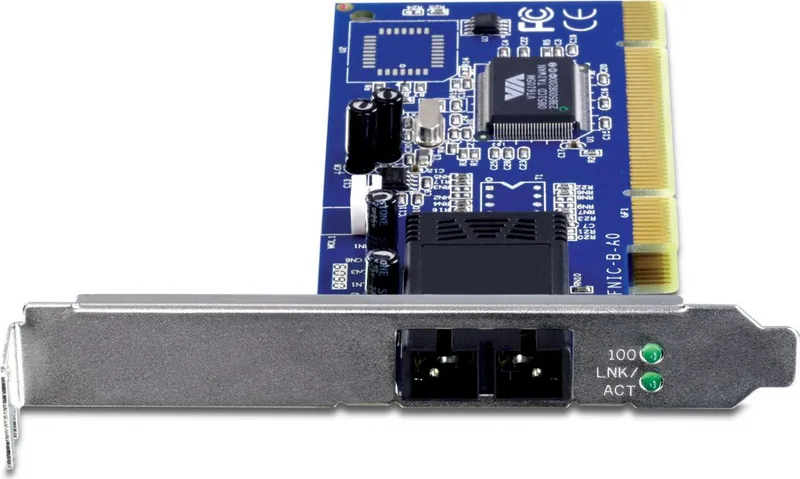
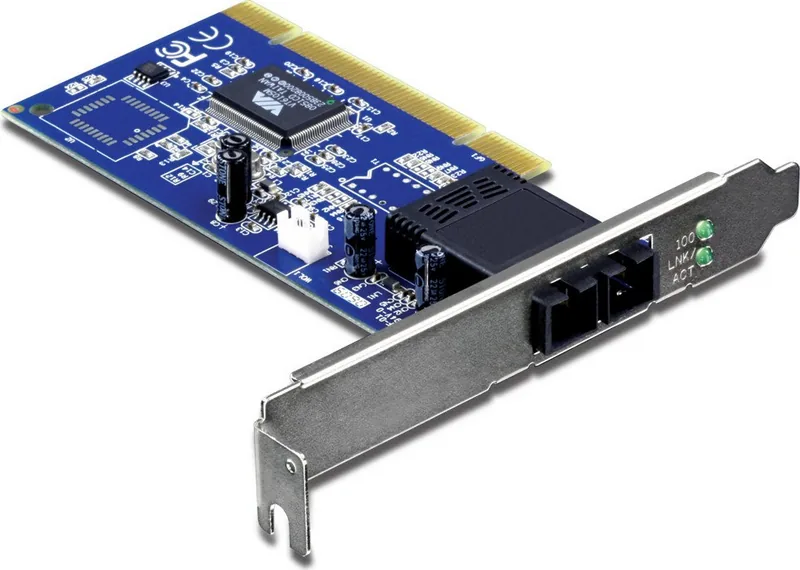
Upgrade your network infrastructure efficiently with the specialized TRENDnet LAN-Adapter SC-Duplex PCI 2.2 hardware card. This expansion unit provides a dedicated 100Base-FX port utilizing fiber optic connectivity for robust data transmission over long distances. Users should consult the TRENDnet LAN-Adapter SC-Duplex PCI 2.2 Manual to guide the physical installation within their computer case. It adheres to PCI 2.1 and 2.2 specifications ensuring wide compatibility. The device features separate two-kilo byte FIFO buffers for both receive and transmit controllers which significantly improves processing flow.
Features
Advanced features include IEEE 802.3x flow support for full-duplex connections allowing balanced data traffic. Power management relies on ACPI specifications covering multiple versions for energy efficiency. MAC enhancement functions support VLAN tagging with ID auto insertion and extraction for network segmentation tasks. TCP and IP checksum offloading further reduces processor load during heavy network loads. Visual indicators include a LED for link activity and another for speed confirmation at 100 megabits.
Installation and Drivers
Driver support covers a wide spectrum including Windows XP, Windows 2000, Linux kernels, and various Unix flavors making it versatile. Installation requires turning off power and accessing an empty non-shared PCI slot. The fiber connection involves specific cabling types with a maximum distance of two kilometers using multi-mode fiber. Network configuration can be managed via the included NIC Control Set utility providing detailed settings and diagnostics. This tool allows users to adjust VLAN parameters and view real-time statistics for the network card.
Utility and Maintenance
A remote wake-up function is also available requiring specific cable connection to the motherboard for power states. DOS utilities offer basic functional testing within a pure DOS environment for troubleshooting hardware issues. Thermal requirements indicate an operating range between zero and forty-five degrees celsius. The warranty provides coverage for defects in material and workmanship for a specific period ensuring peace of mind for buyers. Proper seating in the slot prevents connection issues while the included screw secures it firmly. Checking the status LEDs confirms the network link is active immediately upon powering the system.
Performance
This setup facilitates high speed fiber connections without latency issues common in copper setups. The package contents typically include the main adapter unit along with a quick installation guide for rapid reference during the initial setup phase. Drivers are stored on a CD-ROM facilitating easy access to necessary software components for the operating system. Avoid shared PCI slots to ensure bus mastering functionality operates without interference from other peripherals installed on the main board. If you intend to utilize wake-on-lan capabilities ensure your motherboard supports the remote wake-up connector standard. Connect the transmission cable from the adapter to the receive port on the switch to establish proper data flow.
Conclusion
Monitor the activity light flashing indicates data transfer is occurring successfully between the devices. Regular maintenance ensures the longevity of the optical components within the fiber adapter unit itself. This solution is ideal for small offices needing extended reach beyond typical copper limits. Reliable performance is maintained even under continuous heavy traffic conditions typical in business environments today. Compliance with IEEE standards ensures interoperability with existing network equipment across various vendors globally. Ensure your system BIOS supports the necessary power management protocols for optimal sleep mode functionality. The card dimensions allow for easy fitting into standard desktop computer chassis designs for convenient upgrades.
Search for 67,732 Manuals online


Type-in Brand or Model