

tiptel Ergophone 1300 Manual
PDF manual · 40 Pages
English



Quick check
Incorrect answer, please try again.
Chat with your tiptel Ergophone 1300 manual using AI
Get instant AI answers from your tiptel Ergophone 1300 manual
Ask anything about the tiptel Ergophone 1300. Answers come from this manual, with the pages they are based on.
Ask a Question
Do you recommend Ergophone 1300?
Yes NoFrequently Asked Questions
Press the Emergency button to start an emergency sequence: the phone calls up to three preprogrammed numbers in order, plays an announcement asking the recipient to press 5 to accept, then switches to hands-free if accepted. If unanswered, further loops and retries occur up to four loops.
Is this answer helpful?
Yes. The Ergophone 1300 is compatible with analogue PBX ports. It supports flash (R) operations for transferring calls and can insert pauses or flash signals in stored numbers; flash duration (short/long) can be configured in advanced settings to match system requirements.
Is this answer helpful?
The phone book stores up to 50 entries and the call log retains the last 20 calls with date and time. Numbers from the call log can be copied into the phone book and the device sorts entries alphabetically.
Is this answer helpful?
The receiver includes a magnetic field generator to support T-position hearing aids, improving audio clarity for many devices. However, compatibility is not guaranteed with every hearing aid model.
Is this answer helpful?
Settings and stored entries are retained after a power failure. The internal clock may stop and needs resetting when power is restored; other configurations remain unchanged.
Is this answer helpful?
Press and hold the desired direct-dial button for three seconds, enter the phone number using the numeric keypad (use P for pause or R for flash if needed), then press OK to save. Clearing is done by saving without a number.
Is this answer helpful?
Yes. The keypad lock disables most buttons but allows the emergency button and direct-dial keys to remain functional. You can also configure exception numbers that can be dialled despite the lock.
Is this answer helpful?
Advantages and Disadvantages
Advantages

- Straightforward, large-button design and clear alphanumeric display for ease of use
- Emergency call function dials up to three numbers with automated acceptance procedure
- Hands-free loudspeaker with adjustable volume and easy switching between receiver and speaker
- Phone book (50 entries), call log (20 entries) and six programmable direct-dial keys for fast access
- Hearing-aid compatibility via magnetic coupling improves audio for many T-position aids
Disadvantages

- Analogue-only connection limits use to PSTN or analogue PBX ports, not suitable for VoIP-only setups
- Emergency call relies on recipient pressing digit 5 to accept, which may not work in all scenarios
- Limited storage: 50 phone book entries and 20 call log entries may be small for heavy users
- Multi-press text entry can be slower than modern predictive input methods
- Some advanced features require PIN entry and remote PBX support to function fully
Product Specification
Type
Analog telephone (corded)
Display
monochrome
Phonebook
50 entries
Call log
20 entries
Interfaces
1x analog
Answering machine
no
Features
Caller ID, Speakerphone, Large button phone, Hearing aid compatible, Visual call indicator
Dimensions
8.27x7.48x2.95in
Weight
1.54 lb
Product Description
tiptel Ergophone 1300 — Reliable, Accessible Desktop Telephone
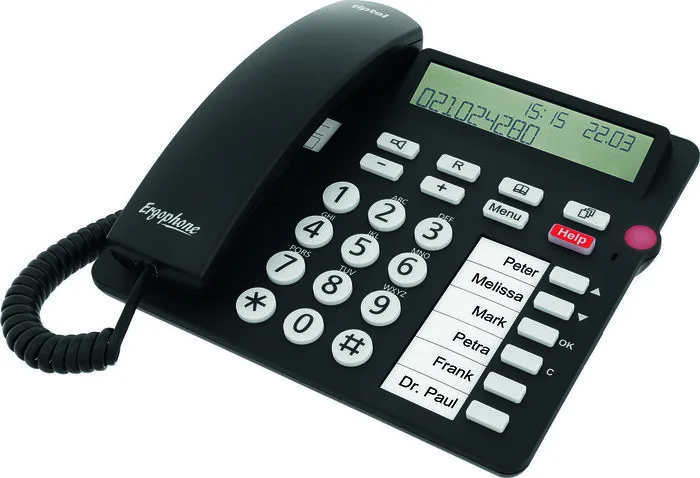
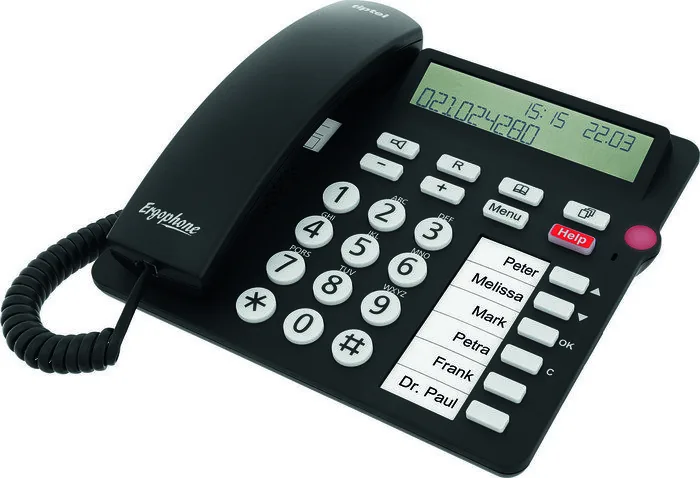
The tiptel Ergophone 1300 is a thoughtfully designed analogue telephone aimed at users who value simplicity, accessibility and essential safety features. Built for connection to public analogue networks and analogue PBX ports, it combines large, clearly labelled controls with hands-free operation, a phone book, call log and an emergency call system that automates contacting up to three preprogrammed numbers. The Ergophone 1300 emphasizes ease of use: a bright alphanumeric display, intuitive navigation buttons, clearly marked direct-dial keys and simple text entry from the numeric keypad make routine tasks quick and straightforward.
Practical features and everyday use
This phone supports immediate and non-immediate dialing, allowing users to either dial digits as they are entered or prepare a number and then initiate the call. The integrated loudspeaker enables hands-free conversations and can be toggled during a call or used to switch from receiver to speaker mode seamlessly. Volume and ring-tone level adjustments are available via dedicated controls. For convenience, six direct-dial buttons store frequent numbers and a phone book holds up to 50 entries, sorted alphabetically, with pause and flash insertion for PBX usage.
The call log retains the last 20 calls with date and time; incoming calls that match stored contacts show the caller name. The device offers an audible ring, LED indication for missed calls (configurable), and the ability to copy numbers from the call log into the phone book. Numeric text entry follows a multi-press system on the keypad, and editing, deleting or clearing entries is simple and consistent across menus.
Safety and accessibility
Safety is addressed with clear warnings about electrical risks and recommended setup practices. The Ergophone 1300 features a dedicated emergency call button that, when activated, dials up to three emergency numbers in sequence and repeats attempts in loops. Called recipients hear an automated announcement and must press digit 5 to accept and enable hands-free two-way audio; digit 8 can end the call. The handset is hearing-aid compatible via magnetic coupling for T-position hearing aids, improving intelligibility for many users.
Installation and maintenance
The package includes the phone, receiver cord, connector cable and adapters, user guide and spare inserts for labeling direct-dial names. Setup is plug-and-play with region-specific adapter guidance, optional wall-mount bracket, and a straightforward menu for language, contrast, date/time, ring tone and advanced options protected by a PIN. The phone is robust in typical environments and easy to clean; disposal and warranty guidance are provided in the documentation.
Notes
- Emergency call relaying cannot be absolutely guaranteed; supplementary safeguards are advised for life-critical situations.
- Advanced settings (PIN-protected) allow flash duration changes, keypad exceptions and automatic hands-free options for return calls.
- Default factory PIN is 000; changing it is recommended.
Search for 67,706 Manuals online


Type-in Brand or Model