
Testo 410i Manual
PDF manual · 50 Pages
English



Quick check
Incorrect answer, please try again.
Chat with your Testo 410i manual using AI
Get instant AI answers from your Testo 410i manual
Ask anything about the Testo 410i. Answers come from this manual, with the pages they are based on.
410i Maintenance Schedule
Calibrate the device regularly to ensure measurement accuracy. The manual recommends doing this annually.
Wipe the housing with a damp cloth using weak household cleaners or soapy water if dirty. Keep connectors clean and free of fat or deposits.
Keep the app up to date by installing updates from the Play Store or App Store as soon as they are available.
Free maintenance reminders
Timed to your purchase date. Always free, unsubscribe anytime.
Ask a Question
Do you recommend 410i?
Yes NoFrequently Asked Questions
The device offers approximately 130 hours of operation on standard AAA batteries. Regular checks of the LED status lights help manage power levels efficiently.
Is this answer helpful?
The instrument uses Bluetooth Low Energy to pair with smartphones. It transfers data automatically to the app once connected without needing cables.
Is this answer helpful?
The range is between 0.4 and 30 meters per second. It also supports different units like feet per minute for broader application.
Is this answer helpful?
Yes, the app allows exporting data to CSV for Excel or PDF formats. This helps create reports immediately after completing measurements.
Is this answer helpful?
Yes, it measures temperature alongside airflow. The range is from minus 20 to plus 50 degrees Celsius for accurate environmental monitoring.
Is this answer helpful?
Calibration is recommended annually to ensure precision. Keeping the sensor clean and storing it properly also helps maintain performance levels.
Is this answer helpful?
It uses three standard Microsize AAA batteries. The battery compartment is located on the rear side of the device for easy access.
Is this answer helpful?
Advantages and Disadvantages
Advantages

- Wireless Bluetooth connectivity enables direct data transfer to mobile devices for real-time monitoring and reporting.
- Long battery life of 130 hours allows for extended field work without frequent recharging or replacement.
- Durable design with protective casing ensures reliability in various construction and industrial environments.
- Integrated app offers multiple view options and export capabilities for streamlined workflow and analysis.
- Wide measurement range covers most typical airflow scenarios from 0.4 to 30 meters per second easily.
Disadvantages

- Requires periodic annual calibration to maintain optimal accuracy and measurement integrity standards.
- Sensor protection requires care to avoid damage from harsh chemicals or physical impact during transport.
- Dependent on a compatible smartphone or tablet which may not be available in all field conditions.
- Limited to specific temperature and humidity ranges which may restrict use in extreme environmental conditions.
- Battery power depletion requires monitoring via LED indicators to prevent interruption during critical measurements.
Product Description
Mastering Airflow Measurement with Precision
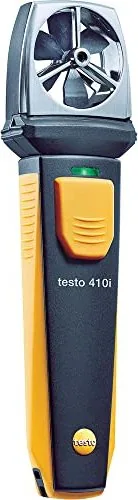
Accurate air velocity measurement is crucial for HVAC technicians and environmental engineers working in diverse industries. The Testo 410 i Propeller Anemometer stands out as a reliable tool for professional applications requiring high data integrity. Many users search for the Testo 410 i Propeller Anemometer Manual to fully understand its technical limits and operational nuances, though hands-on operation proves quite intuitive. This smart probe connects seamlessly to mobile devices, allowing real-time data viewing without complex setups on the spot. The system relies on a robust application that transforms how technicians approach field diagnostics.
Advanced Connectivity and Ease of Use
The device utilizes Bluetooth technology to transfer data directly to tablets or smartphones running compatible operating systems. You can monitor wind speed and temperature instantly through the dedicated software interface. The application interface allows for simple navigation between list, graphics, and table views to suit different reporting needs. Exporting data to Excel or PDF formats ensures that recorded information is ready for client reports immediately after the job. This integration significantly simplifies the workflow for field measurements and reduces manual transcription errors. Battery life supports extended field work without interruption. The app guides users through setup steps clearly.
Robust Performance Specifications
Operating within a wind speed range of 0.4 to 30 meters per second, this tool handles a wide variety of testing scenarios. It measures temperatures from minus 20 to plus 50 degrees Celsius alongside the airflow data accurately. A battery life of approximately 130 hours supports long days of work on construction sites using standard AAA cells. The propeller design captures airflow accurately while the color-coded LED indicators provide clear status updates regarding power and connection. Safety warnings regarding pressure and environmental conditions should always be observed during use to protect the operator. The resolution allows for fine-tuning of measurements for sensitive environments. Multiple unit options include meters per second and feet per minute.
Maintenance and Reliability
Keeping the sensor clean ensures consistent accuracy over time without degradation of performance. Users are advised to calibrate the device annually for optimal performance as suggested by industry standards. The enclosure protects internal components during transport, and the design allows for reach into specific ducts. Whether checking ventilation systems or analyzing environmental conditions, this instrument delivers dependable results consistently. Understanding the settings within the app helps tailor the measurement process to specific job requirements and local regulations. Regular firmware updates ensure compatibility with the latest mobile devices. Cleaning should use mild soap and water without harsh chemicals.
Final Notes on Operation
Always check the battery status indicator before starting any critical measurement session. The LED indicators help manage power levels efficiently during long shifts. Follow the guidelines regarding Bluetooth pairing and app configuration settings. Proper care extends the lifespan of the equipment considerably. Ensure you operate within the specified environmental limits to avoid damaging the delicate sensor components. Regular maintenance checks prevent potential downtime during urgent projects. Trust in precision measurement for professional outcomes in every sector. The device complies with various international safety standards regarding electromagnetic fields.
Search for 67,706 Manuals online


Type-in Brand or Model