
Tenda U12 Manual
PDF manual · 28 Pages
English



Quick check
Incorrect answer, please try again.
Chat with your Tenda U12 manual using AI
Get instant AI answers from your Tenda U12 manual
Ask anything about the Tenda U12. Answers come from this manual, with the pages they are based on.
Ask a Question
Do you recommend U12?
Yes NoFrequently Asked Questions
It is used to add or improve wireless internet access on a computer. The adapter connects through USB and lets a PC or laptop join Wi‑Fi networks even if the device has weak or no built-in wireless support.
Is this answer helpful?
Yes. It works on both bands, which gives you more flexibility. The 2.4GHz band is useful for wider coverage, while 5GHz is better for faster and cleaner connections when you are closer to the router.
Is this answer helpful?
You can select a network from the adapter’s list and enter the password, use WPS if your router supports it, or connect through the Windows built-in Wi‑Fi tools. Hidden networks can also be added manually.
Is this answer helpful?
No, but it can help. The extension cable lets you place the adapter in a better spot for signal reception, especially if the computer tower or desk blocks the router signal.
Is this answer helpful?
The adapter is compatible with Windows 10, 8.1, 8, 7, XP, and Mac OS. That makes it useful for both newer and older computers, depending on your setup and software preferences.
Is this answer helpful?
Check the Wi‑Fi name and password first. If you are using WPS, make sure the router’s WPS feature is enabled and that the signal between the router and adapter is not blocked. Also verify the adapter is properly installed.
Is this answer helpful?
Advantages and Disadvantages
Advantages

- Dual-band Wi‑Fi supports both speed and stability for different network needs.
- USB 3.0 and the extension cable help improve placement and overall performance.
- Multiple connection methods, including WPS and manual setup, add convenience.
- Wide OS support makes it useful for many Windows and Mac computers.
Disadvantages

- Initial setup may require extra steps if the PC has no CD drive.
- Performance can vary depending on router strength and antenna placement.
- Some users may need to disable other adapters to avoid network conflicts.
- WPS depends on router support, so not every setup will use that shortcut.
Product Specification
Type
WLAN Adapter
Form factor
1x USB Stick
Interface
1x USB-A 3.0 (Plug, 5Gb/s)
Connectivity
1x WLAN 802.11a/b/g/n/ac (1x 2.4GHz or 1x 5GHz, WPS button), 1x Transmitter amplifier (20dBm), 1x Antenna (integrated, 2x electrical)
Transmission
1x 2.4GHz WLAN (400Mb/s, 2x2), 1x 5GHz WLAN (867Mb/s, 2x2)
Power supply
Power supply only via interface
Chipset
Realtek RTL8812AU (WLAN Adapter)
Dimensions
1.18x0.51x3.70in (WxHxD)
Compatibility
universal
USB notation
Link
Product Description
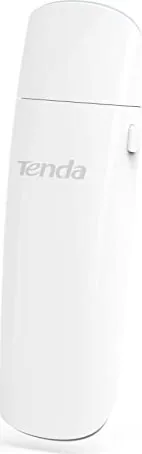
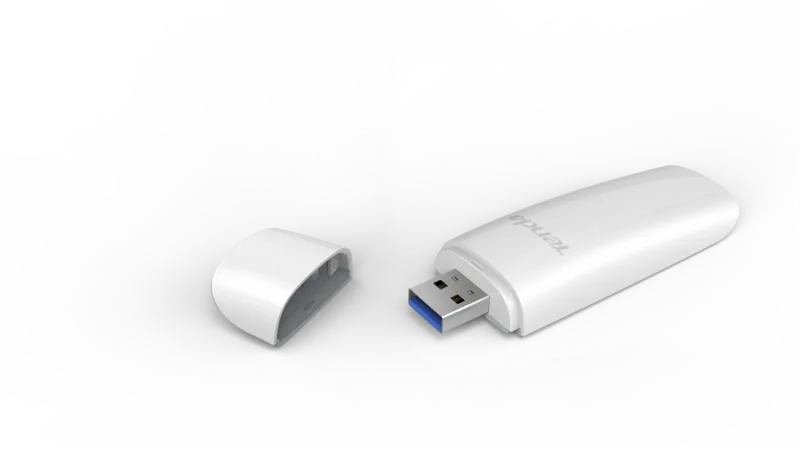
Tenda U12, 2.4GHz/5GHz Wi-Fi, USB-A 3.0 plug Manual
A simple way to upgrade your connection
The Tenda U12 is a compact dual-band wireless USB adapter designed to add fast Wi‑Fi access to a desktop or laptop with ease. It is a practical choice for users who want to improve an older system, replace a weak built-in wireless card, or bring wireless capability to a computer that has none at all. With support for both 2.4GHz and 5GHz bands, it gives you flexibility for everyday browsing, streaming, online meetings, and stable home networking.
One of its biggest strengths is performance. The adapter supports speeds up to 867 Mbps on 5GHz and 400 Mbps on 2.4GHz, and it follows common IEEE 802.11ac/a/b/g/n standards. That makes it suitable for modern routers and a wide range of network setups. It also supports WEP, WPA-PSK, and WPA2-PSK security, so it fits into most home and office wireless environments without much hassle.
The USB-A 3.0 plug is another useful detail. It offers faster data transfer than USB 2.0 and remains compatible with older ports when needed. Tenda also includes a USB extension cable, which helps with placement. That can make a real difference if you want the adapter positioned for better signal reception instead of hidden behind a computer case or desk.
Setup is straightforward, with software support for Windows and Mac systems. You can connect through the adapter’s own interface, use WPS for a quicker password-free setup when the router supports it, or rely on Windows built-in Wi‑Fi tools. This makes the U12 flexible for different users, from casual home users to anyone who prefers a more hands-on network setup.
Notes
- Best results usually come from placing the adapter where the signal is strongest.
- Disabling other network adapters before installation can help avoid conflicts.
- WPS is convenient, but manual connection is still available when needed.
- If your computer lacks a CD drive, the software can be downloaded from Tenda’s website.
Search for 67,732 Manuals online


Type-in Brand or Model
Lukas Novak
8 months ago
Is the WiFi installation really easy, and can I improve the connection by using a USB 3.0 extension cable to place the device near a window?
Manual.ly
8 months ago
Yes, the setup is designed to be straightforward. Typically you connect the WiFi device via USB, install the provided software or follow the on-screen steps, and then select your home WiFi network to complete pairing. For better signal, positioning matters. Using a good-quality USB 3.0 extension cable can help you place the device closer to a window or in a more open spot, which may improve reception and stability. Make sure the cable is in good condition, avoid excessive cable length beyond what the device supports, and do not place the device where it can get wet or damaged.