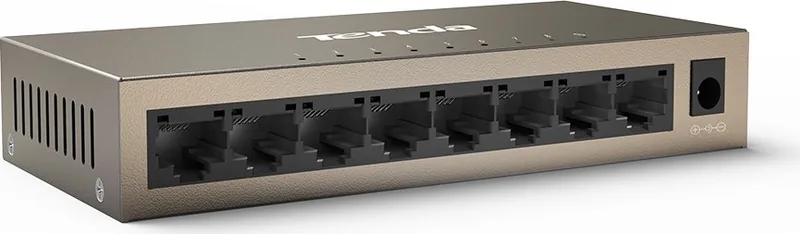
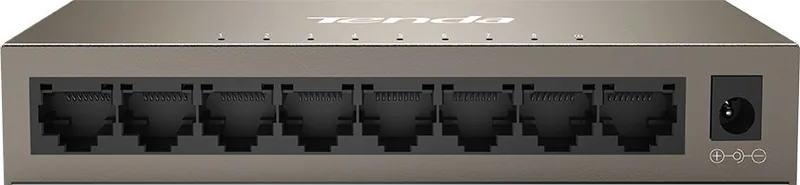
Quick Installation Guide
8-
TE
Package contents
· Switch * 1
· Power adapter * 1
· Quick installation guide * 1
If any item is missing, damaged or incorrect, please keep the
original packaging and contact the local reseller or distributor
immediately.
1. Installing the switch 2. Connecting your devices
Select one mounting method as required.
Option A. Desktop mounting
Put the switch on a stable and flat desktop
Option B.
Step 1: Drill two holes in the wall in a horizontal distance of 116 mm.
Knock sleeve anchors (self-preparation) into the holes using a rubber
hammer till the sleeve anchor is level with the wall.
screws (self-preparation) into the sleev
and keep the screw heads outside the wall at least 2.7 mm, to ensure
that the switch can be hung on the screws firmly
Step 2: Align the slots of the switch to the screw heads
switch to make it fixed on the screws firmly
Sleeve anchor
Screw
2.
116mm
1 2
3
4
5
6 7 8
Note: For saf
Ro
LAN 1 LAN 2 LA N3 LAN 4 WAN
Po
Sw
Co I Pr
L WAN p
I
Ti
All ports of your switch support the auto MDI/MDIX function, indicating that either straight cable or crossover cable is acceptable
to connect your switch to Ethernet devices.
LED indicators
English
The switch is connec
power resource pr
The switch is disconnected or not
properly connected to a power
resource.
The port is connected properly.
Data is being transmitted over the
port.
The port is disconnected or
improperly connected.
Das Gerät ist korrekt an eine
Stromversorgung angeschlossen.
Der Switch ist von der
Stromversorgung getr
ordnungsgemäß angeschlossen.
Der Port ist korrekt verbunden.
Die Daten werden über den P
übertragen.
Der Port ist nicht verbunden oder
falsch angeschlossen.
LED-Anzeige
Deutsch
Standards
IEEE 802.3, IEEE 802.3u,
IEEE 802.3x, IEEE 802.3ab
Switching
capacity
16 Gbps
Store-and-forward
Supported
Auto learning &
auto aging
Supported
MAC address table
4 K
Dimension
140.2 mm * 66.2 mm * 25.2 mm
Pow
Input: 100-240 V AC, 50/60 Hz, 0.3 A
Output: 9 V DC, 0.6 A
Operating
environment
T
Humidity: (10 - 90) % RH, non-
Storage
environment
T
Humidity: (5 - 90) % RH, non-
T
rate
Ethernet: 10 Mbps (half duplex) / 20 Mbps
(full duplex)
F
200 Mbps (full duplex)
Gigabit Ethernet: 2000 Mbps (full duplex)
T
media
Ethernet: CA
F
Gigabit Ethernet: CA
cable (recommended)
Specifications
10/100/1000
Mbps RJ45 Port
Le dispositif est branché
correctement à l'alimentation.
Le commutateur est déconnecté de la
source d’alimentation ou n
connecté à une source d’alimentation.
Le port est correctement connecté.
Les données sont transmises à trav
le port.
Le port est déconnecté ou n’
correctement connecté.
Indicateurs LED
F
El dispositivo está conectado a la
fuente de alimentación
correctamente.
El switch está desconectado o no
correctamente conectado a una
fuente de alimentación.
El puerto está conectado
correctamente.
Se están transmitiendo datos sobre el
puerto.
El puerto está desconectado o mal
conectado.
Indicadores LED
Español
O dispositivo está ligado à fonte de
alimentação adequada.
O interruptor é desligado da fonte de
alimentação ou não é conectado a
uma fonte de alimentação
A porta está ligada corretamente.
Os dados estão a ser transmitidos
pela porta.
A porta está desconectada ou
indevidamente conectada.
Indicadores LED
P
Il dispositivo è collegato alla rete
elettrica correttamente.
L
dall'alimentazione o non
correttamente collegato a una pr
di corrente.
La porta è collegata correttamente.
I dati vengono trasmessi attrav
la porta.
La porta è scollegata o collegata in
modo non corretto.
Indicatori LED
Italiano
Caution:
Adapter Model: BN049-A05009E/BN049-A05009B
Manufacture: SHENZHEN HEWEISHUN NET
Input: 100 - 240 V AC 50/60 Hz, 0.3 A
Output: 9 V 0.6 A
: DC V
This product bears the selective sorting symbol for W
and electronic equipment (
be handled pursuant to European directive 2012/19/EU in order to
be recycled or dismantled to minimize its impact on the
environment.
User has the choice to give his product to a competent r
organization or to the retailer when he buys a new electrical or
electronic equipment.
RECYCLING
Copyright
Copyright © 2019 Shenzhen
reserved.
T
T
herein are trademarks or register
holders. Specifications are subject to change without notice.
T
Shenzhen T
6-8 Floor
District, Shenzhen, China. 518052
USA hotline: 1-800-570-5892
Canada hotline: 1-888-998-8966
Hong Kong hotline: 00852-81931998
Website: http://www
LED-jelzők
Magyar
A készülék helyesen van az
energiaellátáshoz csatlakoztatva.
A váltó nincs, vagy nem
megfelelően van csatlakoztatva a
tápegységhez.
Az egyező port helyesen van
csatlakoztatva.
Adatátvitel van folyamatban a
porton keresztül.
A port nincs, vagy nem
megfelelően van csatlakoztatva.
Пр
пр
Портъ
Даннит
Портъ
неправилносвър
LED индикатори
Бълг
Urządzenie jest prawidłowo
podłączone do źródła zasilania.
Urządzenie jest odłączone od źródła
zasilania lub nie zostało do niego
poprawnie podłączone.
Gniazdo jest połączone poprawnie.
Port obsługuje przesyłanie danych.
Port jest odłączony lub niepoprawnie
podłączony
Kontrolki LED
P
Dispozitivul este conectat corect la
sursa de alimentare.
Switch-ul este deconectat de la sursa
de alimentare sau nu este conectat
corect la sursa de alimentare.
Portul corespunzător este conectat
corect.
Datele sunt transmise prin port.
Portul este deconectat sau nu este
conectat corect.
Indicatoare LED
Română
CE Mark W
This is a Class B product. In a domestic environment, this product
may cause radio interference, in which case the user may be
required to take adequate measur
The mains plug is used as disconnect device; the disconnect device
shall remain readily operable.
NOTE: (1)
interference caused by unauthorized modifications to this
equipment. (2)
recommended to use a shielded RJ45 cable.
This equipment has been tested and found to comply with the
limits for a Class B digital device, pursuant to P
Rules.
against harmful interference in a residential installation.
equipment generates, uses and can radiate radio fr
and, if not installed and used in accordance with the instructions,
may cause harmful interference to radio communications. How
there is no guarantee that interference will not occur in a particular
installation. If this equipment does cause harmful interference to
radio or television reception, which can be determined by turning
the equipment off and on, the user is encouraged to try to correct
the interference by one or more of the following measur
— Reorient or relocate the receiving antenna.
— Increase the separation between the equipment and receiver
— Connect the equipment into an outlet on a circuit different fr
that to which the receiver is connected.
— Consult the dealer or an experienced radio/TV technician for
help.
Operation is subject to the following two conditions: (1) this device
may not cause harmful interference, and (2) this device must accept
any interference receiv
undesired operation.
Светодиодныеиндик
Рус
Коммутат
источникупит
Коммутат
источникапит
подключенкнемунеправильно.
Портподключенправильно.
Черезпортосуществляетс
передачаданных.
Портнеподключенилиподключн
неправильно.
Г
по
Г
по
Alime
Alime
Salid
NOMBRE DEL PRODUCTO: Switch Gigabit de 8 puertos
MODELO:
LA O
SI
a) E
in
b) Este equipo o dispositivo debe aceptar cualquier tipo de
interferencia, incluyendo la que pueda causar su operación no
deseada.
Caution!
Any changes or modifications not expressly approv
responsible for compliance could v
operate the equipment.
NOTE: (1)
interference caused by unauthorized modifications to this
equipment. (2)
recommended to use a shielded RJ45 cable.
Су
зах
вкл