
Tenda P1001P Manual
PDF manual · 48 Pages
English



Quick check
Incorrect answer, please try again.
Chat with your Tenda P1001P manual using AI
Get instant AI answers from your Tenda P1001P manual
Ask anything about the Tenda P1001P. Answers come from this manual, with the pages they are based on.
Ask a Question
Do you recommend P1001P?
Yes NoFrequently Asked Questions
It extends internet access over a home’s electrical wiring. One adapter connects to your router, and the other delivers wired network access to devices in another room or floor.
Is this answer helpful?
Yes. A powerline network needs at least two adapters. One unit alone cannot carry data to another device or create a usable connection.
Is this answer helpful?
Yes. You can connect one adapter to a router and the other to a PC, wireless router, IPTV box, switch, or similar Ethernet-enabled device.
Is this answer helpful?
Use the Pair button on both adapters within the required time window. When paired successfully, the network becomes encrypted and private instead of public.
Is this answer helpful?
It lets you plug another device into the adapter’s built-in AC outlet. This helps preserve wall socket access and may improve electrical noise handling.
Is this answer helpful?
Not for basic use. The kit is plug-and-play, but PLC-Config software is useful for advanced tasks like changing device names, setting QoS, or updating firmware.
Is this answer helpful?
Advantages and Disadvantages
Advantages

- Fast AV1000 powerline speeds with Gigabit RJ-45 support for stable wired networking.
- Passthrough AC socket keeps the outlet usable and can help reduce electrical noise.
- Simple pairing process plus encryption for a more secure private network.
- Useful for extending internet to upper floors, IPTV boxes, PCs, and routers without new cabling.
Disadvantages

- Requires at least two adapters; a single unit cannot create a powerline network.
- Speed and reliability can vary depending on home wiring, outlets, and distance.
- Advanced settings need PLC-Config software, which adds extra setup for some users.
- Best performance is achieved only when adapters are plugged directly into wall sockets.
Product Specification
Type
Powerline adapter (standalone), Bundle
Form factor
2x Socket adapter
Connection
1x RJ-45 (10/100/1000Base-T, 2 devices)
Connection
1x HomePlug AV2 (2-86MHz, IEEE 1901, 2 devices)
Transmission
1x HomePlug AV2 (1000Mbps, OFDM, 128bit AES, 2 devices)
Dimensions
2.36x5.12x1.65in (WxHxD)
Compatibility
HomePlug AV2
Special features
integrated socket (2 devices), Bundle (2x Powerline adapter)
Product Description
Tenda P1001P Powerline AV1000 Passthrough Kit: Practical Whole-Home Networking
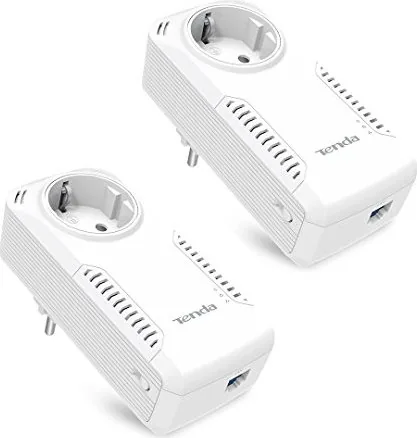
The Tenda P1001P Powerline AV1000 Passthrough Kit, HomePlug AV2, RJ-45, 2-pack Manual centers on one simple idea: turn your home’s electrical wiring into a fast network path. Instead of running long Ethernet cables through walls, you plug in two adapters and let the power lines carry data between rooms, floors, or distant corners of the house.
This kit is built for everyday flexibility. One adapter connects to a router, modem, or switch, while the second adapter brings wired internet to a PC, IPTV set-top box, gaming console, or wireless router in another room. With AV1000 speeds and Gigabit RJ-45 ports, it is designed to support smooth browsing, streaming, and stable device connections without complex installation.
A standout feature is the passthrough AC socket. Because the adapter occupies a wall outlet, the passthrough design helps keep the socket usable for another device. It also helps reduce interference that can affect powerline performance. The front LEDs make setup easier by showing power, powerline pairing, and LAN link status at a glance.
The manual emphasizes a plug-and-play experience, but it also leaves room for more control. Using the Pair/Reset button, users can create an encrypted private network, extend an existing powerline setup with additional adapters, or restore factory defaults when needed. For households that want more advanced management, the PLC-Config Wizard offers device naming, network naming, QoS settings, and firmware upgrades.
In real use, the kit is especially appealing for homes where wireless coverage drops on upper floors or behind thick walls. It can also be useful for latency-sensitive tasks like video calls, IPTV, or online games, where a stable wired path is often more reliable than Wi‑Fi. Since the system supports HomePlug AV2 and 128-bit AES encryption, it balances convenience with a stronger privacy layer when properly paired.
Overall, the P1001P is a straightforward solution for extending wired connectivity through existing electrical lines. It is not about flashy features; it is about dependable coverage, simple setup, and practical expansion for modern homes.
Notes
- Best results come from plugging adapters directly into wall sockets.
- Advanced features require the PLC-Config software.
- Performance depends on electrical wiring quality and distance.
- A minimum of two adapters is required to build a network.
Search for 67,732 Manuals online


Type-in Brand or Model