is a registered trademark legally held by Shenzhen Tenda
Technology Co., Ltd. Other brand and product names mentioned
herein are trademarks or registered trademarks of their respective
holders. Specifications are subject to change without notice.
Español
DECLARACIÓN UE DE CONFORMIDAD
SIMPLIFICADA
Por la presente, SHENZHEN TENDA
TECHNOLOGY CO., LTD., declara que e1 tipo de
equipo radioelectrico 4G680V2.0 es conforme
con 1a Directiva 2014/53/UE.
El texto completo de la declaratión UE de
conformidad está disponible en la direcctión
Internet siguiente:
http://www.tendacn.com/en/service/down-
load-cata-101.html
Deutsch
VEREINFACHTE EU-KONFORMITÄTSERKLÄRUNG
Hiermit erklärt SHENZHEN TENDA TECHNOLOGY
CO., LTD., dass der Funkanlagentyp 4G680V2.0
der Richtlinie 2014/53/EU entspricht.
Der vollständige Text der EU-Konformität-
serklärung ist unter der folgenden
Internetadresse verfügbar:
http://www.tendacn.com/en/service/down-
load-cata-101.html
Français
DECLARATION UE DE CONFORMITE SIMPLIFIEE
Le soussigné, SHENZHEN TENDA TECHNOLOGY
CO., LTD., déclare que l'équipement
radioélectrique du type 4G680V2.0 est
conforme à la directive 2014/53/UE.
Le texte complet de la déclaration UE de
conformité est disponible à l'adresse internet
suivante:
http://www.tendacn.com/en/service/down-
load-cata-101.html
Italiano
DICHIARAZIONE DI CONFORMITÀ UE
SEMPLIFICATA
Il fabbricante, SHENZHEN TENDA
TECHNOLOGY CO., LTD., dichiara che il tipo di
apparecchiatura radio 4G680V2.0 è conforme
alla direttiva 2014/53/UE.
Il testo completo della dichiarazione di
conformità UE è disponibile al seguente
indirizzo Internet:
http://www.tendacn.com/en/service/down-
load-cata-101.html
Polski
UPROSZCZONA DEKLARACJA ZGODNOŚCI UE
SHENZHEN TENDA TECHNOLOGY CO., LTD.
niniejszym oświadcza, że typ urządzenia
radiowego 4G680V2.0 jest
zgodny z dyrektywą 2014/53/UE.
Pełny tekst deklaracji zgodności UE jest
dostępny pod następującym adresem
internetowym:
http://www.tendacn.com/en/service/down-
load-cata-101.html
Русский
Декларация соответствия
Настоящим, SHENZHEN TENDA TECHNOLOGY CO. LTD. заявляет, что радиооборудование типа
4G680V2.0 соответствует Директиве 2014/53 / ЕС. Полный текст декларации соответствия ЕС
доступен по следующему интернет-адресу: http://www.tendacn.com/en/service/download-ca-
ta-101.html
Português
DECLARAÇÃO UE DE CONFORMIDADE
SIMPLIFICADA
O(a) abaixo assinado(a) SHENZHEN TENDA
TECHNOLOGY CO., LTD. declara que o presente
tipo de equipamento de rádio 4G680V2.0 está
em conformidade com a Diretiva 2014/53/UE.
O texto integral da declaração de
conformidade está disponível no seguinte
endereço de Internet:
http://www.tendacn.com/en/service/down-
load-cata-101.html
A1: Try the following solutions.
Q2: I cannot access the internet after completing the settings. What should I do?
A micro or nano SIM card must be converted using a SIM card adapter.
If the INTERNET LED indicator lights solid red, log in to the web UI of the router,
and check if a PIN code is enabled on your SIM card. If so, choose WAN > PIN, and
enter it in the PIN code input box, and click the UnLock PIN button in the lower
right corner.
If the INTERNET LED indicator lights solid green, your SIM card may run out of
money.
If the problem persists, contact your ISP for help.
Check if the router is connected to the modem properly.
Check if the computer connected to your modem directly can access the internet.
If not, contact your ISP for help.
Check if the internet parameters you entered are correct, and the router obtains a
WAN IP address.
If the problem persists, contact your ISP for help.
A2: Try the following solutions.
You use a SIM card to access the internet.
10
6789
RESETWPS
SIM
111213
RESETWPS
SIM
45321
POWERWiFiLANINTERNET
SSID: Tenda_xxxxWiFi Key: XXXXXXXX
IP: 192.168.0.1 User/Key: admin
Wireless N300 4G LTE and
VoLTE Router
Model: 4G680V2.0Power: 12V 1A
MAC
IMEI
S/N
XXXXXXXXXXXXXXX
XXXXXXXXXXXXXXX
XXXXXXXXXXXXXXX
SNLED IndicatorColorStatusDescription
POWER
Green
/
/
/
Solid onThe router is powered on properly.
WiFi
Green
Solid onThe WiFi feature is enabled.
LAN
GreenBlinking
INTERNET
Blue
Solid onRegiester to 4G (not connect).
Signal
strength LED
indicator
Green (1 to 4 bars)It indicates the 3G/2G signal strength of the router.
Green
Solid onRegiester to 3G/2G network (not connect).
BlinkingConnected to 4G network.
BlinkingConnected to 3G/2G network
Purple
Solid on
RedSolid onNo SIM card or no network network service.
BlinkingData is being transmitted over the WAN port.
OffNo device is connected to the RJ45 port of the router.
Slow blinking
Fast blinkingThe router is performing WPS negotiation.
OffThe WiFi feature is disabled.
OffThe router is powered off.
At least one device is connected to the WiFi
network of the router.
At least one device is connected to the LAN port
of the router.
The router is connected to the internet
successfully over the WAN port (port 2).
1
2
3
4
5
SN
Port/ButtonDescription
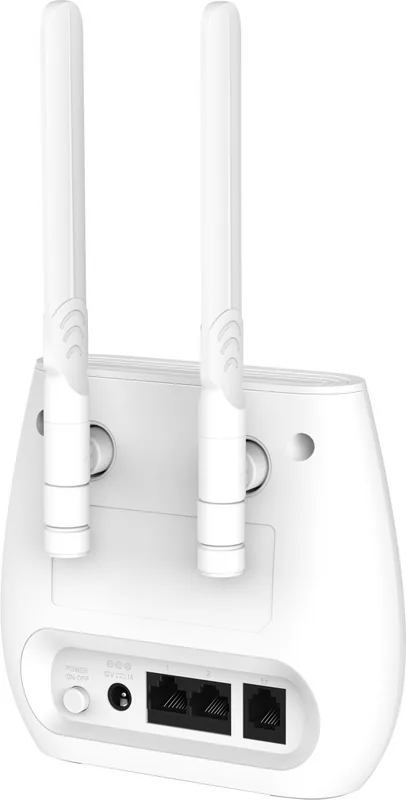
POWER ON/OFFPower on/off button. Used to turn on/off the router.
Power jack. Used to connect to the included power adapter for power supply.
WAN/LAN port. It can server a WAN port or a LAN port.
Telephone port. Used to connect to a telephone for voice service.
Press this button to start WPS negotiation.
SIM card slot. Used to insert the SIM card.
6
7
8
9
10
11
12
13
When the WiFi LED indicator lights up, hold this button down for about 8 seconds,
and release it when the WiFi LED indicator turns off. When the WiFi LED indicator
lights up again, the router is reset to factory settings successfully.
LAN port. Used to connect to Ethernet devices, such as computers, switches,
and so on.
RESET
WPS
SIM
POWERWiFiWPSINTERNET
(Optional) IP phone for
VoLTE service
POWERWiFiWPSINTERNET
POWER
INTERNET
SSID: Tenda_xxxxWiFi Key: XXXXXXXX
IP: 192.168.0.1 User/Key: admin
Wireless N300 4G LTE and
VoLTE Router
Model: 4G680V2.0Power: 12V 1A
MAC
IMEI
S/N
XXXXXXXXXXXXXXX
XXXXXXXXXXXXXXX
XXXXXXXXXXXXXXX
SSID: Tenda_XXXX
WiFi Key: XXXXXXXX
You access the internet through a modem.
/1
%
Quick check
I'm not a robot
Incorrect answer, please try again.
Chat with your Tenda 4G680 manual using AI
Get instant AI answers from your Tenda 4G680 manual
Ask anything about the Tenda 4G680. Answers come from this manual, with the pages they are based on.
Ask a Question
0/1000
Do you recommend 4G680?
YesNo
Frequently Asked
Questions
A
Open a standard web browser on a connected device and type 192.168.0.1 in the address bar. Enter the default username and password found on the device label. Ensure your computer is linked to the router via Ethernet or WiFi to establish a connection first.
Is this answer helpful?
A
A solid blue light means the device is registered to a 4G network but does not have internet access yet. You need to ensure the SIM card is active and data is enabled. Wait for the light to change to solid green for a connection.
Is this answer helpful?
A
Yes, it supports Voice over LTE technology. Connect a compatible IP phone to the telephone port on the back panel. This allows you to make standard calls using the cellular network instead of a traditional landline.
Is this answer helpful?
A
A red solid light usually indicates no SIM card detected or no service. Check the SIM card slot to ensure it is inserted correctly. Also verify with your provider that your data plan is active and not expired to resolve service issues.
Is this answer helpful?
A
Locate the RESET button on the side. Hold it down for about ten seconds while the router is powered on. Release the button when the WiFi indicator light turns off and then starts blinking again. Settings will return to default.
Is this answer helpful?
A
Yes, you can use the WPS button. Press the WPS button on the router and then press the WPS button on your wireless device within two minutes. This will connect them securely without needing to enter the password manually.
Is this answer helpful?
A
The device operates safely between 0°C and 40°C. Humidity should be between 10% and 90% without condensation. Keep it in a well-ventilated area to prevent overheating during extended periods of heavy network usage and traffic.
Is this answer helpful?
M: QW-35-FL
Advantagesand
Disadvantages
Advantages
Supports 4G LTE for high-speed mobile internet access on the go.
Enables VoLTE calls for high-quality voice communication over data.
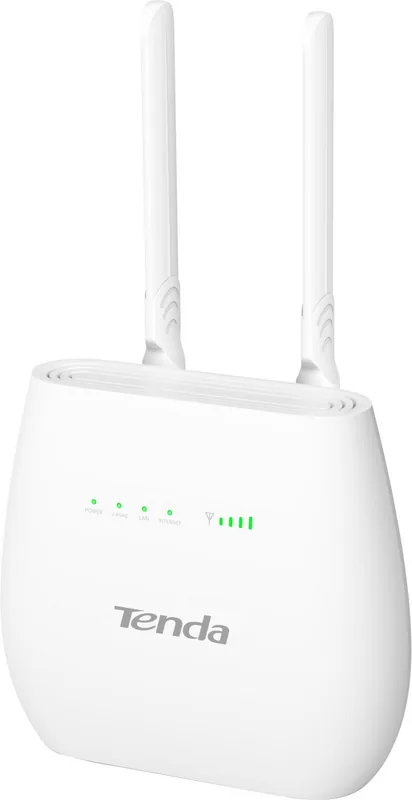
Equipped with dual removable antennas for enhanced signal strength.
Features clear LED indicators for easy troubleshooting and status checking.
Simple installation process requiring minimal configuration steps for users.
VS
Disadvantages
Plastic chassis construction may feel less durable than metal alternatives.
Only provides two wired ports limiting direct device connections.
Lacks a USB port for external storage or network drive sharing.
Performance is dependent on the strength of the local cellular signal.
No native support for multiple concurrent WAN connections without extra tools.
Transform Your Mobile Experience with the Tenda 4G680
In today's fast-paced world, reliable internet access is crucial for both home and office environments. The Tenda 4G680 stands out as a robust solution for users seeking wireless N300 speeds combined with advanced LTE capabilities. This versatile router allows seamless integration of mobile networks into your daily workflow without the need for traditional broadband connections. By leveraging 4G LTE and VoLTE technology, it ensures crystal-clear voice calls alongside rapid data transmission.
One of the standout features is the intuitive setup process. Installing the device is straightforward, requiring only the included antennas and a power source. Once connected, the LED indicators provide clear visual feedback on network status. A solid green light confirms proper power while blinking blue or green signals a successful internet connection. This visual aid simplifies troubleshooting without the need for complex diagnostics. Installation tips confirm that antennas must be attached firmly to the base unit for optimal signal reception. You can also connect a computer directly to test the connectivity before full setup.
Security and performance go hand in hand with this hardware. The built-in firewall protects your devices from unauthorized access while maximizing signal range through dual removable antennas. Whether you are streaming media or video conferencing, the wireless N300 standard delivers consistent throughput. Many users reference the Tenda 4G680 Manual during initial configuration to understand port functions and default credentials.
Practical Features and Connectivity
The device supports both wired and wireless connections. Two LAN ports accommodate desktop computers or gaming consoles, while the Wi-Fi band connects smartphones and laptops. The inclusion of a telephone port enables Voice over LTE services, making it a true all-in-one communication hub. For emergencies or remote work, having a dedicated cellular backup ensures uninterrupted operations.
Maintenance is minimal thanks to a stable design. The router handles heat efficiently within the recommended operating temperature range. Overall, this gateway represents excellent value for connectivity needs. It bridges the gap between mobile coverage and local area networks effectively. Whether you are in a rural area or need temporary internet access, this unit provides stability. The comprehensive guidance available for this model provides detailed steps for accessing the web interface at a standard address. Always check the LED status before assuming connectivity issues.
Final Thoughts
Reliable connectivity is essential. Ensure you place the antennas correctly for best results. Remember to secure your network with a strong password. Enjoy seamless browsing with this powerful networking tool designed for modern demands.