
Telestar DIRA M 5i Manual
PDF manual · 336 Pages
English



Quick check
Incorrect answer, please try again.
Chat with your Telestar DIRA M 5i manual using AI
Get instant AI answers from your Telestar DIRA M 5i manual
Ask anything about the Telestar DIRA M 5i. Answers come from this manual, with the pages they are based on.
Ask a Question
Do you recommend DIRA M 5i?
Yes NoFrequently Asked Questions
Navigate to the System menu using the dial, select Network, choose your available Wi-Fi network from the list, and enter the password using the dial. Confirm the entry to establish the connection.
Is this answer helpful?
Yes, you can record live broadcasts by pressing the Record button while a station is playing. You can also set up timed recordings via the Timer menu to capture shows when you are not at home.
Is this answer helpful?
No, the DIRA M 5i acts as a receiver. You can connect your smartphone or tablet via Bluetooth to stream audio through the radio's speakers, but it cannot output audio to external Bluetooth speakers.
Is this answer helpful?
Download the latest firmware from the manufacturer's website, extract the file, copy it to a formatted USB drive, insert the drive into the radio's USB port, and follow the on-screen prompts to install the update.
Is this answer helpful?
Yes, select the Weather option in the main menu. The device will fetch current conditions for your location if connected to the internet. You can change the city using the List button.
Is this answer helpful?
The device supports MP3, AAC, AAC+, and WMA files. For best quality, ensure your MP3 files have a bitrate of 192 kbps or higher.
Is this answer helpful?
Absolutely. In the System menu under Alarm, you can set two different wake-up times. You can choose to wake up to a beep sound or a specific internet radio station.
Is this answer helpful?
Advantages and Disadvantages
Advantages

- Extensive connectivity options including Wi-Fi, Bluetooth, USB, and UPnP
- Ability to record radio broadcasts directly to a USB drive
- Dedicated mobile app for convenient remote control and setup
- Comprehensive alarm system with sleep timer and snooze function
- Real-time weather information display based on location settings
Disadvantages

- Requires manual time zone and language configuration during initial setup
- No built-in rechargeable battery; must remain plugged into mains power
- USB charging current limited to 1 amp which may be slow for some devices
- Firmware updates require a USB drive and manual file transfer process
- Remote control not included in the package
Product Specification
Power
7W RMS
Tuner
Internet Radio
Display
LCD
Audio Connections
AUX In (3.5mm Jack)
Other Connections
USB-A
Wireless
Bluetooth 5.1
Power Supply
AC Power
Features
Charging Function (USB), Telescopic Antenna
Color
Black
Dimensions
6.06x3.82x1.61 in (WxHxD)
Weight
8.18 oz
Product Description
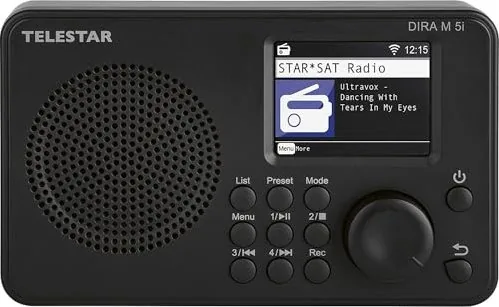
Discover the Telestar DIRA M 5i
The Telestar DIRA M 5i stands as a versatile centerpiece for modern home audio, blending traditional radio functionality with cutting-edge digital connectivity. Designed for enthusiasts who value both simplicity and advanced features, this device transforms your living space into a hub of entertainment. Whether you are tuning into global internet radio stations, streaming music from your smartphone via Bluetooth, or enjoying high-quality audio from USB drives, the DIRA M 5i delivers an exceptional listening experience.
At the heart of this unit is its robust Internet Radio capability. It effortlessly connects to your home Wi-Fi network, granting access to thousands of stations worldwide without the need for complex setups. The intuitive interface allows you to search for specific channels, save your favorites, and organize them into lists for quick access. For those who prefer local content, the Local Radio feature automatically detects stations in your vicinity based on your geographic settings, ensuring you never miss out on community news or regional music.
Connectivity is where the DIRA M 5i truly shines. Beyond standard FM reception, it supports UPnP for seamless playback of media files stored on your networked computers or NAS devices. The built-in Bluetooth module lets you wirelessly stream audio from any compatible smartphone or tablet, turning your radio into a powerful external speaker system. Additionally, the USB port serves dual purposes: it acts as a player for MP3 files stored on flash drives and enables you to record live broadcasts directly onto the drive for later enjoyment.
Smart features further enhance user convenience. The integrated weather function provides real-time forecasts for your selected location, keeping you informed while you listen. A customizable alarm clock allows you to wake up to your favorite station or a gentle signal tone, with options for snooze timers and sleep timers to manage your daily routine. The accompanying mobile app offers complete control over all functions, allowing you to adjust volume, change stations, and manage recordings remotely from your phone or tablet.
Built with safety and durability in mind, the device adheres to strict European standards for electrical safety and energy efficiency. Its compact design fits perfectly on any shelf or desk, while the clear TFT display ensures easy navigation through menus. Whether you are a casual listener or an audiophile seeking reliable performance, the Telestar DIRA M 5i offers a comprehensive solution for all your audio needs.
Key Highlights
- Seamless integration with home networks for global radio access.
- Multi-format support including Bluetooth, USB, and UPnP streaming.
- Smart recording capabilities for saving favorite shows.
- User-friendly app control for remote management.
- Built-in weather updates and customizable alarms.
Important Notes
- Ensure the device is placed in a dry, well-ventilated area away from heat sources.
- Always use the provided power adapter to maintain warranty coverage.
- Keep firmware updated via USB to access new features and improvements.
Search for 67,706 Manuals online


Type-in Brand or Model