
Technoline WS 7033 Manual
PDF manual · 5 Pages
English



Quick check
Incorrect answer, please try again.
Chat with your Technoline WS 7033 manual using AI
Get instant AI answers from your Technoline WS 7033 manual
Ask anything about the Technoline WS 7033. Answers come from this manual, with the pages they are based on.
WS 7033 Maintenance Schedule
For optimal accuracy and performance, replace the battery once a year using only recommended types.
Wipe with a soft damp cloth only; do not use solvents or scouring agents.
Immediately remove depleted batteries to prevent leakage and damage to the unit.
Free maintenance reminders
Timed to your purchase date. Always free, unsubscribe anytime.
Ask a Question
Do you recommend WS 7033?
Yes NoFrequently Asked Questions
Press and hold the SET key to enter settings then toggle units with MIN/MAX until F appears on the screen to confirm.
Is this answer helpful?
The unit requires one 1.5V AAA Micro battery type IEC LR3 to operate effectively and power all functions.
Is this answer helpful?
With alkaline batteries the power lasts approximately twelve months under normal operating conditions before needing replacement.
Is this answer helpful?
Yes use the detachable stand to remove and hang on a screw with the head protruding 5mm for secure attachment.
Is this answer helpful?
Press and hold the MIN/MAX key for three seconds to reset all stored values to current temps immediately.
Is this answer helpful?
The main unit is not waterproof so do not submerge it. The probe wire must avoid rain to function.
Is this answer helpful?
Indoor is -9.9 to +59.9 C outdoor is -40 to +59.9 C with 0.1 C resolution available for users.
Is this answer helpful?
Advantages and Disadvantages
Advantages

- Wireless outdoor probe with 3 meter cable provides flexible sensor placement for any room.
- Dual temperature monitoring capabilities for both inside and outside environments with clear LCD.
- User friendly interface allows easy time and unit setting configuration without software.
- Multiple mounting options available including wall mount or table top display for use.
- Automatic storage of minimum and maximum recorded temperature values tracked for history.
Disadvantages

- Requires annual battery replacement to maintain optimal display accuracy levels throughout usage.
- Outdoor probe cable must be kept away from moisture and rain sources to avoid.
- No humidity sensor included so moisture levels cannot be measured directly in any setting.
- User must manually set time and temperature units upon initial setup without auto.
- Warranty voids if users attempt to open the casing or perform repairs themselves.
Product Specification
Type
digital
Temperature
Indoor and outdoor
Additional displays
Time, stored min./max. temperature
Outdoor temperature range
-4°F to 140°F
Mounting
Desktop, wall mounting possible
Color
silver, anthracite
Package contents
1 outdoor sensor
Product Description
Introducing the Technoline WS 7033 Wireless Temperature Station
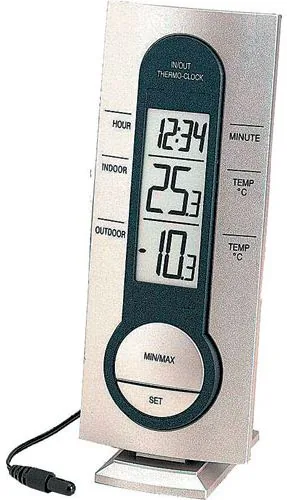
Explore the Technoline WS 7033 Wireless Temperature Station Digital and see its capabilities. This innovative home device brings precision weather monitoring to your living space with exceptional ease. Whether you want to track interior comfort levels or monitor the weather conditions outside, this station handles both zones with a dedicated external temperature sensor. The digital interface ensures clarity and readability for every household member. It serves as a helpful indicator for future weather patterns within your immediate surroundings.
Comprehensive Features and Design
The station features a large LCD screen displaying time and temperature data simultaneously across three distinct lines. You can easily choose between Celsius or Fahrenheit scales to suit your local preference without needing complex software applications. The included 3 meter cable connecting the wireless outdoor probe allows flexible placement while keeping the main unit safe indoors. A detachable stand lets you mount it securely on a desk or hang it on a wall for ultimate versatility during the initial installation phase. All stored minimum and maximum values can be reset when necessary for accurate records.
Detailed Setup and Configuration
Installation is very straightforward for any user with basic electronics skills. You simply insert one AAA battery into the designated compartment observing the polarity markings on the battery cover. Once powered, the unit automatically searches for signals from the external probe located outside the building. You can then configure the preferred time format and temperature units via the SET and MIN/MAX buttons located on the front panel. Resetting stored minimum and maximum recorded values takes just a few simple button presses to clear old data and start fresh measurements.
Maintenance Guidelines and Care Tips
To ensure consistent accuracy over the long term you should replace the battery approximately once a year. Avoid exposing the probe cable to extreme moisture, heavy rain, or direct sunlight which might damage the wiring or reduce signal strength. Clean the display screen gently with a soft damp cloth only. Do not submerge the main unit in water under any circumstances to prevent internal corrosion. The manufacturer explicitly advises against opening the casing yourself as this will invalidate warranty claims during the product lifecycle.
Technical Specifications
Indoor temperature measurement ranges from minus 9.9 degrees to plus 59.9 degrees Celsius with high resolution. Outdoor measurement extends further to minus 40 degrees Celsius for handling harsher climates effectively. Checking intervals occur every ten seconds for both indoor and outdoor settings to provide real time updates. The physical dimensions measure 60 by 20.7 by 150 millimeters ensuring a compact footprint on any surface. Power consumption remains low using alkaline batteries rated for approximately twelve months of continuous operation.
Final Thoughts
Monitor your environment efficiently with this reliable and compact tool for daily use. It provides essential environmental data without requiring complex setup procedures or internet connectivity for basic tracking. The minimalistic design fits various home decor styles while delivering consistent performance for daily weather tracking needs in your house or apartment effectively. Keep out of reach of children as it is not a toy.
Search for 67,706 Manuals online


Type-in Brand or Model