Manual.ly Logo

Technoline WS 7033 Manual

0.0 · 0 Ratings

PDF manual · 5 Pages

English

M: qwen/qwen3.5-flash-20260224
page

/ 5

Loading...
f097f7af652efec75b363f6b3d9065c1589f page 2
1. Checking the correct polarization, insert 1 x AAA, IEC, LR3,
1.5V battery into the battery compartment.
2. Check that the temperature station has received the reading in
the outdoor section (this will be from the temperature probe).
3. Once the temperature is received, carefully thread the cable
outdoor, to a suitable location and secure into place.
4.
Now place your temperature station onto a flat surface or hang
it onto a wall of your choice (see “Positioning the
temperature station” below).
Note: When securing the cable, remember to keep it away from
moisture, rain, direct sunlight or other extreme conditions as these
may cause damage or inaccurate readings.
FUNCTION KEYS
SET key:
• Press and hold the key to enter manual setting modes:
temperature °C/°F, 12/24 hour display, and manual time
settings
MIN/MAX key:
• When this is pressed, the LCD will alternate between the
current, MIN/MAX temperatures for both indoor and outdoor
readings.
•
If the MIN/MAX key is pressed and held down for 3 seconds,
both the MIN/MAX recorded temperatures for indoor and
outdoor will reset to the current indoor and outdoor
temperature readings.
LCD SCREEN
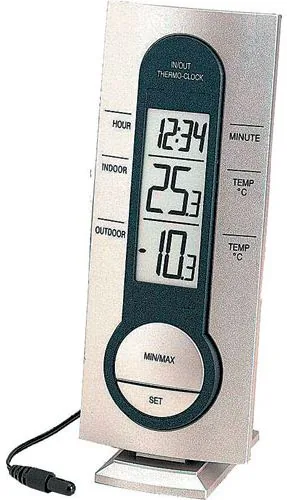
The Temperature Station LCD is comprised of three lines and once
the batteries are inserted, all the segments will light up momentarily
before displaying:
1. Time “0:00”
2.
Indoor and outdoor temperature in degree Celsius (°C) or
Fahrenheit (°F)
MANUAL SETTINGS:
The following manual settings can be changed when pressing the
SET key for:
• °C/°F temperature setting
• 12/24-hour format setting
• Manual time setting
°C/°F TEMPERATURE SETTING:
The temperature display can be selected to show temperature data in
°C or °F (Default °C):
1. Press and hold the SET key to enter the temperature setting.
2. Use the MIN/MAX key to toggle between “C” or “F”.
3.
Press SET key to confirm and enter the 12/24-hour format
setting.
12/24-HOUR FORMAT SETTING:
The hour display can be selected to show hours in 12-hour or 24-hour
settings. (Default 24-hour):
1. Use the MIN/MAX key to toggle between “12h” or “24h”.
2.
Confirm with the SET key and enter the Manual time setting.
MANUAL TIME SETTING:
Following from the 12 or 24 hour setting mode:
1. The Hour digit in the time section starts flashing
2.
Using the MIN/MAX key, enter the hours of the current time
and then followed by pressing the SET key to move into the
minutes mode
3. Again, using the MIN/MAX key, enter the minutes of the current
time.
4.
Then finally followed by pressing the
SET
key to exit the
setting mode. Your temperature station is now fully operational.
MINIMUM AND MAXIMUM INDOOR AND OUTDOOR
TEMPERATURES:
By pressing the MIN/MAX key the current indoor and outdoor
temperature will alternate between the minimum, maximum and
current temperature recordings. Once a new indoor and/or outdoor
temperature high or is low reached, it will automatically be set into the
Temperature Station memory.
RESETTING THE MINIMUM AND MAXIMUM
TEMPERATURES RECORDS:
By pressing and holding down the MIN/MAX key for about 3 seconds,
both the indoor and outdoor minimum and maximum temperature
recordings will be reset to the current indoor and outdoor
temperatures.
POSITIONING THE TEMPERATURE STATION:
The Temperature Station comes attached with a removable table
stand, which provides the option of table standing
or wall mounting the unit. Before wall mounting,
please check that the outdoor temperature can be
received from the desired locations. To wall mount:
1. Fix a screw (not supplied) into the desired
wall, leaving the head extended out the by
about 5mm.
2. Remove the stand from the Temperature
Station by pulling it way from the base and
hang the Temperature Station onto the
screw. Remember to ensure that it locks into
place before releasing.
BATTERY CHANGE:
For best performance, the batteriy should be replaced at
least once a year to maintain maximum running accuracy.
Please help in the preservation of the environment and
return used batteries to an authorized depot.
CARE AND MAINTENANCE:
• Extreme temperatures, vibration and shock should be avoided
as these may cause damage to the units and give inaccurate
forecasts and readings.
•
When cleaning the display and casings, use a soft damp cloth
only. Do not use solvents or scouring agents as they may mark
the LCD and casings.
• Do not submerge the units in water.
•
Immediately remove all low powered batteries to avoid leakage
and damage. Replace only with new batteries of the
recommended type.
• Do not make any repair attempts to the units. Return it to their
original point of purchase for repair by a qualified engineer.
Opening and tampering with the units may invalidate their
guarantee.
• Do not expose the units to extreme and sudden temperature
changes, this may lead to rapid changes in forecasts and
readings and thereby reduce their accuracy.
SPECIFICATIONS:
Temperature measuring range
Indoor : -9.9ºC to +59.9ºC with 0.1ºC resolution
14.2ºF to 139.8ºF with 0.2ºF resolution
(OF.L displayed if outside this range)
Outdoor : -40ºC to +59.9ºC with 0.1ºC resolution
-40ºF to +139.8ºC with 0.2ºF resolution
(OF.L displayed if outside this range)
Temperature checking intervals
Indoor : every 10 seconds
Outdoor : every 10 seconds
Power consumption : 1 x AAA, IEC LR3, 1.5V
(Alkaline batteries recommended)
Dimensions (L x W x H): 60 x 20.7 x 150 mm
LIABILITY DISCLAIMER:
• The electrical and electronic wastes contain hazardous
substances. Disposal of electronic waste in wild country and/or
in unauthorized grounds strongly damages the environment
• Please contact your local or/and regional authorities to retrieve
the addresses of legal dumping grounds with selective
collection
• All electronic instruments must from now on be recycled. User
shall take an active part in the reuse, recycling and recovery of
the electrical and electronic waste.
• The unrestricted disposal of electronic waste may do harm on
public health and the quality of environment.
• This product must however not be thrown in general rubbish
collection points.
• As stated on the gift box and labeled on the product, reading
the “User manual” is highly recommended for the benefit of the
user.
• The manufacturer and supplier cannot accept any
responsibility for any incorrect readings and any
consequences that occur should an inaccurate reading take
place.
• This product is not to be used for medical purposes or for
public information.
• This product is only designed to be used in the home as
indication of the future weather and is not 100% accurate.
Weather forecasts given by this product should be taken only
as an indication and not as being totally accurate.
• The specifications of this product may change without prior
notice.
• This product is not a toy. Keep out of the reach of children.
•
No part of this manual may be reproduced without written
consent of the manufacturer.
STATION DE TEMPERATURES
Livret d’instructions
CARACTERISTIQUES :
• Affichage de l'heure en format 12 ou 24 heures
•
Câble de 3 mètres avec sonde pour relever la température
extérieure
•
Affichage de la température intérieure et extérieure en degrés
Celsius (°C) ou Farhenheit (°F) avec MIN/MAX
•
Remise à zéro de tous les relevés MIN/MAX
• Se monte sur un mur ou se pose sur une table (support de table
amovible)
PARAMETRAGE :
1. Installez 1 x AAA, IEC, LR3, 1,5V dans le logement de la pile
en respectant les polarités.
2. Assurez-vous que la station de températures reçoit les relevés
sur la section de température extérieure (à partir de la sonde
de température).
3. Quand l'appareil reçoit la température extérieure, installez
soigneusement le câble comme il convient et fixez-le en place.
4.
Posez maintenant votre station de températures sur une
surface plate ou accrochez-la sur un mur (reportez-vous à la
section
Mise en place,
ci-dessous).
Remarque :
Lorsque vous mettez le câble en place, n'oubliez pas d'installer ce
dernier à l'abri de l'humidité, de la pluie, des rayons du soleil ou
autres conditions extrêmes qui risqueraient de l'endommager ou
d'entraver l'exactitude des relevés.
TOUCHES DE FONCTION
Touche SET:
• Maintenez la touche enfoncée pour accéder aux modes de
réglages manuels : unités de température °C/°F, affichage
12/24H, et réglage manuel de l'heure.
Touche MIN/MAX :
• Appuyez dessus pour faire alterner le LCD entre les
températures actuelles, minimum et maximum, intérieures et
extérieures.
• Si vous appuyez sans lâcher sur la touche MIN/MAX, les
températures minimum et maximum intérieures et extérieures
enregistrées se ré-enclencheront aux températures intérieure et
extérieure actuelles.
ECRAN LCD
Le LCD de la station de températures comprend trois lignes. Quand les
piles sont installées, tous les segments s'allument momentanément
avant d'afficher:
1. Heure "0:00"
2. Température intérieure et extérieure en degrés Celsius (°C) ou
Fahrenheit (°F)
RÉGLAGES MANUELS :
La touche SET permet l'accès aux réglages manuels suivants :
• Unités de température °C/°F
• Format 12/24H
• Réglage manuel de l'heure
UNITES DE TEMPERATURE °C/°F
L'affichage de la température peut être en format °C ou °F (°C par
défaut) :
1. Appuyez sur la touche SET pour entrer dans le mode
d’affichage de la température.
2. Basculez entre “C” et “F” à l'aide de la touche MIN/MAX.
3.
Appuyez sur la touche SET pour confirmer et passer au au
réglage du Format 12/24H.
FORMAT 12/24H
L'heure peut être affichée au format 12 h ou 24 h (24h par défaut)
1. Basculez entre formats "12h" et "24h" à l'aide de la touche
MIN/MAX.
2.
Appuyez sur la touche SET pour confirmer et passer au
réglage Manuel de l'Heure
.
RÉGLAGE MANUEL DE L'HEURE :
Après le réglage 12 ou 24 heures :
Time
Indoor temperature
in ºC or ºF
Outdoor
temperature
in ºC or ºF
Logement
des piles
Heure
Température
intérieure en
ºC or ºF
Température
extérieure
en
ºC or ºF
Touche SET
(Réglage)
Touche MIN/MAX
Trou de
suspension
Support amovible
Couvercle
des piles
Compartiment
de la pile
Sonde de
température
avec câble de
3 mètres

Chat with your Technoline WS 7033 manual using AI

Get instant AI answers from your Technoline WS 7033 manual

Ask anything about the Technoline WS 7033. Answers come from this manual, with the pages they are based on.

WS 7033 Maintenance Schedule

Remind me when maintenance is due
Yearly
Replace batteries

For optimal accuracy and performance, replace the battery once a year using only recommended types.

As needed
Clean display and casing

Wipe with a soft damp cloth only; do not use solvents or scouring agents.

As needed
Remove low power batteries

Immediately remove depleted batteries to prevent leakage and damage to the unit.

Free maintenance reminders

Timed to your purchase date. Always free, unsubscribe anytime.

By submitting you agree to the privacy policy. Unsubscribe with one click in any email.
M: QW-35-FL

Ask a Question

0/1000

Do you recommend WS 7033?

Yes No

Frequently Asked Questions

A

Press and hold the SET key to enter settings then toggle units with MIN/MAX until F appears on the screen to confirm.

Is this answer helpful?

A

The unit requires one 1.5V AAA Micro battery type IEC LR3 to operate effectively and power all functions.

Is this answer helpful?

A

With alkaline batteries the power lasts approximately twelve months under normal operating conditions before needing replacement.

Is this answer helpful?

A

Yes use the detachable stand to remove and hang on a screw with the head protruding 5mm for secure attachment.

Is this answer helpful?

A

Press and hold the MIN/MAX key for three seconds to reset all stored values to current temps immediately.

Is this answer helpful?

A

The main unit is not waterproof so do not submerge it. The probe wire must avoid rain to function.

Is this answer helpful?

A

Indoor is -9.9 to +59.9 C outdoor is -40 to +59.9 C with 0.1 C resolution available for users.

Is this answer helpful?

M: qwen/qwen3.5-flash-20260224

Advantages and Disadvantages

Advantages

  • Wireless outdoor probe with 3 meter cable provides flexible sensor placement for any room.
  • Dual temperature monitoring capabilities for both inside and outside environments with clear LCD.
  • User friendly interface allows easy time and unit setting configuration without software.
  • Multiple mounting options available including wall mount or table top display for use.
  • Automatic storage of minimum and maximum recorded temperature values tracked for history.
VS

Disadvantages

  • Requires annual battery replacement to maintain optimal display accuracy levels throughout usage.
  • Outdoor probe cable must be kept away from moisture and rain sources to avoid.
  • No humidity sensor included so moisture levels cannot be measured directly in any setting.
  • User must manually set time and temperature units upon initial setup without auto.
  • Warranty voids if users attempt to open the casing or perform repairs themselves.
M: qwen/qwen3.5-flash-20260224

Product Specification

Type

digital

Temperature

Indoor and outdoor

Additional displays

Time, stored min./max. temperature

Outdoor temperature range

-4°F to 140°F

Mounting

Desktop, wall mounting possible

Color

silver, anthracite

Package contents

1 outdoor sensor

M: qwen/qwen3.5-flash-20260224

Product Description

Introducing the Technoline WS 7033 Wireless Temperature Station

Explore the Technoline WS 7033 Wireless Temperature Station Digital and see its capabilities. This innovative home device brings precision weather monitoring to your living space with exceptional ease. Whether you want to track interior comfort levels or monitor the weather conditions outside, this station handles both zones with a dedicated external temperature sensor. The digital interface ensures clarity and readability for every household member. It serves as a helpful indicator for future weather patterns within your immediate surroundings.

Comprehensive Features and Design

The station features a large LCD screen displaying time and temperature data simultaneously across three distinct lines. You can easily choose between Celsius or Fahrenheit scales to suit your local preference without needing complex software applications. The included 3 meter cable connecting the wireless outdoor probe allows flexible placement while keeping the main unit safe indoors. A detachable stand lets you mount it securely on a desk or hang it on a wall for ultimate versatility during the initial installation phase. All stored minimum and maximum values can be reset when necessary for accurate records.

Detailed Setup and Configuration

Installation is very straightforward for any user with basic electronics skills. You simply insert one AAA battery into the designated compartment observing the polarity markings on the battery cover. Once powered, the unit automatically searches for signals from the external probe located outside the building. You can then configure the preferred time format and temperature units via the SET and MIN/MAX buttons located on the front panel. Resetting stored minimum and maximum recorded values takes just a few simple button presses to clear old data and start fresh measurements.

Maintenance Guidelines and Care Tips

To ensure consistent accuracy over the long term you should replace the battery approximately once a year. Avoid exposing the probe cable to extreme moisture, heavy rain, or direct sunlight which might damage the wiring or reduce signal strength. Clean the display screen gently with a soft damp cloth only. Do not submerge the main unit in water under any circumstances to prevent internal corrosion. The manufacturer explicitly advises against opening the casing yourself as this will invalidate warranty claims during the product lifecycle.

Technical Specifications

Indoor temperature measurement ranges from minus 9.9 degrees to plus 59.9 degrees Celsius with high resolution. Outdoor measurement extends further to minus 40 degrees Celsius for handling harsher climates effectively. Checking intervals occur every ten seconds for both indoor and outdoor settings to provide real time updates. The physical dimensions measure 60 by 20.7 by 150 millimeters ensuring a compact footprint on any surface. Power consumption remains low using alkaline batteries rated for approximately twelve months of continuous operation.

Final Thoughts

Monitor your environment efficiently with this reliable and compact tool for daily use. It provides essential environmental data without requiring complex setup procedures or internet connectivity for basic tracking. The minimalistic design fits various home decor styles while delivering consistent performance for daily weather tracking needs in your house or apartment effectively. Keep out of reach of children as it is not a toy.

M: qwen/qwen3.5-flash-20260224

© Copyright 2026 Manual.ly
