
Synology WRX560 Manual
PDF manual · 18 Pages
English



Quick check
Incorrect answer, please try again.
Chat with your Synology WRX560 manual using AI
Get instant AI answers from your Synology WRX560 manual
Ask anything about the Synology WRX560. Answers come from this manual, with the pages they are based on.
Ask a Question
Do you recommend WRX560?
Yes NoFrequently Asked Questions
Connect the power and WAN port to the modem. Use a browser or mobile app to access the router interface via the default IP address to begin configuration.
Is this answer helpful?
The SSID includes the serial number and the password is set to synology, which must be changed during initial setup for security reasons.
Is this answer helpful?
Yes, selected models feature dual WAN ports allowing for internet redundancy and better load balancing capabilities across multiple ISPs for stability.
Is this answer helpful?
It operates using 802.11 ax standards for both 2.4GHz and 5GHz frequencies to ensure modern device compatibility and high throughput speeds.
Is this answer helpful?
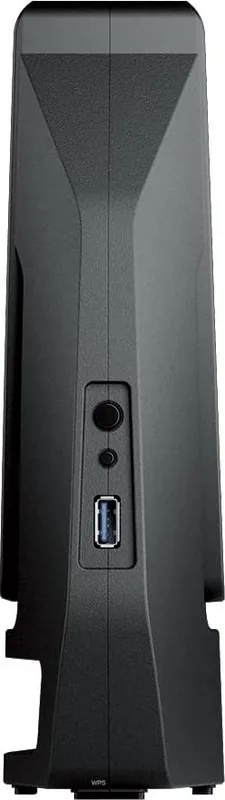
Yes, there is one USB 3.2 Gen 1 Type-A port available for connecting drives or devices for network file sharing and backup purposes.
Is this answer helpful?
Keep it away from liquids, direct sunlight, and unbalanced surfaces to ensure stable operation and prevent physical or electrical hazards during use.
Is this answer helpful?
The 5.15-5.25GHz band is restricted to indoor usage only to reduce interference with mobile satellite systems and other radio equipment legally.
Is this answer helpful?
Advantages and Disadvantages
Advantages

- Dual WAN support allows for internet redundancy and load balancing to keep connections stable for users needing uptime.
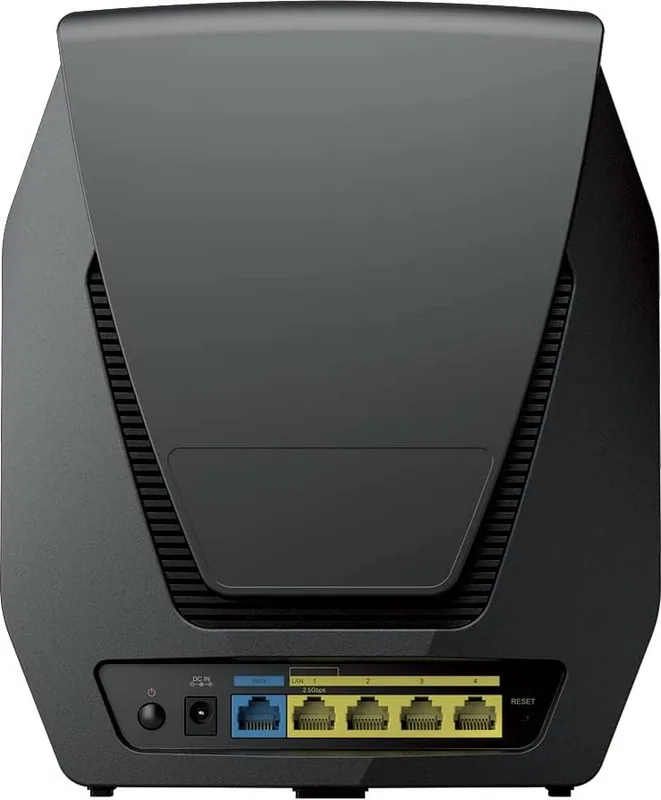
- Equipped with 2.5G WAN and LAN ports for high-speed data transfer exceeding standard gigabit limits easily.
- Supports Wi-Fi 6 standards with WPA3 security for faster and more secure wireless connectivity throughout home.
- Includes a USB 3.2 Gen 1 port for connecting external storage or peripherals to the network for sharing.
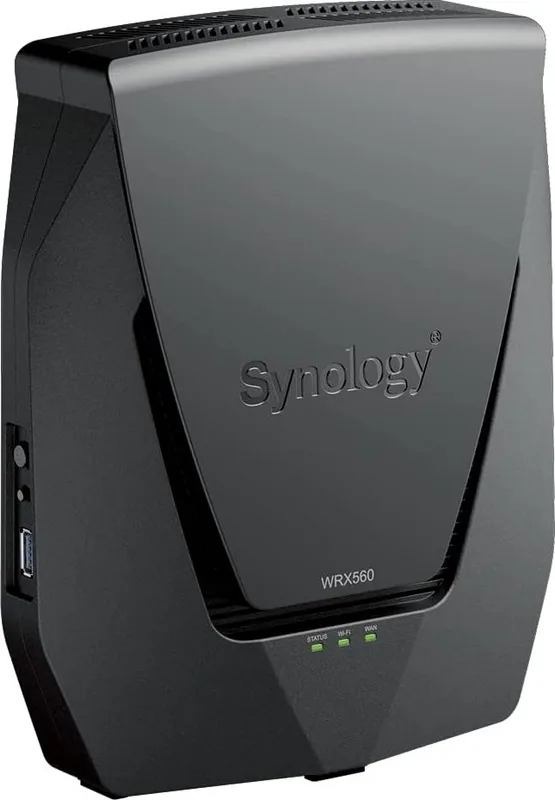
- LED indicators provide visual feedback on system status and network activity for quick troubleshooting of issues.
Disadvantages

- Regulatory rules restrict specific 5.15-5.25GHz frequency bands to indoor usage only in certain regions to prevent interference.
- Requires a minimum distance of 20cm between the radiator and body for radiation exposure compliance during setup.
- Operating and storage temperatures must be maintained strictly to prevent hardware damage or electrical failures during daily use.
- Wireless antennas are fixed dipole types which may limit advanced directional customization for power users seeking range.
Product Specification
Modem
N/A
WAN
1x 2.5GBase-T (shared), 1x 1000Base-T
LAN
1x 2.5GBase-T (shared), 3x 1000Base-T
Wireless
WLAN 802.11a/b/g/n/ac/ax (Wi-Fi 6), simultaneous
Throughput
574Mbps (2.4GHz), 2402Mbps (5GHz)
Security
WPA, WPA2, WPA3
Antennas
internal
Ports
1x USB-A 3.0
Power Consumption
10.8W (Consumption, Operation), Not specified (max. power supply rating)
Dimensions
9.17 x 7.64 x 2.60 inches
Special Features
MU-MIMO, IPv6, VPN passthrough (PPTP/L2TP/IPSec), DLNA, supports mobile modems (3G/4G), WLAN on/off switch, Roaming, Mesh (shared band)
Band Capability
Dual Band (simultaneous), Mesh (shared band)
Manufacturer Warranty
two years
Throughput 802.11ax (Wi-Fi 6 / Wi-Fi 6E) 2.4GHz
574Mbps (Spatial Streams: 2x2, Bandwidth: 40MHz, Modulation: 1024-QAM)
Throughput 802.11ax (Wi-Fi 6 / Wi-Fi 6E) 5GHz
2402Mbps (Spatial Streams: 4x4, Bandwidth: 80MHz, Modulation: 1024-QAM)
Note
Throughput rating for 802.11ax at 2.4GHz and 5GHz. (802.11ax (2.4GHz) 2x2 40MHz 1024-QAM: 574Mbps, 802.11ax (5GHz) 4x4 80MHz 1024-QAM: 2402 Mbps)
Product Description
The Synology WRX560 represents a significant step forward in home networking solutions designed for performance and reliability. This device brings advanced connectivity features to users who demand high speeds and seamless coverage throughout their living spaces. The standout feature is dedicated 2.5G ports for faster data transfer rates compared to traditional gigabit setups. This ensures that your wired connections can keep up with your internet plan without bottlenecks on the local network. Hardware supports simultaneous wireless and wired connections for flexibility.
Setting up this router is simplified through the Synology Router Manager software. Whether you connect via wired or wireless devices, the process is intuitive. Users are guided through a wizard that handles network configuration, security settings, and administration accounts easily. The default Wi-Fi credentials provide immediate access, though changing these during installation is highly recommended for security purposes. This user-friendliness helps less technical users get a robust system running quickly. Scan QR code from mobile to download the management application.
Security is paramount with modern routers, and this unit supports the latest standards including WPA3 enterprise and personal modes. The hardware includes a USB 3.2 Gen 1 port, enabling users to connect external drives or other peripherals for file sharing and backup tasks. It also supports dual WAN connections, which offers redundancy and load balancing options for critical internet access needs. Positioning the unit correctly is vital. Place it on a stable surface, centrally, and away from interference or large metal objects.
Environmental factors also play a role in operation. The device operates within standard temperature ranges but requires adherence to safety instructions regarding liquids and power supply. Regulatory compliance ensures that the radio frequency transmission remains within legal limits, particularly regarding indoor usage restrictions in specific frequency bands. The antennas are designed for high gain, ensuring strong signal propagation without requiring excessive power. Users must ensure there is a minimum distance between the radiator and the body to comply with exposure limits.
The Synology WRX560 Manual ensures safe operation. The focus on ease of use combined with high-end hardware makes it a compelling choice for modern networks looking to upgrade their infrastructure for future-proof speeds and stability. With features like mesh network support and multiple operation modes, this equipment adapts to different needs. Whether router or access point, flexibility remains a key strength.
Search for 67,706 Manuals online


Type-in Brand or Model