
Synology Unified Controller UC3400 Manual
PDF manual · 58 Pages
English



Quick check
Incorrect answer, please try again.
Chat with your Synology Unified Controller UC3400 manual using AI
Get instant AI answers from your Synology Unified Controller UC3400 manual
Ask anything about the Synology Unified Controller UC3400. Answers come from this manual, with the pages they are based on.
Ask a Question
Do you recommend Unified Controller UC3400?
Yes NoFrequently Asked Questions
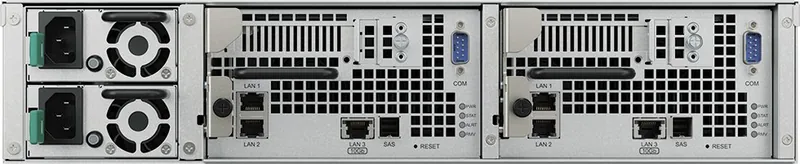
The UC3400 includes two 1GbE RJ-45 ports and one 10GBase-T RJ-45 port per controller, plus a PCIe Gen3 x8 slot for additional NICs and a mini-SAS HD expansion port for connecting RXD1219sas expansion units.
Is this answer helpful?
Each controller supports up to twelve 3.5"/2.5" SAS drives internally. The UC3400 supports up to two RXD1219sas expansion units chained via mini-SAS HD cables for additional capacity; actual limits depend on performance considerations.
Is this answer helpful?
A continuous Alert LED often signals fan failure, overheating, or degraded volume. Check DSM UC for detailed alerts, inspect and replace malfunctioning fans, verify airflow and ambient temperature, and contact Synology support if the issue persists.
Is this answer helpful?
Yes — the manual provides procedures for installing Synology-compatible DDR4 memory modules and PCIe network cards. Power down, follow ESD precautions, remove a controller, and install components as documented. Using non-Synology modules may void support.
Is this answer helpful?
Use mini-SAS HD cables: connect UC3400 SAS OUT to RXD1219sas SAS IN, ensure release bands face upward, chain expansion unit SAS OUT to the next unit's SAS IN for module A/B, and power each expansion unit. Power order and IDs are handled automatically when connected correctly.
Is this answer helpful?
Verify AC outlet and power cords, disconnect UPS to test direct AC, remove external peripherals and added RAM/PCIe cards, check PSU and LED cables internally, clean dust, and if unresolved contact Synology Technical Support for assistance.
Is this answer helpful?
Refer to Synology's official website and product compatibility lists for supported drives, memory, NICs, and DSM UC updates. The site also hosts Knowledge Base articles, tutorials, and support contact options.
Is this answer helpful?
Advantages and Disadvantages
Advantages

- High-availability dual-controller design with HA indicators and clear LED status for rapid fault identification.
- Flexible connectivity: 1GbE and 10GBase-T ports plus PCIe x8 expansion and mini-SAS HD for storage expansion.
- Robust serviceability: hot-swappable drives, redundant PSUs, replaceable fans, and detailed maintenance procedures.
- Scalable storage support with up to 12 internal SAS drives per controller and compatibility with RXD1219sas expansion units.
- Comprehensive documentation covering installation, safety, troubleshooting, and warranty procedures.
Disadvantages

- Physical size and weight require rack space, rails, and potentially two-person handling for installation.
- Limited to two expansion units per controller — may constrain very large capacity expansions.
- Third-party memory or drives may void support; Synology recommends certified components only.
- Advanced operations and warranty processes may require shipping or regional support restrictions.
- Initial setup and troubleshooting can require on-site hardware inspection and familiarity with enterprise storage.
Product Specification
Hard Drive
Attention! various configurations possible
Internal
12x 2.5"/3.5", SAS 12Gb/s, Hot-Swap
External
2x Gb LAN, 1x 10GBase-T (redundant)
Additional Ports
2x USB 3.0 (Host), 1x PCIe 3.0 x8, 1x Expansion port (redundant)
RAID Level
0/1/5/6/10/F1/JBOD (redundant)
CPU
Intel Xeon D-1541, 8C/16T, 2.10-2.70GHz, 12MB+2MB Cache, 45W TDP, Codename "Broadwell-DE" (Broadwell, Intel 14nm)
RAM
8GB DDR4 ECC (1x 8GB redundant, 2x 3 free slots, max. 64GB)
Fans
2x 2.36" (redundant), 51.3dB(A)
Power Consumption
417.48W (Operation), 316.47W (Idle)
Dimensions
16.96x3.46x27.24in (WxHxD), 2U
Weight
43.43 lbs
Special Features
redundant power supply (500W), redundant system, iSCSI, DLNA Server, FTP Server, iTunes Server, 256bit AES encryption, SSD cache/TRIM support
Warranty
60 Months
USB Naming Convention
Link
Product Description
Synology IP SAN Unified Controller UC3400 - Bundles Manual
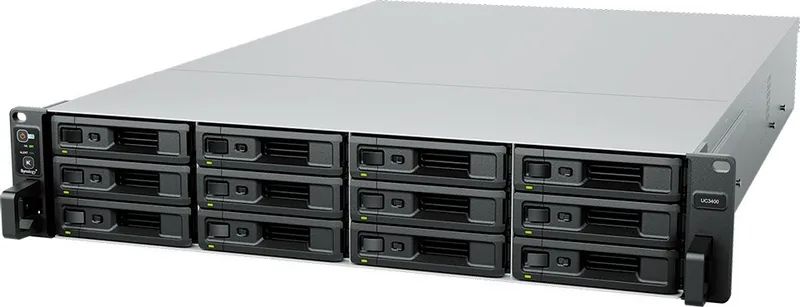
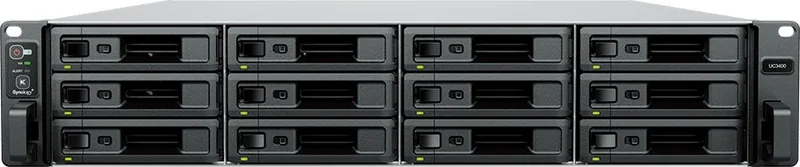
The Synology UC3400 is a high-availability IP SAN unified controller designed for enterprise storage environments that demand performance, redundancy, and expandability. Built around Intel Xeon D processors and DDR4 memory, the UC3400 supports up to twelve 3.5"/2.5" SAS drives per controller, dual controllers for HA configurations, and flexible connectivity including 1GbE and 10GBase-T LAN ports. It offers PCIe expansion for NICs, mini-SAS HD expansion ports for RXD1219sas expansion units, and redundant 500W power supplies to minimize downtime.
Designed with data center deployments in mind, the UC3400 emphasizes serviceability and system monitoring. Front and rear LEDs provide clear status for power, controllers, HA, drives, PSUs, and network links; audible alerts and a Beep Off button simplify fault handling. The device ships with drive trays, screws, dual power cords, and rails, and Synology documents step-by-step procedures for installing drives, PCIe cards, RAM modules, replacing fans or PSUs, and connecting expansion units.
The controller supports DSM UC software for storage management and HA orchestration. System modes (powering on, shutting down, DSM UC not ready, ready for use, powered off) are reflected by Power and Status LEDs, helping administrators quickly identify the controller state. Extensive safety, ESD, and environmental guidance ensures reliable operation — recommended operating temperatures, humidity ranges, and ventilation clearances are specified to protect hardware and data.
Maintenance and troubleshooting guidance included with the UC3400 covers common scenarios: drives not recognized, network connection issues, expansion unit detection, PCIe card recognition, continuous Alert LED conditions (often fan or temperature related), and power-on failures after memory or hardware changes. The manual recommends vendor-compatible drives and memory, provides checks for cabling and connectors, and walks through internal inspections to isolate hardware faults before contacting Synology Technical Support.
Synology also supplies information about spare parts and optional accessories, memory population best practices, and expansion topology when chaining up to two RXD1219sas units per controller. Warranty and licensing sections outline the EULA for DSM UC, support limits, warranty coverage and procedures for returns or replacements, and legal disclaimers about liability and arbitration.
Notes:
- UC3400 supports redundant, hot-swappable components for minimal service disruption.
- Follow Synology compatibility lists for drives, memory, and NICs to ensure supported configurations.
- Use recommended torque and ESD precautions when servicing hardware.
Search for 67,706 Manuals online


Type-in Brand or Model