

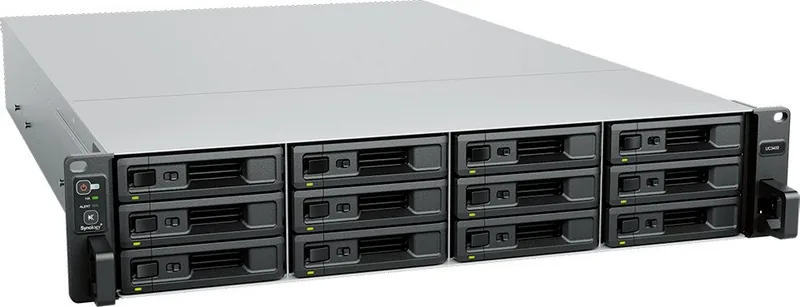
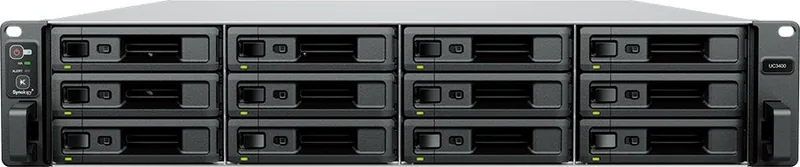
Synology Unified Controller UC3200 Manual
PDF manual · 32 Pages
English



Quick check
Incorrect answer, please try again.
Chat with your Synology Unified Controller UC3200 manual using AI
Get instant AI answers from your Synology Unified Controller UC3200 manual
Ask anything about the Synology Unified Controller UC3200. Answers come from this manual, with the pages they are based on.
Ask a Question
Do you recommend Unified Controller UC3200?
Yes NoFrequently Asked Questions
Power on the unit, connect a computer to the same network, and open a browser to find.synology.com or synologyuc:5000. Use the Web Assistant to download and install DSM UC following the on-screen instructions.
Is this answer helpful?
The base unit supports up to 192TB with twelve 16TB drives. By adding two RXD1219sas expansion units, the total raw capacity can reach up to 576TB.
Is this answer helpful?
No. You must shut down the UC3200, disconnect all cables, pull out the controller module, and remove the rear top cover before accessing or replacing memory modules.
Is this answer helpful?
The HA Status Indicator will show an abnormal status. The remaining active controller will continue to serve data, ensuring high availability and preventing service interruption.
Is this answer helpful?
While you can install drives, Synology recommends using certified models to ensure stability. Using non-Synology hardware may void warranty coverage regarding compatibility issues.
Is this answer helpful?
Press and hold the RESET button until you hear a beep sound to restore default credentials. Alternatively, press again until three beeps sound to return the system to Ready status.
Is this answer helpful?
Advantages and Disadvantages
Advantages

- Dual-controller architecture ensures high availability and zero downtime
- Scalable design supports up to two expansion units for massive storage growth
- Flexible connectivity with 10GbE ports and PCIe expansion slots
- Easy initialization process using the built-in Web Assistant tool
- Supports diverse client operating systems including Windows, Linux, and VMware
Disadvantages

- Requires installation in restricted access locations for security compliance
- Heavy weight may complicate manual handling during initial setup
- Memory upgrades require shutting down the system and removing covers
- Expansion cables must not be removed while the host is powered on
- Limited to SAS drives which may have higher costs than SATA alternatives
Product Specification
Hard Drive
N/A
Internal
12x 2.5"/3.5", SAS 12Gb/s, Hot-Swap
External
2x Gb LAN, 1x 10GBase-T (dual)
Additional Ports
2x USB 3.0 (Host), 1x PCIe 3.0 x8, 1x Expansion Port (dual)
RAID Level
0/1/5/6/10/F1/JBOD (dual)
RAM
8GB DDR4 ECC (1x 8GB dual, 2x 3 slots free, max. 64GB)
Fan
2x 60mm (dual), 51.3dB(A)
Power Consumption
417.48W (operating), 316.47W (idle)
Dimensions
16.95x3.46x27.24in (WxHxD), 2HE
Weight
43.43lbs
Features
redundant power supply (500W), redundant system, iSCSI, DLNA server, FTP server, iTunes server, 256-bit AES encryption, SSD cache/TRIM support
Warranty
60 months
USB Spelling
Link
Product Description
Synology IP SAN Unified Controller Series: Enterprise Storage Excellence
The Synology IP SAN Unified Controller Series, specifically the UC3200 model, represents a robust leap forward in enterprise storage infrastructure. Designed for high availability and seamless scalability, this unified controller combines powerful system hardware with the proprietary DSM UC operating system. It serves as the backbone for organizations requiring reliable block-level storage access over standard IP networks without the complexity of traditional Fibre Channel setups.
At the heart of the UC3200 is its dual-controller architecture, ensuring continuous uptime even during maintenance or component failure. The unit features twelve drive bays supporting both 3.5-inch and 2.5-inch SAS drives, offering a massive raw capacity that can be expanded further by connecting up to two RXD1219sas expansion units. This flexibility allows businesses to start small and grow their storage pool organically as data demands increase. The inclusion of redundant power supplies and hot-swappable fans means the system is built to withstand physical failures without interrupting critical operations.
Connectivity is another standout feature, equipped with multiple 1GbE LAN ports and a dedicated 10GBase-T port for high-speed data transfer. Administrators can easily customize the network interface by installing PCIe add-in cards into the single Gen3 x8 slot. The system supports a wide range of clients, including Windows Server, VMware, Linux distributions, and Citrix environments, making it a versatile choice for heterogeneous IT landscapes. Initialization is streamlined through the Web Assistant tool, which guides users through downloading and installing the latest DSM UC version directly from the browser.
Safety and compliance are prioritized with strict adherence to international standards like FCC Class A and CE. The hardware is designed for restricted access locations to ensure physical security, while the software includes comprehensive troubleshooting tools and LED indicators to monitor system health in real-time. Whether managing a small business or a large enterprise data center, the Synology IP SAN Unified Controller Series delivers the performance and reliability needed to keep data accessible and secure around the clock.
Search for 67,706 Manuals online


Type-in Brand or Model