


Synology RackStation XS+ / XS Series Manual
PDF manual · 22 Pages
English



Quick check
Incorrect answer, please try again.
Chat with your Synology RackStation XS+ / XS Series manual using AI
Get instant AI answers from your Synology RackStation XS+ / XS Series manual
Ask anything about the Synology RackStation XS+ / XS Series. Answers come from this manual, with the pages they are based on.
Ask a Question
Do you recommend RackStation XS+ / XS Series?
Yes NoFrequently Asked Questions
It is an enterprise rack-mounted NAS designed for centralized storage, data protection, file sharing, backup workloads, and scalable business infrastructure. It combines 16 internal drive bays with DSM management tools.
Is this answer helpful?
The chassis supports up to 16 internal 3.5-inch or 2.5-inch SATA drives. With two compatible RX1217 or RX1217RP expansion units, the system can support up to 40 drive bays in total.
Is this answer helpful?
The system includes four 1 GbE RJ-45 ports and two 10 GbE RJ-45 ports. It also has two PCIe Gen3 x8 slots that can accept supported optional network cards.
Is this answer helpful?
Supported configurations include Basic, JBOD, RAID 0, RAID 1, RAID 5, RAID 6, RAID 10, and Synology RAID F1. The appropriate choice depends on capacity needs, performance goals, and desired fault tolerance.
Is this answer helpful?
Yes. The system supports memory expansion using original Synology memory modules. Recommended configurations use identical modules with matching capacity and speed to maintain stability and reliable performance.
Is this answer helpful?
After connecting power and network cables, use a computer on the same local network to open find.synology.com or synologynas:5000. Web Assistant locates the system and guides the DSM installation process.
Is this answer helpful?
Advantages and Disadvantages
Advantages

- Supports up to 16 internal SATA drives and up to 40 bays with two compatible expansion units.
- Includes four 1 GbE ports, two 10 GbE ports, and two PCIe Gen3 x8 slots for network flexibility.
- Dual redundant 800W power supplies and replaceable fans support resilient operation and maintenance.
- Supports Btrfs, ext4, multiple RAID types, scheduled power management, and Wake on LAN.
- DSM provides browser-based setup, monitoring, alerts, and centralized storage administration.
Disadvantages

- Rack installation requires compatible rails, sufficient space, and ideally two people due to chassis weight.
- Expansion units and optional PCIe network cards add cost for maximum capacity or connectivity.
- Only SATA 3.5-inch and 2.5-inch drives are listed for internal bays.
- Using non-original memory modules may affect compatibility, stability, or startup behavior.
- Drive setup can erase existing data, so drives must be backed up before installation.
Product Specification
Hard Drive
N/A
USB Writing Mode
Link
Product Description
Synology RackStation XS+ / XS Serie - Read, Download & Print Free
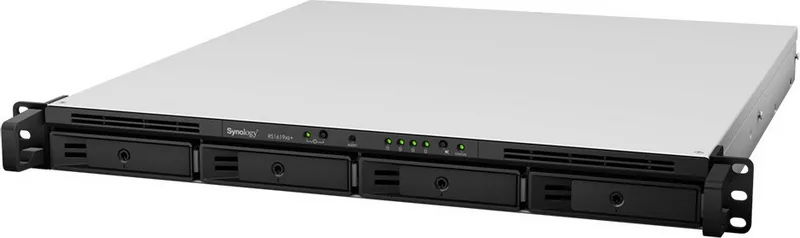
The Synology RackStation XS+ / XS Serie is built for organizations that need dependable, scalable storage in a rack-mounted format. The RS4021xs+ model combines enterprise-oriented hardware with Synology DiskStation Manager (DSM), providing a centralized platform for storing, protecting, sharing, and managing business data. Its 3U chassis supports up to 16 internal 3.5-inch or 2.5-inch SATA drives, making it a strong option for growing teams, virtualized environments, surveillance storage, and backup infrastructure.
Designed for scalable storage
A major strength of the RackStation XS+ / XS Serie is its expansion potential. The RS4021xs+ can connect to up to two RX1217 or RX1217RP expansion units, increasing the total drive count to 40 bays. This allows companies to begin with the capacity they need and add storage as workloads grow. Supported RAID options include RAID 0, 1, 5, 6, 10, JBOD, Basic, and Synology RAID F1, giving administrators flexibility when balancing capacity, performance, and fault tolerance.
Enterprise connectivity and reliability
The system includes four 1 GbE RJ-45 ports and two 10 GbE RJ-45 ports for high-speed network access. Two PCIe Gen3 x8 slots also support optional network expansion cards, helping businesses adapt connectivity to their infrastructure. Dual 800W redundant power supplies help improve service continuity, while replaceable system fans and power modules simplify maintenance in demanding environments.
The unit supports Btrfs and ext4 for internal storage, with Btrfs offering useful data management capabilities for business deployments. External storage compatibility includes common formats such as FAT32, NTFS, HFS+, exFAT, ext3, ext4, and Btrfs. Wake on LAN, scheduled power controls, and drive hibernation can help administrators streamline daily operations.
Straightforward administration with DSM
DSM is Synology's browser-based operating system and provides the management layer for the RackStation. Initial setup is handled through Web Assistant on the local network, and the platform offers clear status monitoring through front-panel LEDs and system controls. Drive, network, power supply, temperature, and fan alerts make it easier to identify issues before they affect availability.
Notes
- Install compatible SATA drives and back up existing data before adding drives, as setup can reformat them.
- Use matching drive capacities for the best RAID capacity utilization.
- Mount the chassis in a suitable rack before installing drives because the populated system can be heavy.
- Keep expansion cables connected while the host is running to avoid possible data loss.
The Synology RackStation XS+ / XS Serie - Read, Download & Print Free overview highlights a flexible rack NAS platform for businesses that require high capacity, strong networking, redundant power, and manageable storage growth.
Search for 67,706 Manuals online


Type-in Brand or Model