
Synology M2D20 Manual
PDF manual · 17 Pages
English



Quick check
Incorrect answer, please try again.
Chat with your Synology M2D20 manual using AI
Get instant AI answers from your Synology M2D20 manual
Ask anything about the Synology M2D20. Answers come from this manual, with the pages they are based on.
Ask a Question
Do you recommend M2D20?
Yes NoFrequently Asked Questions
The M2D20 adds two M.2 NVMe SSD slots to a compatible Synology NAS through a PCIe expansion slot. It can be used in supported SSD cache configurations to improve responsiveness for demanding storage tasks.
Is this answer helpful?
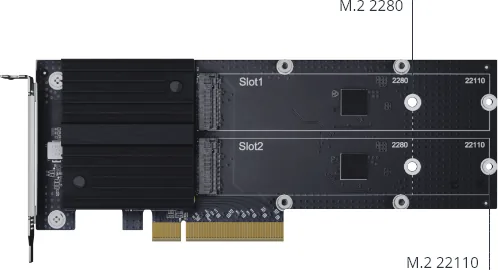
The card supports M.2 2280 and M.2 22110 NVMe SSDs. The 22110 format is longer and uses a slightly different thermal pad and rubber support placement during installation.
Is this answer helpful?
No. The listed storage interface is NVMe, and the two connectors are M-Key slots. Select compatible NVMe M.2 SSDs rather than SATA M.2 drives.
Is this answer helpful?
Yes. The package includes one heatsink, thermal pads, screws, screw nuts, and rubber supports. The heatsink should be secured after the SSDs and thermal materials are correctly installed.
Is this answer helpful?
Yes. It comes with a low-profile bracket and includes a full-height bracket. The bracket can be replaced when needed using a PH2 screwdriver.
Is this answer helpful?
Use a PH1 screwdriver to attach the M.2 SSDs and a PH2 screwdriver if the mounting bracket must be changed. Shut down and disconnect the NAS before beginning installation.
Is this answer helpful?
Advantages and Disadvantages
Advantages

- Two M-Key slots allow installation of up to two compatible NVMe M.2 SSDs.
- PCIe 3.0 x8 connectivity provides substantial bandwidth for SSD expansion workloads.
- Supports both M.2 2280 and longer M.2 22110 SSD form factors.
- Includes a heatsink, thermal pads, mounting hardware, and both low-profile and full-height bracket options.
Disadvantages

- Compatible SSDs and NAS models must be verified before installation.
- Only NVMe M-Key drives are supported; SATA M.2 SSDs are not listed as compatible.
- Installation requires access to the NAS PCIe area and separate PH1 and PH2 screwdrivers.
- Thermal pads and supports must be positioned correctly for effective cooling and secure drive mounting.
Product Specification
Type
Expansion card
Product Description
Synology M2D20 Dual-Slot M.2 SSD Adapter Card, PCIe 3.0 x8, 2x M.2 Manual
The Synology M2D20 Dual-Slot M.2 SSD Adapter Card is designed for NAS users who want to add fast NVMe SSD storage without replacing their existing drive bays. Using a PCIe 3.0 x8 host interface, this expansion card provides two M-Key M.2 slots for compatible NVMe SSDs. It is a practical upgrade for workloads that benefit from responsive caching, faster metadata access, and reduced latency.
Built for Dual NVMe Expansion
The card supports two M.2 SSDs in either 2280 or 22110 form factors, giving users flexibility when selecting compatible drives. Its dual-slot layout allows a pair of SSDs to be installed for cache-oriented configurations supported by the selected Synology NAS. Before purchasing drives or fitting the card, confirm both NAS and SSD compatibility to ensure the intended configuration is available.
The Synology M2D20 Dual-Slot M.2 SSD Adapter Card, PCIe 3.0 x8, 2x M.2 Manual highlights a careful mounting process. SSDs are inserted into their labeled slots and secured with the supplied hardware. The card includes components for installation, including a heatsink, thermal pads, screws, screw nuts, and rubber supports. These parts help create a secure fit while supporting heat transfer from the installed drives.
Cooling and Fitment Considerations
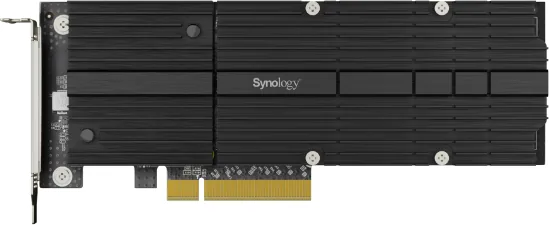
NVMe SSDs can generate significant heat during sustained activity, so the M2D20 includes a dedicated heatsink. Thermal pads are applied before the heatsink is fastened with four screws. For longer M.2 22110 SSDs, the thermal pad is positioned on the drive controller and a rubber support is installed beside the screw nut. Correct placement helps maintain reliable thermal contact and stable operation.
The card ships with a low-profile bracket installed and includes a full-height bracket for larger chassis. This makes the adapter suitable for different compatible NAS expansion layouts. Changing brackets requires a PH2 screwdriver, while mounting the SSD hardware requires a PH1 screwdriver.
Practical Installation Notes
Power down the NAS and disconnect power before working inside the chassis. Handle the adapter and SSDs carefully, avoid liquids and unstable surfaces, and keep the system within its specified operating environment. The M2D20 is rated for operation from 0 to 40 C, with relative humidity from 5 to 95 percent.
Note: This adapter supports NVMe M-Key SSDs only. Drive compatibility varies by Synology NAS model, so verify supported hardware before installation.
Note: The M2D20 measures 71.75 x 181.9 x 15.8 mm and is intended for compatible PCIe-equipped Synology systems.
Search for 67,706 Manuals online


Type-in Brand or Model