

Synology HD6500 Manual
PDF manual · 50 Pages
English



Quick check
Incorrect answer, please try again.
Chat with your Synology HD6500 manual using AI
Get instant AI answers from your Synology HD6500 manual
Ask anything about the Synology HD6500. Answers come from this manual, with the pages they are based on.
Ask a Question
Do you recommend HD6500?
Yes NoFrequently Asked Questions
The HD6500 includes two 10GbE RJ-45 ports, two 1GbE RJ-45 ports plus a dedicated 1GbE out-of-band management port, and two USB 3.2 Gen1 ports. Additional NICs can be added via the four PCIe slots.
Is this answer helpful?
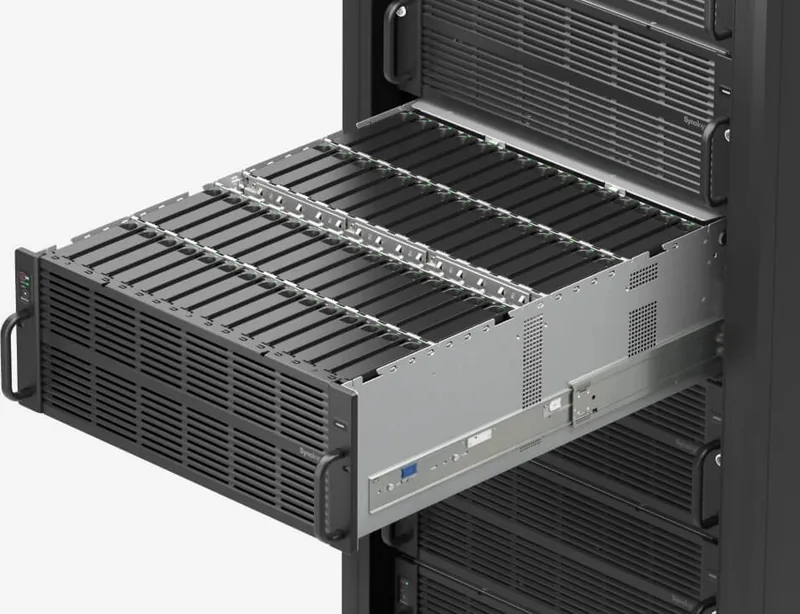
The HD6500 supports up to sixty 3.5" SAS storage drives for bulk capacity and two 2.5" SATA system drives. It also offers SAS OUT ports to connect RX6022sas expansion units for further expansion.
Is this answer helpful?
Memory is upgradable using the module slots shown in Synology’s installation guide. Synology recommends using Synology-approved memory; using third-party modules may void warranty or lose technical support.
Is this answer helpful?
Power on the HD6500, connect it to the same network as your PC, and use Web Assistant (find.synology.com or synologynas:5000) to locate the device and follow the onscreen instructions to download and install DSM.
Is this answer helpful?
Hot-swappable drives, PSUs, and fans allow replacement without full downtime when configured with redundancy. However, certain internal upgrades (memory, PCIe cards) require shutdown and qualified personnel for safe handling.
Is this answer helpful?
Connect SAS expansion cables from the HD6500 primary/secondary SAS OUT ports to expansion units following Synology’s cable orientation guidance and timing recommendations when reconnecting to avoid path errors. Use the longer cable for the farthest unit.
Is this answer helpful?
Front and rear LEDs show system modes, drive status, PSU health, network link/activity, and Alert LED for fan/temperature or volume problems. DSM also provides detailed notifications and S.M.A.R.T. tests for drive health.
Is this answer helpful?
Advantages and Disadvantages
Advantages

- High-density storage: supports up to 60 3.5" SAS drives plus system SSDs in a 4HE chassis.
- Strong I/O: dual 10GBase-T plus dual 1GbE and extra OOB management port for flexible networking.
- Expandable: two SAS OUT ports and compatibility with RX6022sas expansion units for seamless scaling.
- Serviceable design: hot-swappable PSUs and fans, rail-kit support, and clear LED indicators for rapid maintenance.
- Robust expansion slots: four PCIe slots (two x16, two x8) for additional NICs or acceleration cards.
Disadvantages

- Large form factor (4HE) requires rack space and appropriate infrastructure.
- Power and cooling demands are significant; needs proper datacenter environment and redundant power.
- Higher initial cost compared to smaller NAS models, especially when fully populated with drives.
- Replacement and upgrade guidance recommends Synology-approved components to retain warranty.
- Complex setup for multipath expansion units; timing and cable orientation must be followed precisely.
Product Specification
Hard drive
N/A
Internal
60x 3.5", SAS 12Gb/s, Hot-Swap, 2x 2.5", SATA 6Gb/s
External
2x Gb LAN, 2x 10GBase-T, 1x Gb LAN (for management only)
Additional ports
2x USB 3.0 (Host), 2x PCIe 3.0 x16, 2x PCIe 3.0 x8, 2x SAS 12Gb/s (Mini SAS HD/SFF-8644)
RAID level
0/1/5/6/10/F1/JBOD
CPU
2x Intel Xeon Silver 4210R, 10C/20T, 2.40-3.20GHz, 13.8MB+10MB Cache, 100W TDP, Codename "Cascade Lake-SP" (Cascade Lake, Intel 14nm++)
RAM
64GB DDR4 reg ECC (2x 32GB, 14 free slots, max. 512GB)
Fan
4x 3.15in, 60.8dB(A)
Power consumption
1025.2W (operation), 418W (idle)
Dimensions
18.98x6.93x40.16in (WxHxD), 4U
Weight
83.56 lbs
Special features
redundant power supply (1600W), iSCSI, DLNA server, FTP server, iTunes server, 256bit AES encryption, SSD cache/TRIM support
Warranty
60 months
USB notation
Link
Product Description
Synology HD6500 — Powerful 4U Enterprise Storage with 64GB RAM and Dual 10GBase-T
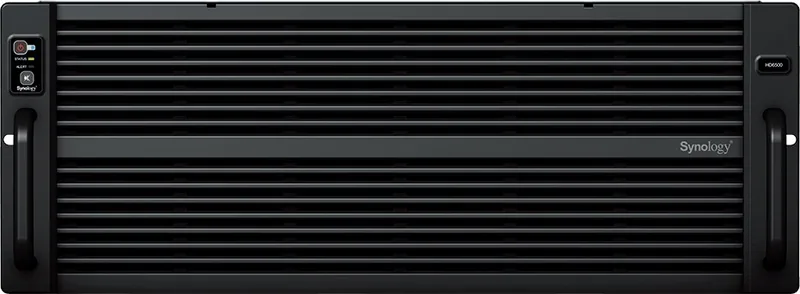
The Synology HD6500 is a rack-mount, 4HE storage platform built for dense enterprise storage and expansion. Designed to host up to 60 3.5" SAS drives plus dedicated system drives and optional expansion units, the HD6500 targets businesses that need high capacity, redundant power, and flexible networking. With 64GB of memory pre-installed, support for additional modules, dual 1GbE and dual 10GBase-T ports, and multiple PCIe slots, the HD6500 is engineered for virtualization, large-scale file services, and multi-path I/O deployments.
High-availability features such as redundant PSUs, hot-swappable fans, and detailed LED/alert indicators make the HD6500 suitable for 24/7 data center use. The chassis includes two 2.5" bays for system drives, extensive LED indicators for system, drive and PSU health, and out-of-band management for secure administration. Installation and serviceability are emphasized: sliding rail kit support, step-by-step drive and memory installation, replaceable PSUs and fans, and compatibility with Synology RX expansion units for seamless capacity scaling.
Networking and expansion are strong suits. The HD6500 features two 10GbE RJ-45 ports for high-throughput connections, two 1GbE ports plus an additional OOB management port, and four PCIe slots (two x16, two x8 lanes) for NICs or other acceleration cards. SAS OUT ports provide straightforward chaining to RX6022sas expansion units, and Synology documents multipath topologies and cable handling for best reliability. Disk and system drive status LEDs, PSU indicators, and a comprehensive system-mode LED logic help administrators quickly identify states such as powering on, DSM readiness, hibernation, or system errors.
Synology’s DiskStation Manager (DSM) is installed via Web Assistant, enabling simplified initial setup and ongoing management. The system supports scheduled power on/off, Wake-on-LAN, and extensive OS-level tools such as S.M.A.R.T. drive tests and alerts. Safety and maintenance are covered with clear instructions for qualified personnel, including environmental requirements, recommended mounting, and spare parts references.
Notes:
- Ideal for dense archive, backup, virtualization storage, and large-scale file services.
- Supports RX6022sas expansion for up to multiple chained expansion units; follow Synology’s timing guidance when reconnecting cables.
- Use Synology-approved memory for warranty and compatibility. DSM and firmware updates are required for full functionality and security.
Search for 67,706 Manuals online


Type-in Brand or Model