

Synology FlashStation FS Series Manual
PDF manual · 23 Pages
English



Quick check
Incorrect answer, please try again.
Chat with your Synology FlashStation FS Series manual using AI
Get instant AI answers from your Synology FlashStation FS Series manual
Ask anything about the Synology FlashStation FS Series. Answers come from this manual, with the pages they are based on.
FlashStation FS Series Maintenance Schedule
Open the device and replace the defective fan if indicated by alerts or failure.
Replace the power supply module or its fan if it is defective.
Ask a Question
Do you recommend FlashStation FS Series?
Yes NoFrequently Asked Questions
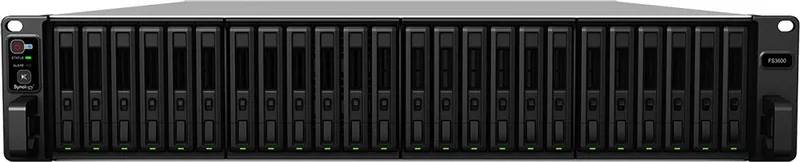
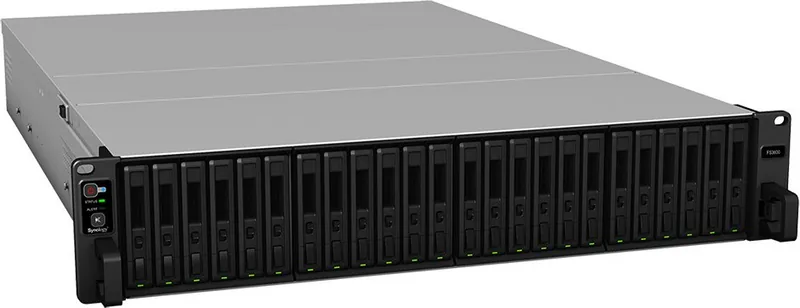
The FS3600 is an enterprise 2U rackmount NAS in the Synology FlashStation FS Serie. It combines high-density 2.5-inch drive support with DSM management, multi-gigabit networking, RAID options, and expansion capabilities for demanding business storage workloads.
Is this answer helpful?
The FS3600 supports up to 24 internal 2.5-inch drives. It works with SAS SSDs, SAS HDDs, and SATA SSDs. For best RAID capacity use, installing drives with matching capacities is recommended.
Is this answer helpful?
The system provides four 1GbE RJ-45 ports and two 10GBase-T RJ-45 ports. It also has one PCIe Gen3 x8 slot for a compatible optional network card, such as additional 10GbE RJ-45 or SFP+ connectivity.
Is this answer helpful?
Yes. The FS3600 supports up to two compatible Synology SAS expansion units, including RX1217sas and RX2417sas models. Expansion units connect through the SAS OUT port and can add storage capacity as needs increase.
Is this answer helpful?
Supported configurations include Basic, JBOD, RAID 0, RAID 1, RAID 5, RAID 6, RAID 10, and Synology RAID F1. The appropriate choice depends on required capacity, performance, and fault tolerance.
Is this answer helpful?
Yes. The FS3600 uses redundant 500W power supply modules. Connecting both power supplies to appropriate power sources can help reduce the impact of a single power supply or power-cord failure.
Is this answer helpful?
Advantages and Disadvantages
Advantages

- Supports up to 24 internal 2.5-inch SAS SSDs, SAS HDDs, or SATA SSDs for dense enterprise storage.
- Includes four 1GbE ports, two 10GBase-T ports, and a PCIe Gen3 x8 slot for network flexibility.
- Supports Btrfs, multiple RAID modes, Synology RAID F1, and up to two compatible expansion units.
- Redundant PSU support, replaceable fans, ECC memory, and status LEDs aid availability and maintenance.
Disadvantages

- The 2U rackmount chassis requires suitable rack space, rail hardware, and careful installation.
- Internal drive support is limited to 2.5-inch formats, which may affect drive selection and cost.
- Expansion units and higher-speed PCIe network cards are optional additions rather than included hardware.
- Compatible memory modules must match in capacity and frequency for supported configurations.
Product Specification
Hard Drive
N/A
RAID Level
0/1/5/6/10/F1/JBOD
Warranty
60 months
USB Writing Style
Link
Product Description
Synology FlashStation FS Serie - Read, Download & Print Free
Enterprise All-Flash Storage Built for Demanding Workloads
The Synology FlashStation FS Serie is designed for organizations that need fast, reliable, and scalable storage for business-critical operations. The FS3600 model combines a 2U rackmount design with support for up to 24 internal 2.5-inch SAS drives or SATA SSDs, making it a strong choice for virtualization, database services, high-speed file access, and collaborative workloads.
Powered by Synology DiskStation Manager (DSM), this platform brings hardware and software together in a centralized storage solution. DSM provides browser-based administration, helping IT teams configure storage, manage users, monitor system health, and deploy services from an accessible interface. Support for Btrfs and ext4 file systems gives administrators flexibility when building volumes for different operational needs.
Connectivity, Expansion, and Data Protection
The FS3600 includes four 1GbE LAN ports and two 10GBase-T LAN ports for versatile network deployment. An available PCIe Gen3 x8 slot supports additional compatible network interface cards, allowing businesses to adapt connectivity as infrastructure requirements grow. Two USB 3.0 ports and a SAS OUT connection add further expansion options.
Storage capacity can be extended through compatible Synology expansion units. The system supports up to two RX1217sas or RX2417sas expansion units, enabling organizations to scale storage without replacing the main platform. Multiple RAID choices are available, including RAID 0, 1, 5, 6, 10, JBOD, and Synology RAID F1, helping teams balance performance, capacity, and resilience.
The hardware also supports redundant 500W power supply modules, replaceable system fans, ECC registered memory upgrades, scheduled power control, Wake on LAN, and drive hibernation. These features support continuous business operation and simplify maintenance in rack-based environments.
Straightforward Deployment and Monitoring
Installation is structured for professional environments. Drives are installed in numbered trays, memory can be expanded with matching ECC DIMMs, and optional rail kits support secure rack mounting. Front and rear LED indicators provide at-a-glance status information for power, volumes, drives, alerts, power supplies, and network connectivity.
DSM installation can be started through Synology Web Assistant on the local network. Once configured, the FS3600 becomes a flexible storage foundation for teams that need all-flash performance, centralized management, and room to expand.
Notes
- Use compatible drives, memory, network cards, rails, and expansion units for reliable operation.
- Back up data before installing drives that may contain existing information.
- Use two power connections where available to improve power redundancy.
- Do not disconnect expansion cables while the system is powered on.
Search for 67,706 Manuals online


Type-in Brand or Model