
Synology E10M20-T1 Manual
PDF manual · 18 Pages
English



Quick check
Incorrect answer, please try again.
Chat with your Synology E10M20-T1 manual using AI
Get instant AI answers from your Synology E10M20-T1 manual
Ask anything about the Synology E10M20-T1. Answers come from this manual, with the pages they are based on.
E10M20-T1 Maintenance Schedule
Disconnect the power cable before cleaning to ensure safety.
Clean the device using damp paper towels only. Do not use chemical or spray cleaners.
Ask a Question
Do you recommend E10M20-T1?
Yes No
Mark Thompson
5 months ago
Does the speed improvement on Synology NAS justify the higher cost compared to cheaper 10Gbe network cards?

Manual.ly
5 months ago
User experiences show transfer rates up to 300 MB/s on models like the DS1819+, which is a significant upgrade. Prices for this card can be around 245 EUR. Cheaper alternatives exist around 80 EUR but may differ in build quality or compatibility. We recommend checking your specific NAS compatibility list on our website before buying.

Ava Ward
7 months ago
Does this network card actually deliver the promised speeds for NAS transfers, and is it compatible with Synology DSM?
Manual.ly
7 months ago
Yes, multiple users confirm that the card significantly improves transfer speeds, achieving around 300 MB/s over a network with HDD-SHR RAID configurations on Synology models like the DS1819+. It works seamlessly with Synology DiskStation Manager software. However, please note that while performance is excellent, some customers feel the price point of 245 euros is high compared to similar 10Gbe cards available elsewhere.
Danielle Butler
5 months ago
Is the build quality good and does the package include clear instructions?
tracy37
5 months ago
Does this network card provide a noticeable speed improvement, and is it worth the high price?
Manual.ly
5 months ago
Customers report that the card meets its specifications and works reliably with Synology NAS software. One user increased network copy speeds from about 120 MB/s to around 300 MB/s when transferring from a DS1819+ with an HDD SHR RAID. Build quality, packaging, and instructions were also rated positively. However, the price is commonly seen as high compared with third-party 10GbE cards, so its value depends on whether you prefer official Synology compatibility and support.
Anjali Pfeffer
5 months ago
Does this network card deliver the advertised speed, and is it worth the high price?
Manual.ly
5 months ago
Users report that the card meets its technical specifications and works reliably with Synology NAS software. One reviewer achieved around 300 MB/s network transfers from a DS1819+ with an HDD SHR RAID. Build quality, packaging, and documentation were also rated positively. However, the price is considered high compared with alternative 10GbE cards.
Harvey Thompson
6 months ago
Is this network card worth its high price, and does it actually improve NAS transfer speeds?
Manual.ly
6 months ago
The card meets its stated specifications and can significantly improve network throughput when used with compatible hardware and network equipment. One user reported speeds rising from about 120 MB/s to around 300 MB/s when copying from a DS1819+ with an HDD SHR RAID. Build quality, packaging, and instructions were also rated positively. However, its price is considered high compared with some third-party 10GbE cards, so value depends on your need for Synology compatibility and support.
Frequently Asked Questions
It adds one RJ45 multi-gigabit Ethernet port and two M.2 NVMe SSD slots to a compatible Synology NAS. This allows a single PCIe card to improve network throughput and support SSD-based acceleration.
Is this answer helpful?
The card supports 10Gbps, 5Gbps, 2.5Gbps, 1Gbps, and 100Mbps Ethernet connections. It uses an RJ45 copper connector and operates in full-duplex mode.
Is this answer helpful?
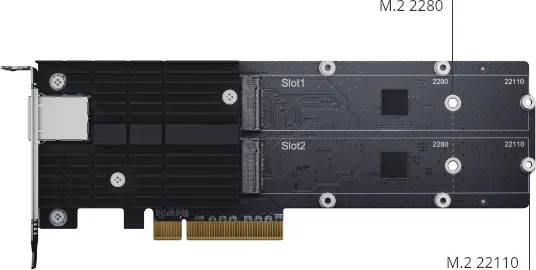
The E10M20-T1 supports M-Key NVMe SSDs in M.2 2280 and M.2 22110 form factors. Confirm SSD compatibility with the specific Synology NAS before installation.
Is this answer helpful?
For 10GBASE-T, Cat 6 supports cable runs up to 55 meters, while Cat 6a supports runs up to 100 meters. Cable quality and network equipment can affect real-world performance.
Is this answer helpful?
Yes. It includes a heatsink and thermal pads, along with mounting components. These parts should be installed as directed to help manage NVMe SSD heat during operation.
Is this answer helpful?
The upper LAN LED is green for a 10Gbps link and orange for 5Gbps, 2.5Gbps, 1Gbps, or 100Mbps. The lower green LED stays on when connected and flashes during network activity.
Is this answer helpful?
Advantages and Disadvantages
Advantages

- Combines 10GbE RJ45 networking and two NVMe M.2 SSD slots in one PCIe 3.0 x8 expansion card.
- Supports 10GbE, 5GbE, 2.5GbE, 1GbE, and 100MbE speeds for flexible network upgrades.
- Accepts M-Key NVMe SSDs in M.2 2280 and 22110 form factors.
- Includes a heatsink, thermal pads, mounting hardware, and low-profile and full-height brackets.
- LAN LEDs provide clear feedback for link speed, connection status, and network activity.
Disadvantages

- Compatibility varies by Synology NAS model and supported NVMe SSD list.
- Requires an available PCIe expansion slot in the NAS.
- 10GbE distance is limited to 55 m with Cat 6; Cat 6a is needed for up to 100 m.
- SSD installation and bracket replacement require PH1 and PH2 screwdrivers.
- Thermal pads and heatsink must be installed correctly to support reliable SSD operation.
Product Specification
Type
Expansion card
Product Description
Synology E10M20-T1 M.2 SSD & 10GbE Combo Adapter Card, PCIe 3.0 x8, 2x M.2, 1x 10GBase-T Manual
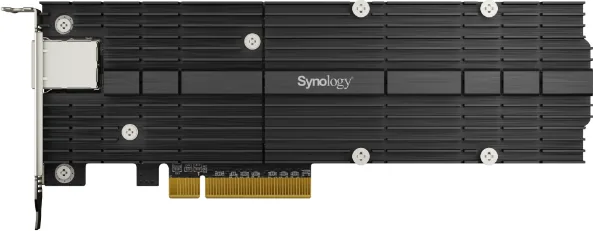
The Synology E10M20-T1 M.2 SSD & 10GbE Combo Adapter Card, PCIe 3.0 x8, 2x M.2, 1x 10GBase-T Manual highlights a practical upgrade for compatible Synology NAS systems that need faster network access and NVMe SSD acceleration in one expansion slot. By combining a 10GbE RJ45 network interface with two M.2 NVMe SSD slots, this card helps create a more responsive storage environment for busy offices, media workflows, virtualization tasks, and multi-user file access.
Network and SSD Acceleration in One Card
The E10M20-T1 uses a PCIe 3.0 x8 host interface and provides one copper RJ45 port supporting 10GbE, 5GbE, 2.5GbE, 1GbE, and 100MbE connections. This multi-gigabit flexibility is useful when upgrading an existing network gradually, while 10GBASE-T connectivity can reach up to 55 meters with Cat 6 cabling or 100 meters with Cat 6a cabling. The port operates in full-duplex mode and supports IEEE flow control for dependable data movement.
Two M-Key M.2 slots accept NVMe SSDs in 2280 and 22110 form factors. Depending on NAS compatibility and storage configuration, these SSDs can be used to improve cache performance and reduce delays during frequent access to files, databases, or applications. The dual-slot layout also gives administrators room to install one or two compatible drives according to their performance goals.
Designed for Clean Installation
Synology includes installation hardware such as a heatsink, thermal pads, rubber pieces, screws, and both low-profile and full-height bracket options. The cooling components are important because NVMe SSDs can generate heat during sustained workloads. Properly fitting the thermal pad and securing the heatsink helps support stable operation.
Installation requires a PH1 screwdriver for M.2 SSD mounting and a PH2 screwdriver when changing the bracket. Before fitting the card, confirm that both the NAS model and selected NVMe SSDs are supported. The card has numbered SSD slots, making drive placement easier to identify during setup and maintenance.
LED Status at a Glance
Built-in LAN LEDs offer quick connection feedback. The upper LED shows green for a 10Gbps link and orange for 5Gbps, 2.5Gbps, 1Gbps, or 100Mbps connections. The lower green LED indicates network connectivity and flashes when network activity is present.
Notes
- Use the card only in a compatible Synology NAS with an available PCIe expansion slot.
- Confirm supported SSD models before purchase or installation.
- Keep the operating environment between 0 and 40 degrees C with 5 to 95 percent relative humidity.
- Disconnect power before installing or servicing hardware.
Search for 67,706 Manuals online


Type-in Brand or Model
Lukas Fischer
8 months ago
Is the performance upgrade worth the price difference compared to cheaper 10Gbe cards for Synology NAS users?
Manual.ly
8 months ago
Users report significant speed improvements, achieving around 300 MB/s over the network with compatible RAID setups. The build quality and packaging are described as excellent. While the price is considered high by some compared to budget options costing around 80 EUR, compatibility with Synology software and hardware is confirmed reliable. It fulfills all technical specifications. Potential buyers should weigh the cost against the value of guaranteed compatibility and build quality for their specific needs.