
Synology DVA3221 Manual
PDF manual · 25 Pages
English



Quick check
Incorrect answer, please try again.
Chat with your Synology DVA3221 manual using AI
Get instant AI answers from your Synology DVA3221 manual
Ask anything about the Synology DVA3221. Answers come from this manual, with the pages they are based on.
Ask a Question
Do you recommend DVA3221?
Yes NoFrequently Asked Questions
The DVA3221 supports up to 64 TB using internal drives alone. By connecting two DX517 expansion units, the total raw capacity can reach 224 TB, making it ideal for large-scale surveillance needs.
Is this answer helpful?
While physically possible, installing non-Synology memory modules will void your product warranty and may lead to system instability or failure to boot. Synology recommends using only their genuine memory modules.
Is this answer helpful?
Use the built-in Web Assistant tool. Connect the device to your network, open a browser, and visit find.synology.com or synologynvr:5000. Follow the on-screen instructions to download and install the latest DSM version automatically.
Is this answer helpful?
If the fan malfunctions, the device will emit a beeping sound and trigger an alert indicator. You should replace the fan immediately following the steps in the maintenance guide to prevent overheating and potential damage.
Is this answer helpful?
Yes, it supports Basic, JBOD, RAID 0, RAID 1, RAID 5, RAID 6, RAID 10, and Synology Hybrid RAID. This allows you to choose the best balance between performance, redundancy, and storage efficiency.
Is this answer helpful?
No, the limited warranty is not transferable. It applies only to the original customer who purchased the product from an authorized distributor or reseller and terminates upon sale or transfer to a third party.
Is this answer helpful?
Advantages and Disadvantages
Advantages

- Supports up to 224 TB total storage with dual expansion units
- Includes deep learning capabilities for advanced video analytics
- Four 1GbE LAN ports provide flexible network connectivity options
- User-friendly DSM OS with Web Assistant for easy initial setup
- Hot-swappable drive trays simplify maintenance and upgrades
Disadvantages

- Requires specific Synology memory modules for upgrades to avoid warranty voiding
- Initial memory upgrade process involves removing pre-installed modules first
- System startup time may increase significantly after memory changes
- Non-Synology hardware compatibility is limited for warranty purposes
- Fan replacement requires disassembly and careful handling of internal components
Product Specification
Channels
32
Compression
MJPEG, MPEG-4, H.264, H.265, MxPEG, PCM, G711, G726, AMR, AAC
Hard Drive
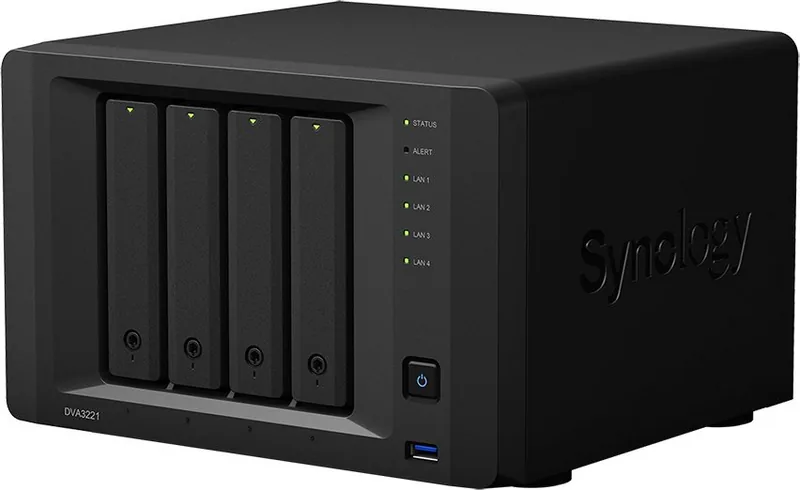
4x 3.5" SATA 6Gb/s
Drive
N/A
Interfaces
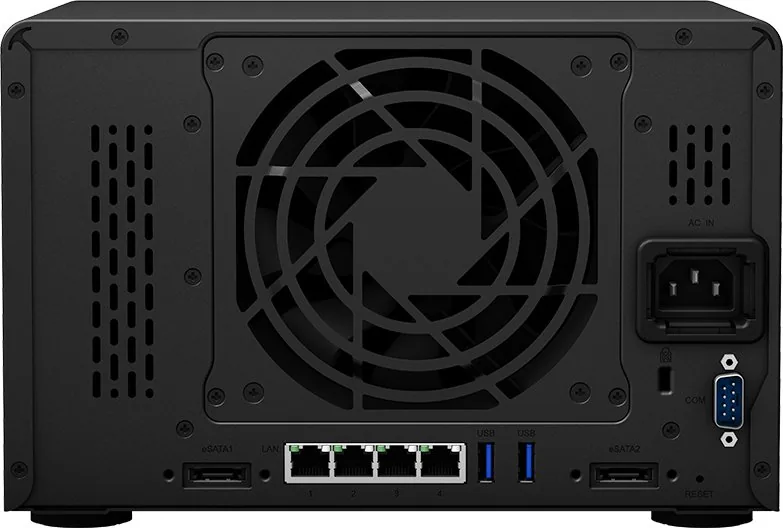
4x RJ-45, 3x USB 3.0 (Host), 2x eSATA (Host), 1x COM Port
Features
App-controlled (Android, iOS), NFS, FTP, WebDAV, SSH, VPN
Manufacturer Warranty
three years
Product Description
Synology Deep Learning NVR DVA3221: Advanced Surveillance Solution
The Synology Deep Learning NVR DVA3221 represents a significant leap in network video recording technology, designed specifically for environments requiring high capacity and intelligent analysis. This 32-channel Network Video Recorder is built to handle complex security setups with ease, offering robust hardware capabilities that support up to four drive bays for massive storage expansion. With the ability to connect two DX517 expansion units, users can scale their storage capacity up to an impressive 224 TB, ensuring years of continuous footage retention.
At the heart of the DVA3221 lies its deep learning integration, which transforms standard surveillance into proactive security monitoring. The device features four 1GbE LAN ports, allowing for flexible network configurations and dedicated traffic management. Whether you are managing a small business or a large enterprise facility, the DVA3221 provides the necessary bandwidth and processing power to analyze video feeds in real-time. The system runs on DiskStation Manager (DSM), a user-friendly operating system that simplifies setup through the Web Assistant tool, guiding users through installation without technical headaches.
Hardware maintenance is straightforward thanks to thoughtful design elements like hot-swappable drive trays and accessible fan replacement panels. The unit includes comprehensive LED indicators for status, alerts, and drive health, providing immediate visual feedback on system performance. Security is paramount, evidenced by the inclusion of a Kensington security slot and support for Wake-on-LAN features. Safety instructions emphasize proper ventilation and voltage stability, ensuring longevity in diverse environmental conditions ranging from cold storage to warm server rooms.
Key Features and Specifications
The DVA3221 supports various RAID types including RAID 0, 1, 5, 6, 10, and Synology Hybrid RAID, offering flexibility in data protection strategies. It is compatible with both 2.5-inch and 3.5-inch SATA drives, giving users the choice between speed and capacity. The system also supports scheduled power on/off and HDD hibernation to reduce energy consumption when not needed. For those needing external connectivity, three USB 3.0 ports and two eSATA ports allow for seamless connection of external storage and backup devices.
Important Notes
- Always use genuine Synology memory modules to maintain warranty coverage and system stability.
- Ensure drives are identical in size when creating a RAID volume for optimal capacity usage.
- Regularly check LED indicators for early detection of fan failures or temperature issues.
Search for 67,706 Manuals online


Type-in Brand or Model