
Synology DVA1622 Manual
PDF manual · 23 Pages
English



Quick check
Incorrect answer, please try again.
Chat with your Synology DVA1622 manual using AI
Get instant AI answers from your Synology DVA1622 manual
Ask anything about the Synology DVA1622. Answers come from this manual, with the pages they are based on.
Ask a Question
Do you recommend DVA1622?
Yes NoFrequently Asked Questions
Power on the DVA1622, connect it to the same network as your computer, and open a browser to find.synology.com or synologynvr:50004 to launch Web Assistant. Follow on-screen steps to download and install the latest DSM. Alternatively, connect an HDMI display, keyboard, and mouse and follow the local installer prompts.
Is this answer helpful?
The DVA1622 supports 2.5" and 3.5" SATA drives and common RAID configurations including Basic, JBOD, RAID 0, RAID 1, and Synology Hybrid RAID. For RAID setups, Synology recommends using drives of identical capacity. Note: installing drives with existing data will format and erase them—backup first.
Is this answer helpful?
An orange or blinking STATUS LED indicates system errors such as fan failure, overheating, or degraded volumes. Sign in to DSM, check Storage Manager > HDD/SSD for drive health, run S.M.A.R.T. tests if available, restart the unit, reseat drives, and contact Synology Support if issues persist.
Is this answer helpful?
Yes; exFAT support is available by purchasing and installing the exFAT Access package from Synology Package Center. Without this package, external drives should use supported file systems like Btrfs, ext4, NTFS, FAT32, or HFS+.
Is this answer helpful?
Pull the drive tray handle, remove the tray, and mount a 3.5" or 2.5" SATA drive following the tray instructions. Secure with screws for 2.5" drives or fastening panels for 3.5" drives, reinsert the tray until it clicks, and lock with the provided key if desired. Ensure drives are fully seated before use.
Is this answer helpful?
The DVA1622 requires a network connection to download DSM via Web Assistant. The unit uses a single 1GbE RJ-45 port, and both the DVA1622 and the computer used for setup must be on the same local network. Recommended browsers for Web Assistant are Chrome and Firefox.
Is this answer helpful?
Place the unit upright, avoid liquids and direct sunlight, use the correct AC voltage, unplug before cleaning, and keep body parts clear of moving fans. Follow electrostatic and handling guidelines when installing drives and use the Kensington slot for physical security if needed.
Is this answer helpful?
Advantages and Disadvantages
Advantages

- Deep-learning analytics support with Synology Surveillance Station for smarter event detection.
- Compact, quiet design ideal for small spaces with Kensington lock and drive-tray security.
- Straightforward DSM installation via Web Assistant or local HDMI/keyboard/mouse.
- Supports multiple RAID types including Synology Hybrid RAID and S.M.A.R.T. diagnostics.
- Dual USB 3.2 ports and HDMI output allow flexible local display and external storage options.
Disadvantages

- Single 1GbE LAN port may limit throughput for high-channel or high-resolution deployments.
- Only two internal drive bays restrict on-device storage capacity for long retention periods.
- No built-in redundant power supply; relies on external 60W adapter.
- exFAT support requires separate purchase from Synology Package Center.
- Limited fan/service access may require spare parts ordering for repairs.
Product Specification
Channels
16 (8 camera licenses included)
Compression
MJPEG, MPEG-4, H.264, H.265, MxPEG, PCM, G711, G726, AMR, AAC
Hard drive
2x 3.5" SATA 6Gb/s
Drive
N/A
Interfaces
1x RJ-45, 2x USB 3.0 (Host)
Special features
app controllable (Android, iOS), NFS, FTP, WebDAV, SSH, VPN
Manufacturer's warranty
three years
Product Description
Synology Deep Learning NVR DVA1622 16-Channel, Network Video Recorder Manual
The Synology Deep Learning NVR DVA1622 is a compact, purpose-built 16-channel network video recorder designed for reliable surveillance and smart analytics. Built around Synology's DiskStation Manager (DSM) ecosystem and Surveillance Station, the DVA1622 combines robust hardware with deep-learning–driven video analytics to help businesses and installers deploy efficient, intelligent security systems. Its small footprint makes it suitable for retail, offices, and remote sites where space and silence matter.
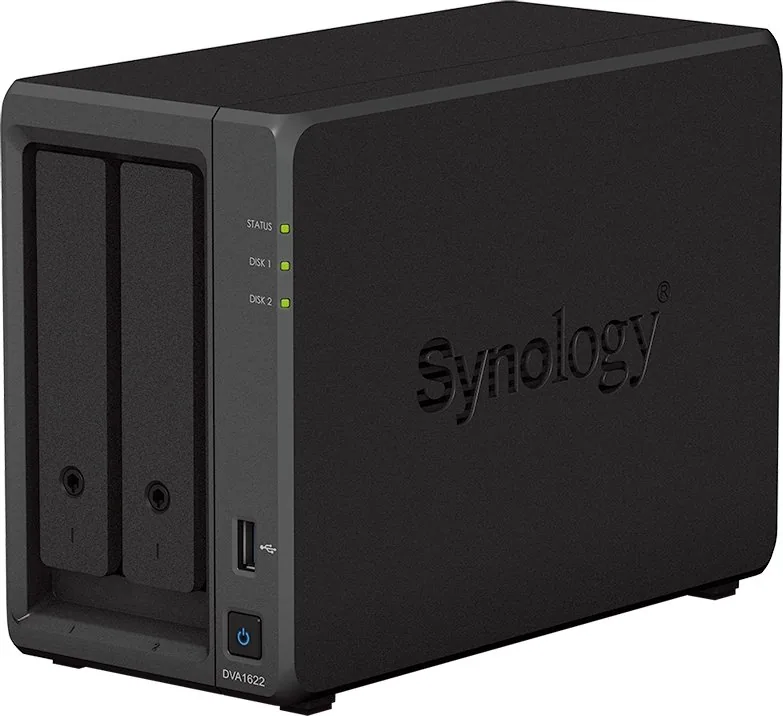
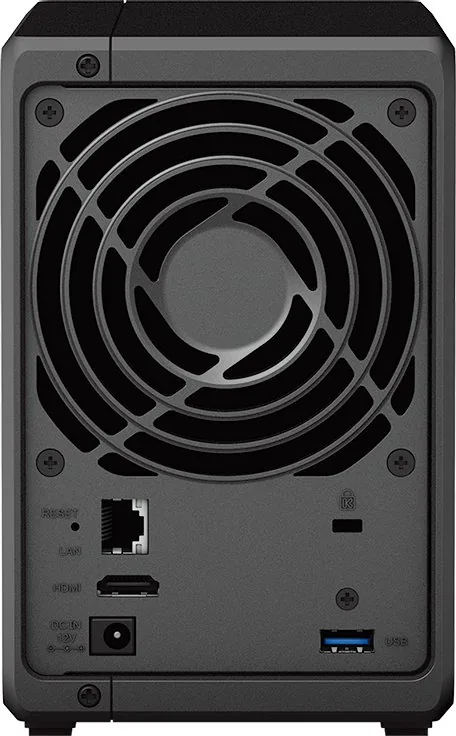
Under the hood, the DVA1622 supports up to two SATA drives (2.5"/3.5") with common RAID modes including RAID 0 and RAID 1, JBOD, Basic, and Synology Hybrid RAID. The unit provides dual USB 3.2 Gen 1 ports, one HDMI output for local display, a single 1GbE LAN port, and a 60W external power adapter. Status and drive LEDs give clear feedback on system mode and health, while a Kensington security slot and drive-tray locks protect physical access. The device supports common file systems (Btrfs, ext4) and optional exFAT support via Synology’s package store.
Installation and setup follow a straightforward hardware-first workflow: mount compatible SATA drives into branded trays, connect network and power, and power on. DSM can be installed using Web Assistant (find.synology.com or synologynvr:50004) or directly via local HDMI, keyboard, and mouse for onsite configuration. DSM provides the Surveillance Station package, storage management, S.M.A.R.T. tests, and firmware updates. The manual highlights LED behavior across seven system modes (powering on, shutting down, DSM not ready/ready, hibernation, application states, powered off) and explains troubleshooting steps for drive or fan faults.
Safety and operational guidance are emphasized: position the unit upright, avoid liquids and direct sunlight, use correct voltage, and unplug before cleaning. Drive installation notes warn that any existing data on drives will be formatted, so backups are essential. Synology also documents spare parts and optional accessories for compatibility and serviceability.
Ideal for small- to medium-scale surveillance deployments, the DVA1622 merges Synology’s mature software platform with hardware capable of running AI-assisted analytics and continuous recording. Its warranty and EULA terms follow Synology’s standard policies; users are advised to review support, warranty periods, and return procedures for replacement or repair.
Notes
- Backup all drive data before installation: drives are formatted during setup.
- Use recommended browsers (Chrome, Firefox) for Web Assistant installations.
- exFAT support requires the exFAT Access package from Synology.
- If STATUS LED is orange or blinking, sign in to DSM to view system logs and Storage Manager.
Search for 67,706 Manuals online


Type-in Brand or Model