
Synology DiskStation DS420j Manual
PDF manual · 23 Pages
English



Quick check
Incorrect answer, please try again.
Chat with your Synology DiskStation DS420j manual using AI
Get instant AI answers from your Synology DiskStation DS420j manual
Ask anything about the Synology DiskStation DS420j. Answers come from this manual, with the pages they are based on.
Ask a Question
Do you recommend DiskStation DS420j?
Yes NoFrequently Asked Questions
The DS420j has four internal bays for 3.5-inch or 2.5-inch SATA drives. It can be configured with one to four compatible HDDs or SSDs, depending on storage and redundancy requirements.
Is this answer helpful?
The listed maximum internal raw capacity is 64 TB, based on four 16 TB hard drives. Usable capacity depends on the RAID configuration, file system overhead, and whether disk redundancy is enabled.
Is this answer helpful?
Supported options include Basic, JBOD, RAID 0, RAID 1, RAID 5, RAID 6, RAID 10, and Synology Hybrid RAID. The best choice depends on whether capacity, speed, or protection against drive failure is the priority.
Is this answer helpful?
Connect the NAS and a computer to the same local network, then use a browser to visit find.synology.com or synologynas:5000. Web Assistant detects the NAS and guides the DSM installation process. Internet access is required for this method.
Is this answer helpful?
A solid green STATUS LED means the volume is normal. A flashing orange STATUS LED may indicate a damaged, missing, or uncreated volume, or that DSM is not installed. Drive LEDs show activity, readiness, or drive-related errors.
Is this answer helpful?
Yes. The NAS includes two USB 3.0 ports for compatible external drives and USB devices. Supported external file systems include ext4, ext3, FAT, NTFS, HFS+, and exFAT when exFAT Access is enabled.
Is this answer helpful?
Advantages and Disadvantages
Advantages

- Four SATA bays support flexible storage expansion and a listed maximum raw capacity of 64 TB.
- Supports multiple RAID types, including RAID 5, RAID 6, RAID 10, and Synology Hybrid RAID.
- DSM installation is guided through Web Assistant on the local network.
- Two USB 3.0 ports, Gigabit Ethernet, Wake on LAN, and scheduled power features add convenience.
- LED indicators and a replaceable system fan simplify routine monitoring and maintenance.
Disadvantages

- Only one Gigabit Ethernet port is listed, which may limit network throughput options.
- Drives are not included and must be selected separately for capacity and RAID needs.
- Initial setup can reformat installed drives, requiring users to back up existing data first.
- The chassis must be opened and drives secured with screws during installation.
- exFAT support requires the separately obtained exFAT Access package.
Product Specification
Hard drive
Warning! Different configurations possible
Internal
4x 2.5 in/3.5 in, SATA 6 Gb/s
External
1x Gigabit LAN
Additional ports
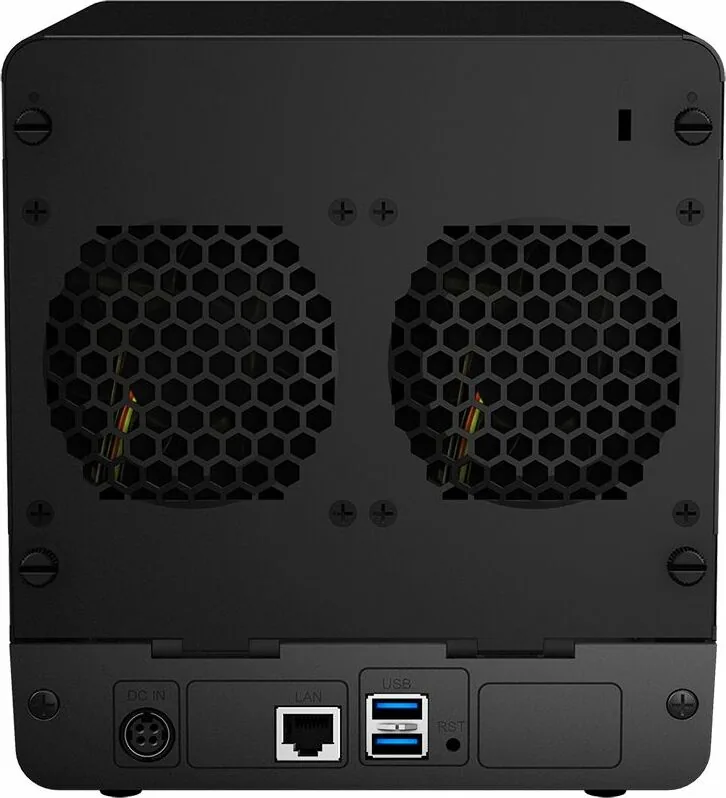
2x USB-A 3.0 (host)
RAID levels
0/1/5/6/10/JBOD
CPU
Realtek RTD1296, 4x 1.40 GHz (ARM Cortex-A53)
RAM
1 GB DDR4
Fans
2x 3.15 in, 20.6 dB(A)
Power consumption
21.71 W (operation), 7.88 W (idle)
Dimensions
6.61 x 7.24 x 9.06 in (W x H x D)
Weight
4.87 lb
Features
iSCSI, iTunes server, DLNA server, FTP server, WebDAV
Warranty
24 months (Valid for the storage system - storage expansions may have different warranty periods.)
USB notation
Link
Product Description
Synology DiskStation DS420j - Bundles Manual
The Synology DiskStation DS420j is a compact four-bay NAS designed for households, small teams, and anyone who wants a central place for files, backups, and media. With support for up to four 3.5-inch or 2.5-inch SATA drives, it provides flexible storage that can grow with changing needs. Its maximum listed internal raw capacity is 64 TB when populated with four 16 TB hard drives.
This bundle-ready NAS combines practical hardware with Synology DiskStation Manager, or DSM, a browser-based operating system for organizing data and managing services across a local network. After connecting the unit to a router or switch, Web Assistant helps locate the NAS and install DSM. The setup process is approachable for first-time NAS owners while still providing storage options suited to more advanced users.
Storage flexibility and protection
The DS420j supports Basic, JBOD, RAID 0, RAID 1, RAID 5, RAID 6, RAID 10, and Synology Hybrid RAID configurations. This range makes it possible to prioritize capacity, performance, or drive-failure protection depending on the chosen disks and use case. For efficient capacity planning, using drives of the same size is recommended when creating a RAID volume.
Four front-access drive positions make the system suitable for consolidated backups, shared family archives, photo collections, and document libraries. The enclosure includes mounting hardware for both 3.5-inch and 2.5-inch SATA drives. Drives used during initial setup may be reformatted, so existing data should be backed up before installation.
Connectivity and daily operation
A single Gigabit Ethernet port connects the DS420j to the network, while two USB 3.0 ports support compatible external storage and USB devices. Scheduled power control, drive hibernation, and Wake on LAN add convenience for users who want the NAS available around their routine without leaving it fully active at all times.
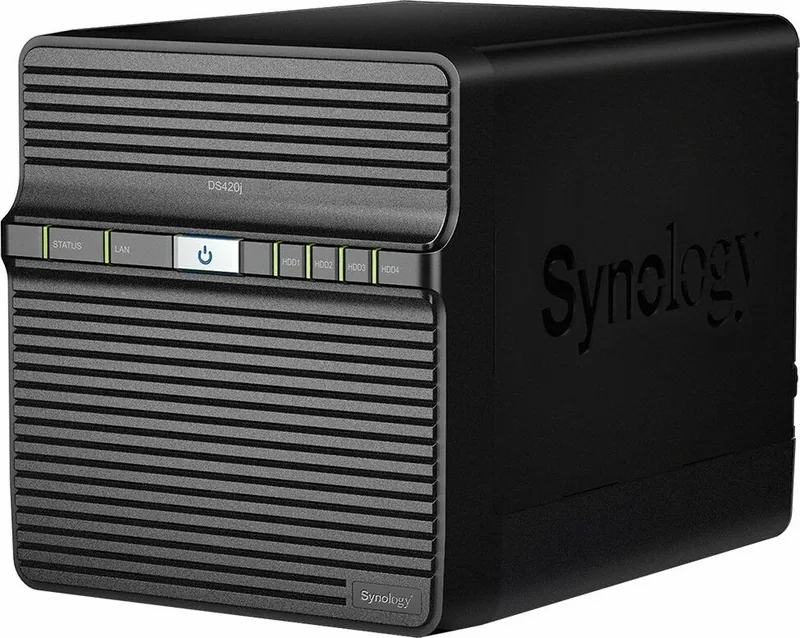
Front LEDs provide a quick view of power, network, system volume, and individual drive activity. A green STATUS light indicates a normal volume, while a flashing orange status light can signal a missing, damaged, or uncreated volume. Disk LEDs also help identify drive access or faults, making basic checks easier before deeper diagnostics.
Maintenance-minded design
The DS420j includes an 80 mm system fan to move heat away from the enclosure. If the fan fails, the system can issue an audible alert, and the fan can be replaced by opening the rear cover. The reset button can restore network and administrator defaults, or return the device to an uninstalled state for DSM reinstallation.
Note: Keep the NAS upright, away from liquids, direct sunlight, chemicals, and sudden temperature or humidity changes. Use compatible SATA drives and maintain separate backups for important data.
Search for 67,706 Manuals online


Type-in Brand or Model