
Sygonix SY-4966400 Manual
PDF manual · 12 Pages
English


Quick check
Incorrect answer, please try again.
Chat with your Sygonix SY-4966400 manual using AI
Get instant AI answers from your Sygonix SY-4966400 manual
Ask anything about the Sygonix SY-4966400. Answers come from this manual, with the pages they are based on.
SY-4966400 Maintenance Schedule
Press the test button to ensure correct operation. Stand an arms-length away due to loud volume.
Replace the CR123A battery after approximately 2 years or when low battery warnings appear.
Free maintenance reminders
Timed to your purchase date. Always free, unsubscribe anytime.
Ask a Question
Do you recommend SY-4966400?
Yes NoDo you recommend SY-4966400?
Yes NoFrequently Asked Questions
The unit uses one 3 V CR123A lithium battery (preinstalled). Typical battery life is approximately two years under normal conditions; replace immediately when low-battery warnings appear (1x red flash + 1x beep every 40 seconds).
Is this answer helpful?
The detector requires a 2.4 GHz Wi‑Fi network (IEEE 802.11 b/g/n). It is not compatible with 5 GHz networks. Ensure your mobile device and the detector connect to the same 2.4 GHz SSID (case sensitive) when pairing using AP or EZ mode.
Is this answer helpful?
Test the alarm weekly by pressing the Test button (stand an arm’s length away). Clean the outer casing and detection holes periodically with a dry, lint-free cloth or a vacuum with a soft brush attachment; avoid solvents, alcohol or immersing the unit in water.
Is this answer helpful?
Status codes include: 1x red flash every 40 seconds = normal standby; continuous red flash + continuous beep = smoke alarm; 1x red flash + 1x beep every 40 seconds = low battery; 2x red flash + 2x beep every 40 seconds = device fault; 3x red flash + 3x chirp every 40 seconds = Wi‑Fi network error.
Is this answer helpful?
Yes. Press and hold the Test button to hush a nuisance alarm for 9 minutes. If smoke concentration remains above the alarm threshold after 9 minutes, the alarm will reactivate automatically.
Is this answer helpful?
Mount the detector on the ceiling near the center of the room, at least 150 cm from lights, exhaust fans and air inlets/outlets. Do not install in bathrooms, very humid areas, or outdoors. Use screws/dowels or the supplied adhesive on appropriate surfaces.
Is this answer helpful?
If the detector indicates a fault (2x red flash + 2x beep every 40 seconds), remove it from service and contact authorized customer support. Do not attempt to repair or modify the device yourself.
Is this answer helpful?
Advantages and Disadvantages
Advantages

- Photoelectric sensing ideal for detecting slow, smouldering fires and visible smoke particles.
- Wi‑Fi connectivity (2.4 GHz) with Smart Life app gives remote push notifications and battery monitoring.
- Compact, lightweight design with easy ceiling or adhesive mounting and preinstalled battery.
- Loud alarm (≥85 dB at 3 m) plus visual LED indications and clear blink codes for status.
- Low standby current (<9 µA) and approx. 2-year battery life with CR123A lithium cell.
Disadvantages

- Not compatible with 5 GHz Wi‑Fi networks — requires 2.4 GHz connection for app features.
- Photoelectric sensors may detect slow fires better but can be slower on fast flaming fires than ionization units.
- Mounting plate cannot be attached without a battery inserted, complicating pre-install preparation.
- Not rated for outdoor use or installation in caravans; avoid humid areas such as bathrooms.
- Uses single-use CR123A battery only; no rechargeable battery support, requiring periodic replacements.
Product Specification
Type
Smoke detector
Sensors
Smoke particles
Alarm zones
1
Standard
Wi-Fi 4 (WLAN 802.11b/g/n)
Power supply
Battery (CR123A)
Operating temperature
32F to +131F
Dimensions
2.99x2.99x1.14in
Weight
0.19lb
Special features
Siren (85dBA), app-controlled
Product Description
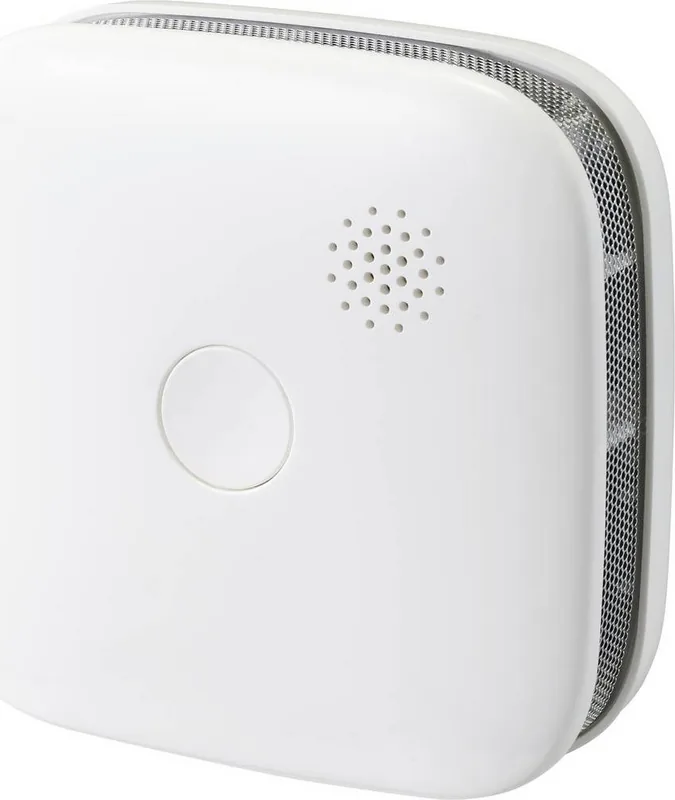
Sygonix SY-4966400 Wireless Smoke Detector
The Sygonix SY-4966400 Wireless Smoke Detector is a compact, battery-powered photoelectric alarm designed for reliable home protection. Lightweight and easy to install, it uses a single CR123A lithium battery (preinstalled) and offers audible, visual and app-based alerts to keep you informed of smoke events and battery status.
Key features and operation
This detector senses visible smoke particles using photoelectric technology, making it especially effective for detecting slow, smouldering fires. When smoke reaches a threshold, the alarm emits a continuous audible beeper (≥85 dB at 3 m), a steady red LED, and sends a push notification via the Smart Life - Smart Living mobile app. Normal operation is indicated by a single red blink every 40 seconds.
The unit supports Wi‑Fi (2.4 GHz, IEEE 802.11 b/g/n) for remote notifications and battery monitoring. Pairing methods include AP and EZ modes. LED blink patterns indicate Wi‑Fi connection status, network errors, low battery or device faults.
Installation and placement
Mount on the ceiling in room centers for optimal coverage. Keep detectors at least 150 cm from vents, lights and HVAC outlets and avoid bathrooms or damp areas. The detector can be surface-mounted with screws and dowels or attached with the supplied double-sided adhesive on clean, non-porous surfaces. Insert the battery before securing the mounting plate; the plate will not attach without a battery.
Testing, maintenance and safety
Weekly alarm tests are recommended—press the test button (stand an arm’s length away during tests). The hush function silences nuisance alarms for 9 minutes. Replace the CR123A battery roughly every two years or when low-battery warnings appear (1x red flash + beep every 40 seconds). Clean periodically with a dry, lint-free cloth or vacuum with a soft brush; do not use solvents or immerse the unit in water.
Standards and disposal
The detector complies with EN 14604 and EU radio directives; Conrad Electronic distributes it. At end of life, follow local WEEE regulations and remove and recycle batteries separately according to battery disposal laws.
Notes
- Use only non-rechargeable CR123A batteries; rechargeable cells are prohibited.
- Do not open, modify, or attempt repairs—contact authorized service for faults.
- The product is for indoor domestic use only and not approved for caravans or outdoor use.
Search for 67,732 Manuals online


Type-in Brand or Model