
Swedx SDS50K8-01 Manual
PDF manual · 24 Pages
English


Quick check
Incorrect answer, please try again.
Chat with your Swedx SDS50K8-01 manual using AI
Get instant AI answers from your Swedx SDS50K8-01 manual
Ask anything about the Swedx SDS50K8-01. Answers come from this manual, with the pages they are based on.
SDS50K8-01 Maintenance Schedule
If the remote control is left unused for a long time, take the batteries out and store them in dry places.
Unplug the product before cleaning it. Do not use solvents or liquids to clean the product.
Only clean the product with a soft and dry fabric. Avoid subjecting the product to direct sunlit or other heat sources.
Ask a Question
Do you recommend SDS50K8-01?
Yes NoFrequently Asked Questions
It is designed for digital signage and general display use, such as retail screens, lobbies, presentations, and scheduled content playback. Its features focus on reliable operation, multiple source support, and easy content management.
Is this answer helpful?
Yes. The HDMI inputs support up to 3840 x 2160 at 60 Hz on compatible ports, making it suitable for modern 4K devices and sharp playback when used with the right source and settings.
Is this answer helpful?
Yes. The built-in media player can play videos and images from USB flash drives or supported storage devices. It also supports playlist-style playback and auto play options for unattended operation.
Is this answer helpful?
The display supports several inputs, including HDMI, PC, AV, component, USB media player ports, and other professional connections depending on the series variant. This makes it flexible for different setups.
Is this answer helpful?
Yes, it is built for continuous signage-style use, but it should be installed with proper ventilation and used carefully. Static images should not stay on screen too long to help prevent image retention.
Is this answer helpful?
Yes. The time menu includes timer functions that allow scheduled on and off operation. This is useful for business hours, energy saving, and automated display routines.
Is this answer helpful?
Advantages and Disadvantages
Advantages

- Large 50-inch format works well for signage, presentations, and public viewing.
- Multiple inputs support HDMI, PC, AV, component, and USB media playback.
- Built-in timer and auto-sleep options help automate daily operation.
- OSD controls make picture, sound, and system settings easy to adjust.
- Media player supports direct USB playback without needing extra hardware.
Disadvantages

- Static images displayed too long may cause image retention or burn-in.
- Some advanced functions depend on mode, source, or compatible accessories.
- Best picture results may require careful setup of aspect ratio and scaling.
- Cooling and wall-mount installation need proper placement and attention.
Product Specification
Diagonal
50"/127 cm
Resolution
3840x2160, 16:9
Brightness
350 cd/m2
Contrast
4,000:1 (static), 100,000:1 (dynamic)
Response Time
9.5 ms
Viewing Angle
178°/178°
Shape
straight (flat)
Backlight
White-LED
HDR
N/A
Refresh Rate
120 Hz
Signal Frequency
not specified (horizontal), not specified (vertical)
Connections
1x VGA, 2x HDMI 2.0 (60 Hz@3840x2160), 1x HDMI 2.0 (36 Hz@3840x2160), 1x RCA Component
Further Connections
2x USB-A 2.0 (480 Mb/s)
VESA
200x200 (free)
Power Consumption
not specified (maximum), 110 W (typical), not specified (old energy label A+++ to G), 0.5 W (Standby)
Energy Efficiency Class SDR (A to G)
G
Energy Consumption SDR
132 kWh/1000 h
Dimensions (WxHxD)
43.94x25.16x1.22 in
Weight
36.38 lb
Product Description
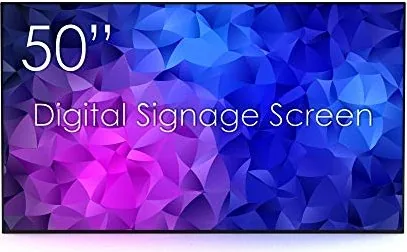
Swedx SDS50K8-01, 50-inch Digital Signage Display
The Swedx SDS50K8-01, 50-inch Manual reveals a display built for reliable everyday presentation work, whether it is used in retail, hospitality, reception areas, or internal communication spaces. Designed with digital signage in mind, this 50-inch screen focuses on flexibility, stable operation, and simple control rather than unnecessary complexity. It is a practical choice for users who want a large-format display that can handle both scheduled content and live source playback with ease.
One of the strongest points of this model is its broad connection support. With HDMI inputs, PC compatibility, AV and component options, plus built-in media player USB ports, the screen is ready for a wide range of playback scenarios. That makes it suitable for everything from promotional slides and video loops to PC-driven presentations. The 4K-capable HDMI support also helps deliver a sharp image when paired with modern sources, while picture settings such as contrast, brightness, color, and aspect ratio give users room to fine-tune the viewing experience.
The display also includes a useful on-screen menu system that makes routine adjustments straightforward. Users can manage picture and sound behavior, set timers, activate auto sleep, and configure settings like HDMI CEC, color range, and fan behavior. For businesses, the timing tools are especially valuable because they allow the screen to power on and off according to a schedule, reducing manual work and helping control energy use. The media player is another highlight, supporting USB-based playback for images and videos without requiring an external device.
From an installation and operation perspective, the product is designed with practical use in mind. Wall-mount support, remote control pairing, and clear input labeling make setup easier, while the built-in safety guidance emphasizes proper ventilation, stable placement, and protection from heat and moisture. The manual also highlights important care points such as avoiding still images for too long, which helps preserve screen quality over time.
Overall, the Swedx SDS50K8-01, 50-inch Manual points to a signage display that balances performance, usability, and versatility. It is a solid option for users who want a professional screen that can run continuously, accept multiple sources, and adapt to different content workflows without fuss.
Notes
- Best suited for digital signage, looping media, and scheduled display use.
- Use Point-to-Point or Just Scan for cleaner pixel mapping in HDMI modes.
- Avoid static images for extended periods to reduce burn-in risk.
- Proper ventilation and careful installation are important for long-term reliability.
Search for 67,706 Manuals online


Type-in Brand or Model