
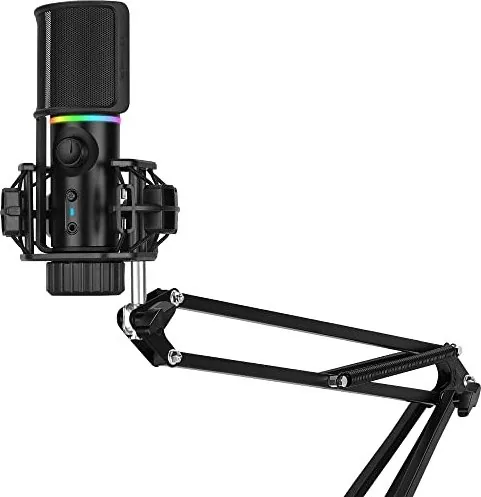
Streamplify Mic Arm Manual
PDF manual · 2 Pages
English



Quick check
Incorrect answer, please try again.
Chat with your Streamplify Mic Arm manual using AI
Get instant AI answers from your Streamplify Mic Arm manual
Ask anything about the Streamplify Mic Arm. Answers come from this manual, with the pages they are based on.
Ask a Question
Do you recommend Mic Arm?
Yes NoFrequently Asked Questions
No, this device does not require any driver installation. It is designed for instant plug-and-play functionality, allowing you to start using it immediately after mounting.
Is this answer helpful?
You can visit the official webpage at streamplify.com for comprehensive details. Additionally, scanning the included QR code provides quick access to guides and support in multiple languages.
Is this answer helpful?
Yes, the arm is designed to accommodate various microphone models commonly used by streamers and podcasters, ensuring versatile application across different setups.
Is this answer helpful?
The website and QR code resources support numerous languages including English, Spanish, German, French, Italian, Polish, Turkish, Finnish, Swedish, Russian, Hungarian, Portuguese, Chinese, Japanese, Kazakh, and others.
Is this answer helpful?
The arm features a robust build designed to hold microphones securely without slipping, ensuring consistent positioning even during active streaming or recording sessions.
Is this answer helpful?
While generally compatible with standard desks, specific mounting requirements should be checked against your desk thickness and material to ensure a secure fit.
Is this answer helpful?
Yes, customers can reach out through the streamplify.com website for assistance. The site offers resources and contact options to help resolve any setup or usage questions.
Is this answer helpful?
Advantages and Disadvantages
Advantages

- No driver installation required for immediate plug-and-play usage
- Smooth articulation allows precise positioning of the microphone
- Durable construction ensures stability during long recording sessions
- Multi-language support accessible via QR code and website
- Sleek design reduces desk clutter and improves aesthetics
Disadvantages

- Limited information provided regarding specific weight capacity limits
- Cable management clips may not be included in the base package
- Compatibility with non-standard mounting surfaces is not explicitly stated
- No mention of warranty duration or replacement policies in the text
- Adjustment tension may require manual fine-tuning by the user
Product Specification
Type
Streaming Microphone
Design
Digital (16bit/48kHz)
Transducer Principle
Condenser
Polar Pattern
Cardioid
Connection
USB
Frequency Range
100Hz-18kHz
Nominal Impedance
680 Ohms
SPL Max.
120dB
Signal-to-Noise Ratio (SNR)
85dB
Power Supply
USB
Package Contents
Microphone Stand, Pop Filter, Boom Arm
Features
Headphone Jack (3.5mm), Switch
Product Description
Elevate Your Streaming Setup with the Streamplify Mic Arm
The Streamplify Mic Arm is designed to transform your audio recording experience by offering a robust and flexible solution for content creators. Whether you are a podcaster, streamer, or voice-over artist, this device ensures your microphone remains perfectly positioned without any clutter on your desk. The standout feature of this product is its plug-and-play simplicity. It operates without requiring any driver installation, allowing you to set it up instantly and focus on what matters most: creating high-quality content.
Designed with durability in mind, the arm provides smooth movement and secure locking mechanisms to hold your microphone steady during intense sessions. The sleek design complements any modern workspace while eliminating cable management issues often associated with loose equipment. By visiting streamplify.com, users can access detailed guides and additional resources to maximize their setup efficiency. The included QR code offers quick access to support materials in multiple languages, ensuring global accessibility for all users.
This mic arm is not just about holding a microphone; it is about optimizing your workflow. Its ergonomic adjustments reduce strain and improve posture, making long recording sessions more comfortable. The stability of the arm prevents accidental bumps or vibrations from affecting your audio quality. For those seeking a reliable accessory that combines functionality with ease of use, the Streamplify Mic Arm stands out as an essential tool for professional-grade audio capture.
Why Choose This Solution?
Choosing the right equipment can make a significant difference in production value. This arm eliminates the need for complex software configurations or technical troubleshooting. Simply mount it, adjust the angle, and start recording. The versatility allows it to work with various microphone models, making it a future-proof investment for your studio.
Important Notes
- No drivers are required for operation.
- Compatible with standard mounting surfaces.
- Multi-language support available via website.
Search for 67,732 Manuals online


Type-in Brand or Model