
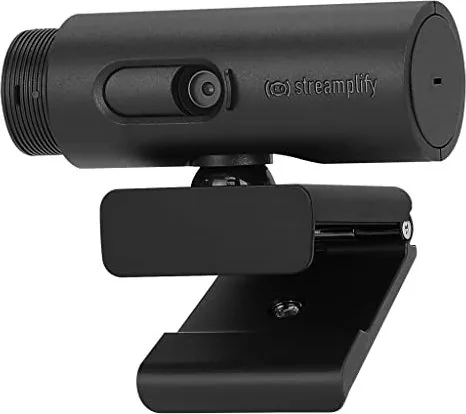
Streamplify Cam 1080p Manual
PDF manual · 2 Pages
English



Quick check
Incorrect answer, please try again.
Chat with your Streamplify Cam 1080p manual using AI
Get instant AI answers from your Streamplify Cam 1080p manual
Ask anything about the Streamplify Cam 1080p. Answers come from this manual, with the pages they are based on.
Ask a Question
Do you recommend Cam 1080p?
Yes NoFrequently Asked Questions
No, the device is designed to be fully compatible without any driver installation. You can connect it directly to your computer via USB and it will work immediately.
Is this answer helpful?
The Streamplify Cam provides a crisp 1080p HD resolution, ensuring high-quality video output for professional calls, streaming, and recording.
Is this answer helpful?
You can visit the official website at streamplify.com or scan the QR code included with the device to access detailed guides and support pages.
Is this answer helpful?
Yes, the driver-free design implies broad compatibility with standard operating systems that support USB video class devices without additional software.
Is this answer helpful?
The documentation and support resources are available in numerous languages including English, Spanish, German, French, Chinese, Japanese, and many others.
Is this answer helpful?
No software downloads are necessary. The plug-and-play feature allows you to start using the webcam instantly upon connecting it to your PC.
Is this answer helpful?
Advantages and Disadvantages
Advantages

- Completely driver-free installation for instant plug-and-play usability
- Delivers clear 1080p HD video quality suitable for streaming and meetings
- Extensive multi-language support including major global languages
- Includes QR code for immediate access to web resources and help
- Compact design makes it highly portable for remote workers
Disadvantages

- No physical mounting bracket or tripod included in the package
- Limited information regarding advanced manual settings or customization
- Microphone quality is not specified or highlighted in the documentation
- Requires constant internet connection for accessing the support website
- No mention of specific low-light performance capabilities
Product Specification
Type
Webcam
Image sensor
1x CMOS 2.0 MP
Resolution
1920x1080 Pixels (60fps)
Viewing angle
90 degrees
Pan
360 degrees
Compression/Codecs
MJPEG, YUY2
Wireless
N/A
Focusing
Autofocus
Camera cover
Sliding shutter
Microphone
Integrated (stereo)
Speaker
N/A
Lighting
N/A
Cable length
6.56 feet
Power supply
Via USB
Mount
Clip mount, with 1/4" thread
Product Description
Streamplify Cam 1080p Webcam: The Ultimate Plug-and-Play Solution
The Streamplify Cam 1080p Webcam redefines the standard for seamless video communication. Designed with modern creators and professionals in mind, this device eliminates the frustration of complex setup procedures. Unlike many competitors that require tedious driver installations or software configurations, the Streamplify Cam is built on a universal plug-and-play architecture. This means you can simply connect the webcam to your computer via USB and start broadcasting immediately.
Crystal Clear Visuals Without the Hassle
In an era where high-definition video is essential for remote work, online education, and content creation, clarity matters. The Streamplify Cam delivers sharp 1080p resolution, ensuring that your audience sees every detail. Whether you are conducting a virtual meeting or streaming your latest gaming session, the image quality remains consistent and vibrant. The camera is engineered to perform well in various lighting conditions, making it a reliable tool for any environment.
Global Accessibility and Support
One of the standout features of the Streamplify Cam is its universal compatibility. The device supports multiple languages right out of the box, as evidenced by its extensive documentation available in Spanish, German, French, Italian, Polish, Turkish, Finnish, Swedish, Russian, Hungarian, Portuguese, Chinese, Japanese, Kazakh, and more. This global approach ensures that users from all over the world can access support materials easily. For those seeking deeper technical insights, the manufacturer provides a dedicated webpage at streamplify.com. Scanning the included QR code offers instant access to tutorials, troubleshooting guides, and firmware updates without needing to search manually.
Why Choose Streamplify?
Choosing the Streamplify Cam means prioritizing efficiency and quality. It removes the barriers that often prevent users from getting started quickly. No downloads, no drivers, just pure functionality. This simplicity allows you to focus on what truly matters: your content and your message. The device is compact, portable, and ready to travel with you wherever your digital life takes you.
Search for 67,732 Manuals online


Type-in Brand or Model