
Streacom BC1 Mini Manual
PDF manual · 10 Pages
English


Quick check
Incorrect answer, please try again.
Chat with your Streacom BC1 Mini manual using AI
Get instant AI answers from your Streacom BC1 Mini manual
Ask anything about the Streacom BC1 Mini. Answers come from this manual, with the pages they are based on.
Ask a Question
Do you recommend BC1 Mini?
Yes NoFrequently Asked Questions
No, the Streacom BC1 Mini only supports Mini ITX motherboards. It is designed specifically for compact form factors and does not have the internal dimensions to accommodate larger ATX boards.
Is this answer helpful?
The chassis supports SFX and SFX-L power supplies with a maximum weight capacity of 8kg. Ensure the PSU fits within the specified height and dimensions for proper mounting.
Is this answer helpful?
Up to two 2.5-inch drives can be installed vertically on the underside of the main body. They are secured using M3 thumbscrews for a stable connection.
Is this answer helpful?
Remove the 4 side thumbscrews and loosen the 2 PCI thumbscrews running through the foot center. Pivot the feet downwards and out from the main body securely.
Is this answer helpful?
Yes, thin plastic washers are included at the base of screws to ensure minimal damage to the aluminum surface at the point of contact during assembly.
Is this answer helpful?
Yes, the brackets pivot from 60mm to 170mm spacing to accommodate most accessories, including large radiators like 360mm ones if weight limits are respected.
Is this answer helpful?
Yes, it features bracket cooling support for spacing between 60 and 170 mm to fit fans and radiators effectively for thermal management.
Is this answer helpful?
Advantages and Disadvantages
Advantages

- AL5052 aluminum body offers robust frame and excellent heat dissipation
- Self-contained storage for screws and brackets prevents parts loss
- Versatile bracket mounting range accommodates large radiators easily
- Supports SFX and SFX-L power supplies up to 8kg weight
- Secure pushpin standoffs provide stable motherboard locking mechanism
Disadvantages

- Requires careful selection between M3 and 6#32 thumbscrews to prevent damage
- No dedicated cable routing channels shown in assembly guides
- Limited strictly to Mini ITX motherboards for system configuration
- Manual assembly needed for every component as parts are stored on body
- Plastic washers must be used carefully to avoid misalignment during install
Product Specification
External
N/A
Internal
2x 2.5"
Connectors
N/A
Fans (Front)
N/A
Fans (Rear)
N/A
Fans (Left)
N/A
Fans (Right)
N/A
Fans (Top)
N/A
Fans (Bottom)
N/A
Fans (Other)
N/A
Power Supply
SFX-L
Power Supply Position
Bottom
CPU Cooler
Unlimited Height
Lighting
No Lighting
Chassis Type
Bench Table
Front
Open
Top
Open
Bottom
Open
Left
Open
Right
Open
Rear
Open
Front I/O Position
N/A
Motherboard Orientation
Motherboard Orientation: Upward
Features
Aluminum Chassis, Open Chassis, Passive (Fanless)
USB Layout
Left
Product Description
Exploring the Streacom BC1 Mini Design
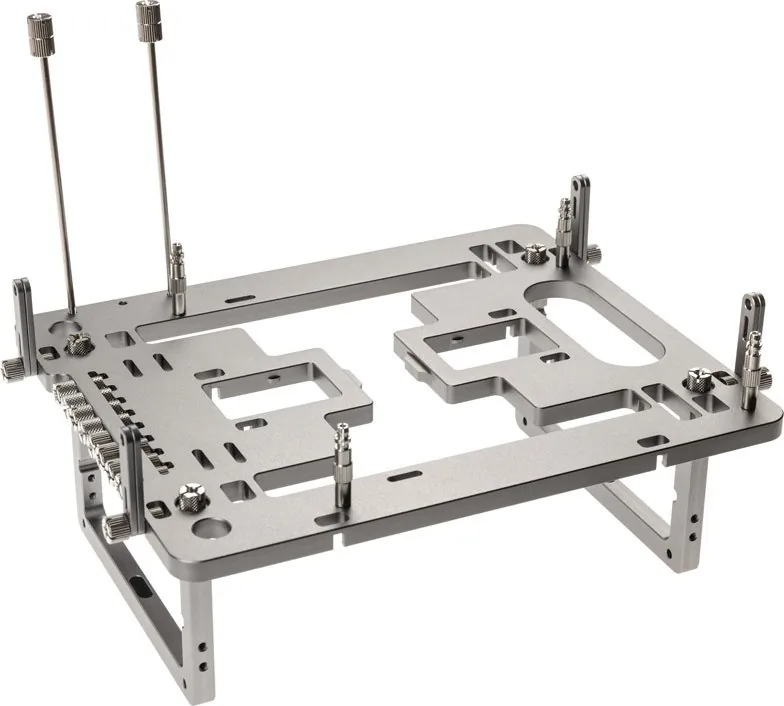
The Streacom BC1 Mini represents a pinnacle of compact computing engineering within the modern tech landscape today. Designed specifically for enthusiasts who demand high performance within a very compact footprint, this chassis redefines what a small form factor can truly achieve for your home setup. When you consult the Streacom BC1 Mini Manual for detailed guidance, you uncover a level of precision that ensures stability and modularity for every custom build. This open design allows builders to create a system that fits their exact aesthetic and functional needs while maintaining excellent thermal properties throughout the aluminum enclosure walls.
Dimensions and Build Quality
Measuring only 190mm in width and 230mm in length, this chassis fits virtually anywhere on a desk or shelf without taking up excess space. The thickness is just 8mm, but the assembled height reaches 78mm to accommodate internal components effectively. The body is crafted from AL5052 aluminum alloy, offering a robust frame that weighs 805 grams including all parts. This material choice ensures minimal vibration and excellent heat dissipation for critical hardware such as the CPU and motherboard. Stainless steel screws ensure that threads do not strip over time during multiple assembly cycles.
Screw and Bracket Details
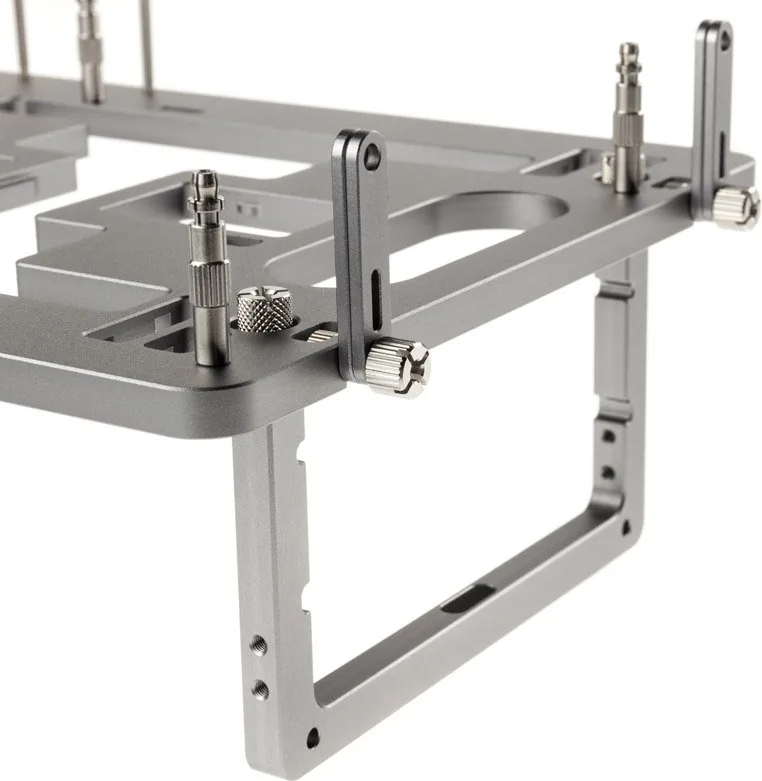
The chassis is supplied with specific screws to mount various hardware efficiently. All screw threads are M3 except for 6#32 thumbscrews used for power supplies. You must ensure the correct ones are used to avoid damage to the threads. The brackets feature thick and thin sides which are interchangeable to accommodate different lengths of screw. A thin plastic washer is found at the base to ensure minimal damage to the aluminum surface at the point of contact. This attention to detail protects the finish during long-term use.
Assembly and Mounting Options
One of the standout features is the self-contained storage for all assembly parts directly on the main body for convenience. The feet, brackets, and screws are stored right on the chassis until needed to minimize loss. Using M3 and 6#32 thumbscrews, users can secure hard drives, power supplies, and motherboards with ease. The pushpin standoffs provide a secure lock for the motherboard without requiring traditional screws initially for a quick setup process.
Expansion and Cooling
The BC1 Mini supports Mini ITX motherboards and various SFX power supply units up to 8kg load weight. Dual 2.5-inch drive slots allow for ample storage on the underside of the unit securely. The side brackets offer a versatile mounting range from 60 to 170mm, accommodating large radiators or fans for cooling solutions. With a max load capacity of 15kg, the structure remains rigid even under heavy configurations without flex. This flexibility makes it ideal for home theater PCs or high-performance workstations requiring quiet operation for daily use.
Final Notes and Maintenance
Build this chassis carefully by following the established steps to prevent damage to components. Cable routing is not shown in guides, but should be considered whilst planning the build layout. Disassembly is straightforward by reversing the procedure for any future upgrades. Ensure washers are used between brackets to avoid surface damage to the aluminum finish. This system prioritizes longevity and ease of maintenance above all else, making it a standout choice for the tech-savvy community looking for premium small form factor solutions for their next rig.
Search for 67,706 Manuals online


Type-in Brand or Model