
Free STMicroelectronics Manuals – Read, Download & Print
1 Manuals
Manuals
Categories

Free STMicroelectronics Manuals - Read, Download & Print
Find free STMicroelectronics manuals for development boards, microcontrollers and evaluation kits. STMicroelectronics, often shortened to ST, is a European semiconductor manufacturer headquartered in Geneva. Its chips are used in cars, industrial systems, consumer electronics and many maker projects. Among developers, ST is best known for the STM32 family of microcontrollers and for affordable boards like STM32 Nucleo and Discovery, which make it easy to start working with these chips.
What You Will Find in an STMicroelectronics Manual
ST user manuals are detailed technical documents. A typical board manual covers:
- Board overview: the target microcontroller, the integrated ST-LINK debugger/programmer and the supported expansion connectors, such as Arduino Uno V3 headers and ST morpho headers
- Power options: how the board is powered over USB, from an external supply or from a connected shield, and which jumpers select the source
- Hardware layout: the position of LEDs, push buttons, solder bridges and jumpers, with tables of their default settings
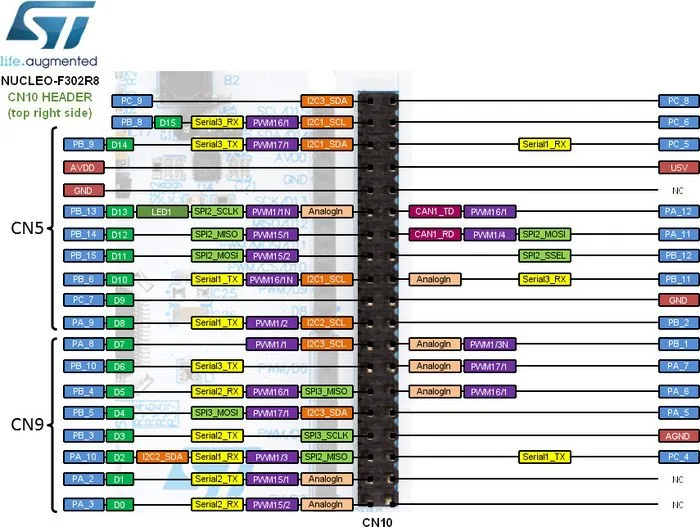
- Pin assignments: which microcontroller pins are routed to which connector pins
- Getting started: how to connect the board, install the drivers and load a first program with the supported development tools
Read Online, Download or Print
Read an ST manual online when you need to check a pin or a jumper quickly. Download the PDF to search it for terms such as "solder bridge", "ST-LINK", "VIN" or "pinout". Print the connector tables and keep them next to your setup, so you can wire sensors and shields without looking things up again.
Tips for Working with ST Boards
- Check the exact board name, such as NUCLEO-L432KC, before you follow a manual. One manual often covers several boards, and pin assignments differ between them.
- Pay attention to solder bridges and jumpers. Many board functions are set by them, and the manual lists the default positions.
- Respect voltage limits on the I/O pins. Many pins are 3.3 V, and only some of them tolerate 5 V.
- Keep the ST-LINK firmware up to date, as the manual recommends, to avoid connection problems.
From the first blinking LED to a finished prototype, the right STMicroelectronics manual helps you use the board correctly. Read, download and print the documentation you need for free.
Search for 67,706 Manuals online


Type-in Brand or Model