
StarTech VS440HDMI Manual
PDF manual · 13 Pages
English



Quick check
Incorrect answer, please try again.
Chat with your StarTech VS440HDMI manual using AI
Get instant AI answers from your StarTech VS440HDMI manual
Ask anything about the StarTech VS440HDMI. Answers come from this manual, with the pages they are based on.
Ask a Question
Do you recommend VS440HDMI?
Yes NoFrequently Asked Questions
It is a 4x4 HDMI matrix switch that lets you connect four video sources and route them independently to four displays. It is useful when different screens need different content at the same time.
Is this answer helpful?
Yes, it can support DVI sources when used with HDMI-to-DVI adapters. Audio handling may depend on the adapter and the overall device setup.
Is this answer helpful?
You can use the front panel buttons, the included remote control, the IR extender, or RS232 software control from a compatible Windows computer.
Is this answer helpful?
Yes. The unit supports audio switching and includes EDID modes to help source devices match display requirements more effectively.
Is this answer helpful?
The switch supports up to 1080p, with a maximum listed resolution of 1920x1200. It is best suited for standard HD and similar formats.
Is this answer helpful?
Yes. You can store and recall display relationships using the front panel or software. The software supports multiple custom profiles for faster setup changes.
Is this answer helpful?
Yes. It includes rack-mount brackets and has a metal enclosure, making it a solid option for organized AV racks and professional environments.
Is this answer helpful?
Advantages and Disadvantages
Advantages

- Independent 4-in/4-out routing supports different content on each screen.
- Multiple control options: front panel, remote, IR, RS232, and software.
- EDID support helps improve compatibility with varied displays.
- Rack-mountable metal enclosure makes it suitable for AV installations.
Disadvantages

- Maximum video resolution is limited to 1080p / 1920x1200.
- Recommended cable length is only 10 m / 32.8 ft.
- Software support is aimed at older Windows systems.
- Hot plugging can risk damage if power is not handled carefully.
Product Specification
Video Inputs
4x HDMI In
Video Outputs
4x HDMI Out
Product Description
StarTech VS440HDMI 4-Port HDMI Switch Manual
The StarTech VS440HDMI 4-Port HDMI Switch is built for users who need more control than a basic splitter can offer. Instead of sending the same source everywhere, this HDMI matrix lets you route different inputs to different displays at the same time, giving you a flexible setup for offices, classrooms, demo rooms, or home entertainment spaces.
Flexible switching for modern AV setups
With four HDMI inputs and four HDMI outputs, the VS440HDMI is designed to manage multiple sources and multiple screens with ease. It can also work with DVI devices when used with HDMI-to-DVI adapters, making it a practical choice for mixed equipment environments. Audio is carried alongside video, so you do not need a separate solution for sound management in typical use cases.
What makes this unit especially useful is the range of control options. You can switch from the front panel, use the included remote, control it by IR extender, or manage it through RS232 and software on a compatible Windows computer. That means it fits both simple everyday use and more structured professional installations.
Designed for convenience and reliability
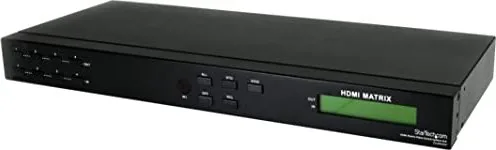
The front LCD makes status checking quick and straightforward, showing which source is assigned to each output. It also supports EDID handling, helping connected devices communicate better when display capabilities differ. For users who want a neat installation, the included rack-mount brackets make it easy to place the switch in a cabinet or AV rack.
This product is especially appealing when you want to share one source across several displays, or assign separate sources to different screens without constantly swapping cables. It is a strong fit for conference rooms, digital signage, and small production environments where uptime and flexibility matter.
Key takeaways
- 4x4 matrix routing gives each display independent source selection.
- Supports HDMI and DVI input devices with adapters.
- Multiple control methods improve ease of use and installation flexibility.
- EDID support helps match source output to display capability.
- Rack-mountable metal design suits professional AV setups.
Notes
- Maximum resolution is 1080p / 1920x1200.
- Best results come from short, high-quality HDMI cables.
- Power should be disconnected before hot-plug changes to protect the unit.
- Software support is tied to older Windows versions.
Search for 67,706 Manuals online


Type-in Brand or Model