
StarTech VGA2VID Manual
PDF manual · 8 Pages
English



Quick check
Incorrect answer, please try again.
Chat with your StarTech VGA2VID manual using AI
Get instant AI answers from your StarTech VGA2VID manual
Ask anything about the StarTech VGA2VID. Answers come from this manual, with the pages they are based on.
Ask a Question
Do you recommend VGA2VID?
Yes NoFrequently Asked Questions
The device converts VGA video signals from a computer source into Composite or S-Video signals for older display devices like CRT televisions.
Is this answer helpful?
It uses a USB-A to USB Mini cable connected to a USB power source such as a computer USB port or a standard USB wall charger.
Is this answer helpful?
PAL is the standards used in Europe and parts of Asia while NTSC is used in North America. You must switch the mode to match your display device.
Is this answer helpful?
Press the Scan Button on the device until the aspect ratio is corrected and the video image fills the display without cutting off edges.
Is this answer helpful?
No, it is designed for a single VGA input source to be converted to one video output per connection type simultaneously.
Is this answer helpful?
Yes, this product is backed by a two-year warranty covering defects in materials and workmanship for peace of mind.
Is this answer helpful?
Advantages and Disadvantages
Advantages

- Supports both Composite and S-Video output for versatile connectivity options.
- Includes a scan button to fix underscan and overscan display issues.
- USB power port provides flexible energy sources without bulky adapters.
- Toggles between PAL and NTSC standards for international compatibility.
- Two-year warranty provides reliable protection against manufacturing defects.
Disadvantages

- Digital VGA signal must be converted to analog video formats.
- Resolution is limited compared to modern HDMI or DisplayPort connections.
- USB power requirement needs an available port on a device or adapter.
- Cables for VGA and display output are not included in the package.
- No native support for audio transmission through the video converter.
Product Description
Unlocking Legacy Display Options
Bridging Modern Connections to Analog Screens
Upgrading older televisions or projectors to handle modern computer signals often requires a specialized adapter. This device serves as a vital bridge between a VGA video source and older composite or S-Video displays. It allows users to project content from laptops or desktops on screens that lack HDMI or VGA inputs directly. The hardware supports critical video standards required for international use across different regions.
Essential Features for Seamless Operation
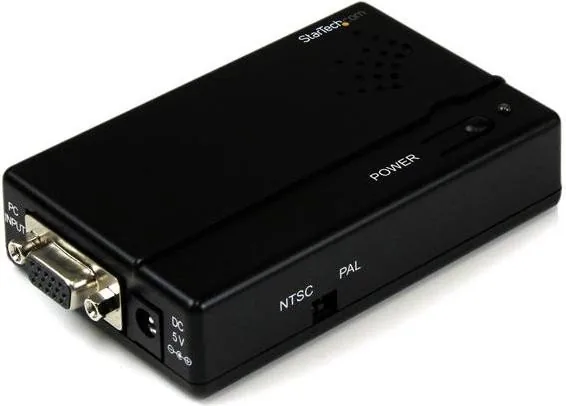
The unit includes a dedicated scan button to adjust underscan and overscan issues effectively. This ensures the image fills the screen perfectly without cutting off important edges during playback. Users can toggle the PAL or NTSC switch to match their regional video output standard accurately. Power is supplied via a USB connection, ensuring flexibility with existing external power sources like adapters. Installation is generally straightforward for most technical beginners in a home office setting.
Integration with Existing Systems
You might refer to the StarTech VGA to Composite Video/S-Video Manual for detailed troubleshooting if issues arise during setup. It is important to verify cable connections match the output ports on the converter carefully. A VGA cable connects the source while video cables link to the display screen. Proper power management is essential for consistent signal transmission without interference. This setup protects the input devices while enhancing output quality for viewing purposes clearly.
Maintenance and Safety Guidelines
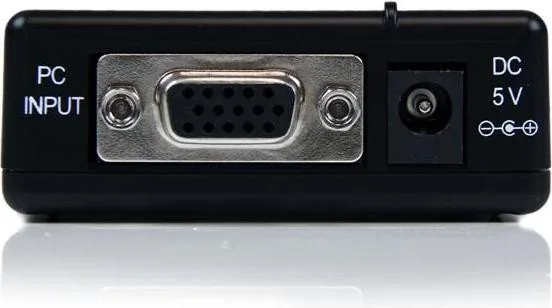
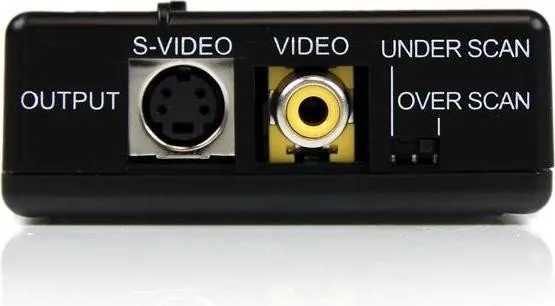
Connect a VGA cable to the VGA input port on the video converter and link it to your primary source device like a PC efficiently. Next, attach a USB power cable to ensure stable operation throughout the session. For the display connection, choose either the composite video output or the S-video output depending on your monitor availability. If the video appears too large or small, utilize the scan button to find the optimal resolution fit quickly. The FCC compliance statement guarantees safety for residential installations regarding radio frequency energy exposure standards. Always adhere to safety measures regarding exposed circuit boards to avoid electrical hazards. Contact support for the latest requirements on the official website. This product backs up its reliability with a standard two-year warranty covering defects in materials. Ensure you register the product for full protection against potential failures. Many users successfully repurpose old TVs for retro gaming consoles or presentations with these adapters. The versatility makes it a valuable tool for home offices and educational settings globally. Avoid modifying the device as this voids warranty terms and compromises safety. Keep the manual safe for future reference regarding firmware or driver updates. Regular checks on cable integrity can prevent signal loss over time. By following these guidelines, you ensure longevity for both your equipment and the conversion hardware effectively. Enjoy the clarity of analog video with the power of modern computing capabilities today.
Additional Operational Notes
The converter handles standard digital video inputs and converts them for composite transmission. This process maintains signal integrity while adapting to older display technologies. Users should ensure all devices are powered off before making connections. This prevents electrical shorts during the setup phase. Testing the signal on the primary display helps confirm proper functionality before finalizing the installation. If interference occurs, reorient the receiving antenna as suggested in compliance statements. The device accepts any incoming interference without guaranteeing no operation issues but adheres to rules.
Search for 67,706 Manuals online


Type-in Brand or Model