
StarTech VGA to HDMI Converter Manual
PDF manual · 13 Pages
English



Advantages and Disadvantages
Advantages

- Multiple switching modes (Manual, Priority, Automatic) for flexible source selection.
- Supports both VGA and HDMI inputs and outputs up to 1920x1200 (WUXGA).
- 3.5mm audio input for adding audio from VGA sources.
- Screen Shift Mode and resolution alteration tools for display alignment and compatibility.
- Includes universal power adapter, mounting kit, and lifetime technical support.
Disadvantages

- Single HDMI output limits use to one display without an additional splitter.
- Requires separate HDMI/VGA cables and optional audio cable (not included).
- Limited to 1920x1200 — not suitable for higher-resolution displays (e.g., 4K).
- LED indicators require learning to interpret multi-color flashing patterns.
- Resolution cycling is manual and may require trial-and-error for some source/display combos.
Ask a Question
Frequently Asked Questions
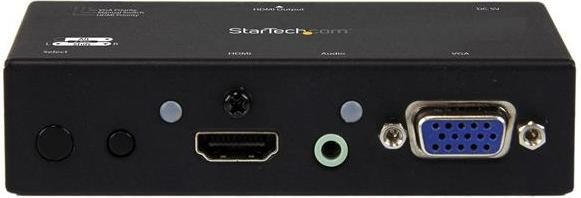
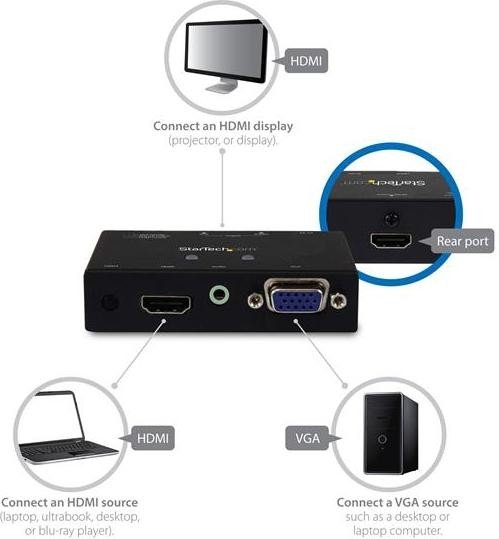
The converter accepts one VGA input and one HDMI input and provides a single HDMI output. It also offers a 3.5mm audio input for VGA audio support.
Is this answer helpful?
The device supports output resolutions up to 1920x1200 (WUXGA). It does not support resolutions above this, such as 4K.
Is this answer helpful?
Manual mode toggles sources with the front button. Priority mode (HDMI or VGA) auto-selects the chosen source when it powers on. Automatic mode selects the most recently powered-on source.
Is this answer helpful?
Use the Resolution Alteration Mode by holding the resolution button for two seconds; the unit will cycle available resolutions (indicated by LED color changes) until a compatible output is found. The device retains the last working setting.
Is this answer helpful?
Press both screen adjustment buttons for two seconds to enter shift mode, then use left/right buttons to adjust horizontal position up to 50 steps. The unit exits shift mode after 20 seconds of inactivity and remembers the last setting.
Is this answer helpful?
Yes — connect a 3.5mm audio cable from the VGA source to the converter’s audio input to route stereo audio through the HDMI output to the display or connected audio system.
Is this answer helpful?
The product includes a two-year limited warranty covering defects in materials and workmanship, plus StarTech’s lifetime technical support and online resources, including product downloads and documentation.
Is this answer helpful?
Product Description

StarTech VGA to HDMI Converter Manual — Versatile VGA+HDMI to HDMI Converter
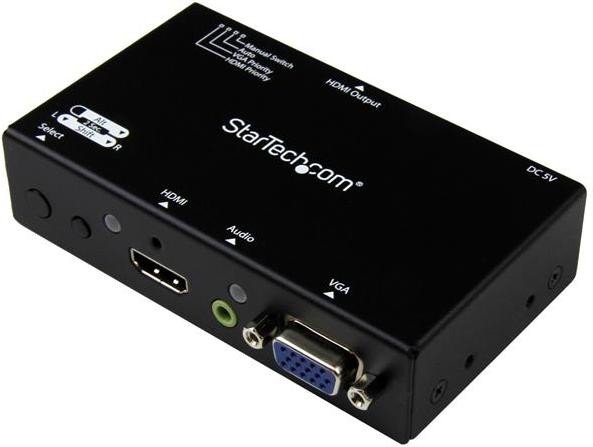
The StarTech VGA to HDMI Converter offers a practical solution for blending legacy VGA sources with modern HDMI displays. Designed for home, office, and educational setups, this compact converter switch accepts one VGA and one HDMI input and outputs to a single HDMI display. It supports audio passthrough via a 3.5mm jack for VGA sources, and includes a universal power adapter and mounting kit for flexible installation.
Key Features and Workflow
This unit provides multiple operation modes — Manual, Priority (HDMI or VGA), and Automatic — so you can choose whether to switch inputs manually, prefer one source when it powers on, or let the switch select the most recently active input. Front-panel controls include an input selection button and resolution/shift adjustment buttons. Rear ports house the HDMI output and the mode selection switch, while LED indicators show active input, connection type, and status cues for troubleshooting.
Installation is straightforward: connect the HDMI source to HDMI input, the VGA source to the VGA input, optionally add a 3.5mm audio cable for VGA sound, then run an HDMI cable to your display and plug in power. The device supports resolutions up to 1920x1200 (WUXGA), and the resolution alteration function helps resolve unsupported output formats by cycling available resolutions.
Practical Adjustments and Modes
Screen Shift Mode lets you nudge the image left or right in up to 50 steps to correct horizontal alignment; the device exits shift mode after inactivity and retains your last setting. Resolution Alteration Mode is triggered when the output isn't compatible with the display; pressing and holding the resolution button cycles available resolutions and signals status via LED colors. LEDs also convey connection and HDCP-related conditions to simplify diagnosis.
Reliability and Support
Built by StarTech, the converter benefits from lifetime technical support and online resources, plus a two-year limited warranty covering defects in materials and workmanship. Documentation and software/driver downloads are available through StarTech’s support site, and the product carries FCC Class B compliance for residential installations.
Notes:
- Supports one VGA and one HDMI input with a single HDMI output (max 1920x1200).
- Use a 3.5mm audio cable for VGA audio support.
- Modes: Manual, HDMI/VGA Priority, Automatic; includes screen shift and resolution alter functions.
Search for :pdfCount Manuals online


Type-in Brand or Model