
StarTech USBDUPE17 Manual
PDF manual · 23 Pages
English



Quick check
Incorrect answer, please try again.
Chat with your StarTech USBDUPE17 manual using AI
Get instant AI answers from your StarTech USBDUPE17 manual
Ask anything about the StarTech USBDUPE17. Answers come from this manual, with the pages they are based on.
Ask a Question
Do you recommend USBDUPE17?
Yes NoFrequently Asked Questions
No, the device operates standalone. It handles processing internally so no permanent computer connection is needed for cloning tasks, though setup can be configured without one initially.
Is this answer helpful?
The system supports FAT16 and FAT32 natively. It can also handle NTFS and Linux formats if they are recognized during the file format analysis phase of the copy process.
Is this answer helpful?
Yes, the utility menu allows you to format drives to FAT16 or FAT32. You can also set specific cluster sizes for the formatting process according to your storage needs.
Is this answer helpful?
You can choose between Quick Erase, Full Erase, or DoD Erase. The DoD Erase performs a multi-pass overwrite ensuring data cannot be recovered from the drive media completely.
Is this answer helpful?
The red LED indicator illuminates next to the port. If target tolerance settings are active, the data will not be copied to prevent incomplete transfers due to insufficient space.
Is this answer helpful?
Yes, you must connect a USB to SATA docking station or enclosure to the duplicator ports. Then enable Active mode in the setup menu to allow copying to these larger storage devices.
Is this answer helpful?
Yes, StarTech.com provides lifetime technical support. You can visit their support website to access documentation, downloads, and contact technical advisors for help with configuration.
Is this answer helpful?
Advantages and Disadvantages
Advantages

- Standalone operation requires no computer for basic mass cloning tasks efficiently.
- Supports 1 to 7 cloning with independent control units per individual USB port.
- Includes Department of Defense approved erase for secure data sanitization compliance.
- Features dual synchronous and asynchronous copying modes for maximum workflow flexibility.
- LED indicators provide clear real-time status feedback for all active ports immediately.
Disadvantages

- No wireless capabilities exist as it is a wired standalone hardware unit only.
- Firmware updates currently require a specific USB stick configuration to proceed.
- Capacity tolerance checks may interrupt copying if source and drive mismatch occurs.
- Does not support direct card readers without additional external USB adapters connected.
- Fixed power adapter regions require specific unit purchases matching local standards.
Product Specification
Type
Copy Station (USB-A)
Usage
Stationary
Connection
N/A
Media
8x USB-A 2.0, USB-A (max. 2TB/Port)
Copy Function
USB-A (7x simultaneous, 90GB/h)
Print Function
N/A
Dimensions
6.30x1.38x7.48in (WxHxD)
Weight
2.43 lbs
Features
Standalone operation, Display, Erase function, Metal housing, Buffer memory 128MB
Manufacturer Warranty
2 years
Product Description
Master Data Distribution Efficiency
Mass Cloning Solutions
Product Overview
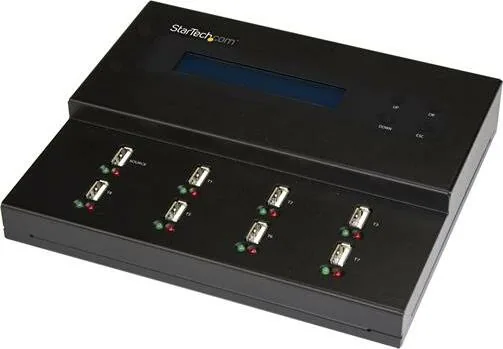
In the modern era of industrial digital distribution, organizations often require rapid data replication across multiple storage devices simultaneously without constant computer oversight. The StarTech USB Flash Duplicator & Eraser 1:7 Standalone offers a robust hardware solution designed specifically for this high-volume task to streamline operations for manufacturing plants, training centers, and IT departments distributing software or media files. This standalone unit allows users to clone content from a single source drive to up to seven destination drives instantly. It eliminates the bottleneck of PC-based cloning by handling processing internally with dedicated control units for every port.
Core Functionalities
The device features independent control processing units for each of its USB flash drive ports. This unique architecture enables both synchronous and asynchronous copying modes. Synchronous mode copies all connected drives at the same time, ensuring perfect synchronization across the batch. Asynchronous mode allows users to remove and replace destination drives individually as they finish, increasing workflow flexibility significantly. Users can also set target tolerances to ensure capacity matches or allow for minor variances.
Security and Maintenance
Data security remains a top priority for administrators managing sensitive information across large networks. This hardware integrates advanced erasing capabilities that comply with Department of Defense standards for data sanitization. Users can perform quick erases, full erases, or the more rigorous DoD erase process to ensure no data remnants remain on recycled drives. A media check feature allows for quality assessment of the storage media to detect bad sectors before critical copying begins. This prevents costly failures during long production runs.
Operational Details
Setup is straightforward thanks to the front panel LCD display and intuitive button navigation system. Green and red LED indicators provide real-time feedback on drive detection and error states instantly. If you need deeper configuration details, the StarTech USB Flash Duplicator & Eraser 1:7 Standalone Manual provides extensive guidance on setup and troubleshooting. Changing languages, adjusting copy speeds, or setting tolerance ranges are easily accessible within the menu. Firmware updates can be applied using the utility section via a standard USB stick.
Important Notes
Ensure power stability is maintained during operations to prevent data corruption. Regular firmware updates are recommended to maintain compatibility with emerging drive standards. Always create backups if drive integrity is uncertain. Avoid removing drives during the blinking green indicator phase.
Search for 67,706 Manuals online


Type-in Brand or Model