
StarTech USBDUPE115 Manual
PDF manual · 23 Pages
English



Quick check
Incorrect answer, please try again.
Chat with your StarTech USBDUPE115 manual using AI
Get instant AI answers from your StarTech USBDUPE115 manual
Ask anything about the StarTech USBDUPE115. Answers come from this manual, with the pages they are based on.
Ask a Question
Do you recommend USBDUPE115?
Yes NoFrequently Asked Questions
It is a standalone hardware unit designed for cloning and erasing USB flash drives without needing a host computer connection.
Is this answer helpful?
Yes, it operates independently using built-in controls and an LCD interface for all setup and execution requirements.
Is this answer helpful?
It can handle one source drive and up to fifteen destination drives simultaneously for efficient batch processing.
Is this answer helpful?
Yes, it supports Quick Erase, Full Erase, and Department of Defense erasing methods to remove all sensitive data.
Is this answer helpful?
It supports FAT16, FAT32, NTFS, and various Linux partitions automatically or through manual configuration settings.
Is this answer helpful?
Yes, StarTech.com provides a two-year warranty covering defects in materials and workmanship from the date of purchase.
Is this answer helpful?
You select synchronous mode in the settings menu to copy all connected drives at once instead of individually.
Is this answer helpful?
Advantages and Disadvantages
Advantages

- Standalone operation without needing a host PC for cloning tasks.
- Supports cloning up to fifteen destination drives simultaneously.
- Includes three distinct data erasing methods for security compliance.
- Features an LCD display for direct menu navigation and control.
- Supports automated formatting for FAT16 and FAT32 file systems.
Disadvantages

- Requires connection to an external power source to function.
- Lacks wireless connectivity and relies on physical USB ports.
- SD card support necessitates additional USB card readers.
- Restricted to USB flash drives for primary data operations.
- Manual configuration required for specific settings and updates.
Product Specification
Type
Copy Station (USB-A)
Usage
Stationary
Connectivity
N/A
Ports
16x USB-A 2.0, USB-A (max. 2TB/Port)
Copy Function
USB-A (15x simultaneous, 90GB/h)
Print Function
N/A
Dimensions
13.58x1.38x6.30in (WxHxD)
Weight
3.97lbs
Features
Autonomous operation, Display, Erase function, Metal housing, Buffer memory 128MB
Manufacturer Warranty
2 Years
Product Description
Introduction to Data Cloning Solutions
The StarTech USB Flash Duplicator & Eraser 1:15 Standalone Manual provides comprehensive guidance for efficient data management. This robust hardware solution simplifies the cloning process for IT professionals and businesses who need to mass produce bootable images or replicate data sets. You can copy data from one source drive to up to fifteen others simultaneously without requiring a computer connection. This standalone capability saves valuable time and resources during large deployments.
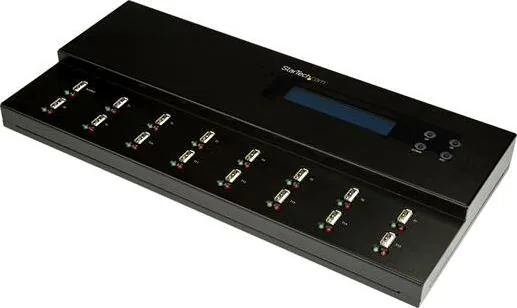
Setup is straightforward using the included universal power adapter compatible with various regions. The device features a clear LCD display for easy menu navigation without needing a mouse or keyboard. Users can control synchronous or asynchronous copying modes to suit their specific workflow needs. Synchronous mode copies all connected drives at once, whereas asynchronous mode allows independent completion of tasks for each port. This flexibility ensures daily productivity is not halted by a single slower drive in the queue, maximizing throughput for large projects.
Data security is a major concern with this unit, and it addresses this effectively. It supports multiple erasing methods including Quick Erase, Full Erase, and DoD Erase. These options ensure sensitive information is permanently removed before disposal or resale of the hardware. Additionally, formatting functions allow users to standardize drives to FAT16 or FAT32 filesystems automatically. Media checks verify drive health to prevent future failures during operation.
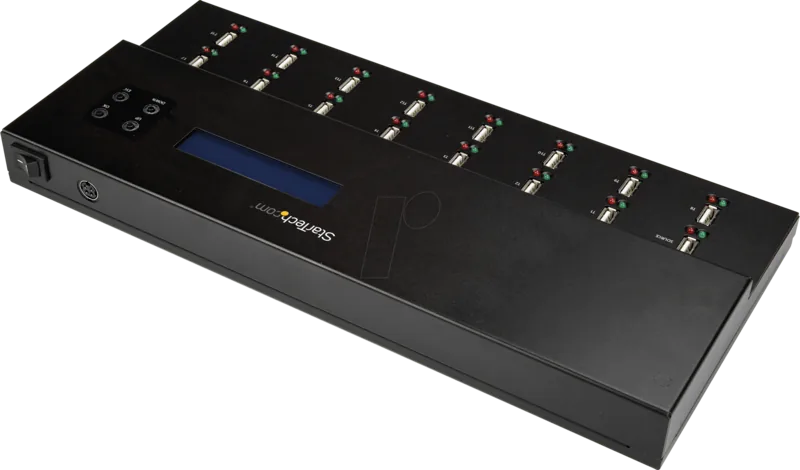
Refer to the StarTech USB Flash Duplicator & Eraser 1:15 Standalone Manual for detailed instructions on changing device settings or updating firmware remotely. You can adjust copy speeds and target capacities directly on the hardware interface. Visual indicators show process status through colorful LED lights located near each port. The system warns if a drive is full or encountering errors during the transfer. These visual cues help users monitor progress without reading numerical data on the screen constantly.
This tool is essential for warehouses and repair shops handling electronic inventory. It reduces manual entry errors and accelerates mass distribution significantly. The two-year warranty ensures reliability over long operational periods. Technical support remains available for troubleshooting complex scenarios. Proper usage maintains data integrity across all connected storage media efficiently and securely.
Operating within a secure environment requires attention to physical connections and power stability. Always verify the source drive quality before initiating a bulk write cycle. The device handles various file systems including NTFS and Linux partitions transparently. Capacity checks ensure the destination holds enough space for a successful write operation.
Search for 67,706 Manuals online


Type-in Brand or Model