

StarTech USBDUP15 Manual
PDF manual · 18 Pages
English



Quick check
Incorrect answer, please try again.
Chat with your StarTech USBDUP15 manual using AI
Get instant AI answers from your StarTech USBDUP15 manual
Ask anything about the StarTech USBDUP15. Answers come from this manual, with the pages they are based on.
Ask a Question
Do you recommend USBDUP15?
Yes NoFrequently Asked Questions
The unit supports one source drive and up to five destination drives simultaneously, enabling 1:5 duplication in a single operation.
Is this answer helpful?
Asynchronous mode buffers the source and allows continuous insertion/removal of destination drives for sequential copying; synchronous mode writes to all connected destinations at once and is used when source data exceeds the device buffer or when synchronous operation is explicitly selected.
Is this answer helpful?
If 'System and Files' mode recognizes NTFS or Linux file systems, it will copy data but destinations must be equal or larger in capacity. Some utilities may reformat destination drives to FAT16/FAT32; formatting and certain operations can change or erase file systems.
Is this answer helpful?
Yes. The device offers Quick Erase, Full Erase (single-pass overwrite), and a DoD-compliant 3-pass erase (DoD 5220) to securely remove data. Note these erase functions affect destination ports only and will destroy data irreversibly.
Is this answer helpful?
Yes. It includes capacity checks, media health tests (H3 read-only and H5 read/write), read/write speed measurement per port, and checksum calculation to verify integrity. Some tests may format or alter destination drives.
Is this answer helpful?
Save the unzipped firmware file to a USB flash drive, insert it, and select '6.7 System Update' from the menu. After the update completes, power the unit off for 5 seconds, then power it back on to finalize the update.
Is this answer helpful?
Try reducing the duplication speed in Setup (choose slower modes), ensure destination drives match or exceed source capacity, check media health with the diagnostic tools, and use high-quality flash drives. If issues persist, consult StarTech support.
Is this answer helpful?
Advantages and Disadvantages
Advantages

- Simultaneous duplication to up to five destination drives for efficient mass replication.
- Supports asynchronous and synchronous modes for flexible performance based on source size.
- Includes secure erase options up to DoD 3-pass overwrite for data sanitization.
- Provides diagnostics: capacity check, media health (H3/H5), speed measurement, and checksum.
- Clear LCD menu and LEDs simplify operation; firmware updates supported via USB.
Disadvantages

- Destination drives must be overwritten, increasing risk of accidental data loss if not confirmed.
- Some functions (erase, format, media check) will destroy data and are limited to destination ports.
- Larger or NTFS/Linux-formatted sources require equal or larger destination capacity to avoid failures.
- Optional adapters (card readers, SATA enclosures) required for non-USB media, sold separately.
- High-speed duplication may increase failure rates on lower-quality flash drives; may require slower settings.
Product Specification
Type
Copy Station (USB-A)
Usage
stationary
Connectivity
N/A
Media
6x USB-A 2.0, USB-A (max. 2TB/Port)
Copy Function
USB-A (5x simultaneous, 90GB/h)
Print Function
N/A
Dimensions
6.57x0.98x4.72in (WxHxD)
Weight
0.70 lb
Special Features
autonomous operation, Display, Erase function, Buffer memory 64MB
Manufacturer Warranty
two years
Product Description
StarTech USB Flash Duplicator & Eraser 1:5 Standalone Manual
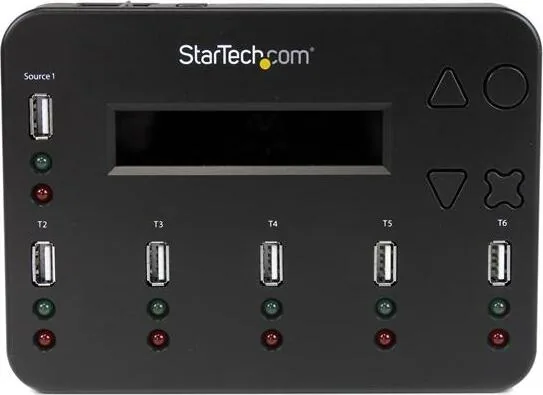
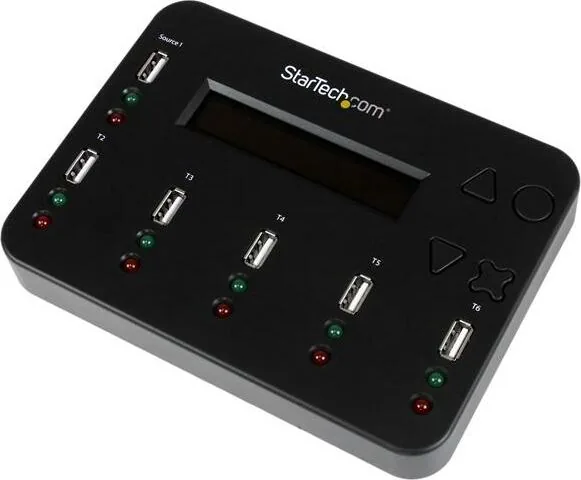
The StarTech USB Flash Duplicator & Eraser 1:5 Standalone is a compact, purpose-built device designed for rapid cloning and secure erasure of USB flash drives and other media via USB adapters. Built for IT departments, imaging labs, and media distribution tasks, this unit supports one source drive and up to five destination drives simultaneously, offering flexible copying modes, integrity checks, and multiple erase standards including a DoD 3-pass overwrite.
Equipped with a clear LCD display and simple navigation buttons, the duplicator supports both asynchronous and synchronous copy modes. Asynchronous mode buffers source data and allows continuous insertion and removal of destination drives for high-throughput replication, while synchronous mode writes simultaneously to all targets—useful for larger images or drives exceeding internal buffer size. The system auto-selects the appropriate method based on source size, but users can force modes via setup.
Beyond duplication, the unit provides capacity checks, copy-compare functionality, checksum calculation, and speed measurement (read/write) per port. Media health diagnostics include H3 (read-only) and H5 (read/write) checks to reveal bad sectors and performance metrics. Formatting utilities support FAT16/FAT32 and will convert NTFS or Linux formats to FAT when appropriate for destination ports. Multiple setup options let users define copy area (system and files vs whole media), target tolerance for capacity differences, asynchronous hold time, button beeps, and operational language.
Security-focused features include quick erase, full single-pass overwrite, and DoD 5220.22-M compliant 3-pass erase for thorough data sanitization. Firmware updates are supported via a USB drive, and system information and diagnostics are accessible from the menu for troubleshooting. The unit ships with a universal power adapter and supports optional adapters for SD/microSD/CF or SATA drives via external readers and enclosures.
Practical for organizations that need dependable, repeatable duplication and secure data disposal, the StarTech 1:5 duplicator balances speed, configurability, and usability. The device’s LEDs provide real-time feedback—green for active/progress and red for errors—and the menu guides operators through copy, format, erase, and diagnostic workflows. Recommended practice includes matching source/destination capacities for best reliability and using slower speeds for problematic media.
Notes:
- Destination drives will be overwritten; always verify targets before starting.
- Some functions (erase, media check, speed measure) may format or destroy data—use destination ports only for these operations.
- For non-USB media, use appropriate card readers or USB-SATA enclosures (sold separately).
Search for 67,706 Manuals online


Type-in Brand or Model