
StarTech USB3HDCAP Manual
PDF manual · 25 Pages
English



Quick check
Incorrect answer, please try again.
Chat with your StarTech USB3HDCAP manual using AI
Get instant AI answers from your StarTech USB3HDCAP manual
Ask anything about the StarTech USB3HDCAP. Answers come from this manual, with the pages they are based on.
Ask a Question
Do you recommend USB3HDCAP?
Yes NoFrequently Asked Questions
No. The system does not record digital encrypted content such as commercial DVDs or Blu-rays due to HDCP restrictions found in those source formats. Standard limitation for this type of capture hardware.
Is this answer helpful?
It supports an extensive array of inputs including HDMI, DVI, VGA, Component, S-Video, and Composite. Use the A-V breakout cable for older analog signals.
Is this answer helpful?
Yes. The device supports RTMP protocols, enabling direct streaming to platforms like Twitch or USTREAM without needing extra encoding tools.
Is this answer helpful?
You need a USB 3.0 port, a dual-core CPU above 2.8 GHz, 2 GB of RAM, and Windows XP through 8.1 to run the system.
Is this answer helpful?
The unit comes with a two-year warranty from the manufacturer, covering material defects and ensuring reliable performance over time. Abuse excludes coverage.
Is this answer helpful?
Yes, the computer must be restarted after the driver and software installation process is completed to ensure all components are recognized.
Is this answer helpful?
No. This product is not backwards compatible with USB 2.0 or 1.1. A USB 3.0 capable computer is strictly required for operation.
Is this answer helpful?
Advantages and Disadvantages
Advantages

- Supports multiple video input types including HDMI, VGA, and composite for broad compatibility.
- Enables direct streaming to platforms like Twitch using native RTMP protocol support.
- Includes Stream Catcher software for scheduling recordings and taking snapshots.
- Comes with necessary adapters for older VGA and DVI connections.
- Backed by a two-year warranty against material defects and workmanship issues.
Disadvantages

- Cannot capture HDCP protected content from commercial discs like Blu-rays.
- Requires USB 3.0 port as it is explicitly not compatible with USB 2.0.
- Specific USB controllers like Etron may cause compatibility issues during use.
- Audio requires breakout cable for older composite inputs to function correctly.
- Software installation must precede hardware connection to ensure proper drivers load.
Product Specification
Compression
H.264 (Hardware Encoder)
Resolution
1920x1080p (60fps)
Inputs
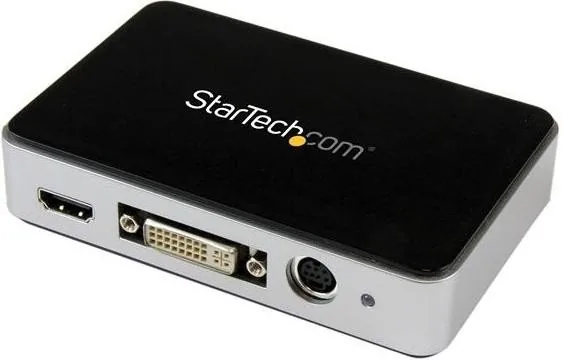
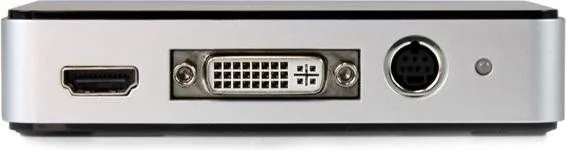
HDMI, DVI, Component, Composite Audio
Outputs
HDMI, DVI, Component, Composite Audio
Interface
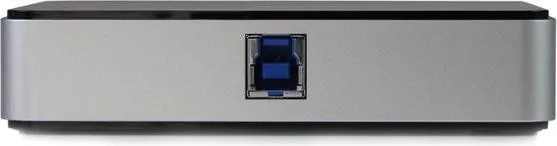
USB-B 3.0
Dimensions
4.50x2.97x0.96 inches
Weight
0.23 lbs
Manufacturer Warranty
2 years
Product Description
StarTech USB3HDCAP Video Capture Device Review
The StarTech USB3HDCAP represents a robust solution for capturing high-def video from various sources directly to your computer. This USB 3.0 HD-Video capture device allows users to record 1080p content seamlessly. Whether you are archiving old family footage or creating new streaming content for a personal channel, this hardware simplifies the analog-to-digital conversion process significantly. The device connects easily via a USB 3.0 port and supports an extensive array of inputs including HDMI, DVI, VGA, Component, S-Video, and Composite. This versatility ensures compatibility with older consoles, legacy DVD players, and modern gaming systems alike without needing multiple different devices.
Setting up the system involves a straightforward installation process designed for efficiency. Users should download the latest software before connecting the hardware physically to avoid driver conflicts. The provided application, known as Stream Catcher, offers a user-friendly interface for managing recordings and viewing live feeds instantly. Inside the software, you can adjust video properties like sharpness and brightness, or configure audio sources specifically for component or composite signals using the included A-V breakout cable. Audio handling is flexible, allowing dual-channel RCA audio inputs alongside video streams to ensure high-quality sound capture alongside visuals for complete media files.
One of the standout features is the built-in streaming capability integrated directly into the driver suite. The device supports RTMP protocols, enabling direct streaming to popular platforms like Twitch or USTREAM. For local network distribution within a home lab, it also facilitates HLS streaming through open-source webserver software like AppServ. This flexibility makes it ideal for webcasting without external encoding hardware. When planning longer recording sessions, the software allows you to schedule capture tasks automatically to run at specific times, saving time and ensuring you never miss a broadcast event.
Important to note regarding content protection is the limitation on digital encryption. The system does not record digital encrypted content such as commercial DVDs or Blu-rays due to HDCP restrictions found in those source formats. System requirements include a dual-core CPU above 2.8 GHz and 2 GB of RAM running Windows operating systems from XP through 8.1. The unit arrives with a comprehensive package containing cables and a VGA-to-DVI adapter for older monitors. The unit comes with a two-year warranty from the manufacturer, covering material defects and ensuring reliable performance over time. The warranty excludes damage from misuse or abuse. FCC regulations confirm this device meets Class B digital standards for home use, minimizing radio frequency interference risks. For detailed setup instructions, referring to the official StarTech USB3HDCAP Manual is highly recommended. This documentation guides users through troubleshooting driver installation to maintain optimal operation in home environments.
Search for 67,706 Manuals online


Type-in Brand or Model