
StarTech USB32HDEH Manual
PDF manual · 13 Pages
English



Quick check
Incorrect answer, please try again.
Chat with your StarTech USB32HDEH manual using AI
Get instant AI answers from your StarTech USB32HDEH manual
Ask anything about the StarTech USB32HDEH. Answers come from this manual, with the pages they are based on.
Ask a Question
Do you recommend USB32HDEH?
Yes NoFrequently Asked Questions
The adapter supports up to 1920x1200 and 1080p resolutions across common widescreen and standard modes, suitable for most monitors and projectors at those resolutions.
Is this answer helpful?
Yes. StarTech recommends installing the latest drivers from StarTech.com (or using the included CD) and rebooting the system before plugging in the USB32HDEH to ensure proper driver and software initialization.
Is this answer helpful?
The adapter is backward compatible with USB 2.0, but video bandwidth and hub speeds will be reduced compared to USB 3.0, which may impact performance for high-resolution or high-frame-rate content.
Is this answer helpful?
Yes. You can connect multiple adapters to expand displays, with a maximum of five adapters supported on a single PC. Each additional adapter will install drivers automatically when connected.
Is this answer helpful?
Yes. The product includes an HDMI-to-DVI adapter, allowing connection to DVI displays while retaining supported resolutions up to 1920x1200.
Is this answer helpful?
StarTech recommends a USB 3.0-enabled system, quad-core CPU (2.4GHz or higher, i5 recommended), 4GB or more RAM, and Windows 7/8 (32/64-bit) for optimal operation.
Is this answer helpful?
The USB32HDEH is covered by a two-year warranty for defects in materials and workmanship, and StarTech.com provides free lifetime technical support and driver downloads from their website.
Is this answer helpful?
Advantages and Disadvantages
Advantages

- Adds HDMI output via USB 3.0 with up to 1920x1200/1080p resolution.
- Includes a built-in 1-port USB 3.0 hub to replace the used USB port.
- Supports mirror and extended desktop modes for increased productivity.
- Bundled HDMI-to-DVI adapter for legacy display compatibility.
- Backed by a two-year warranty and lifetime technical support.
Disadvantages

- Performance is limited when connected to USB 2.0 ports (reduced speed).
- Requires driver installation and system reboot before use.
- Maximum of five adapters per PC may limit very large multi-monitor setups.
- Optimal performance needs a fairly powerful CPU and 4GB+ RAM.
- Audio and graphics performance depend on host system resources.
Product Specification
Compatibility
USB 3.0
Ports
1x USB 3.0, 1x HDMI
Product Description
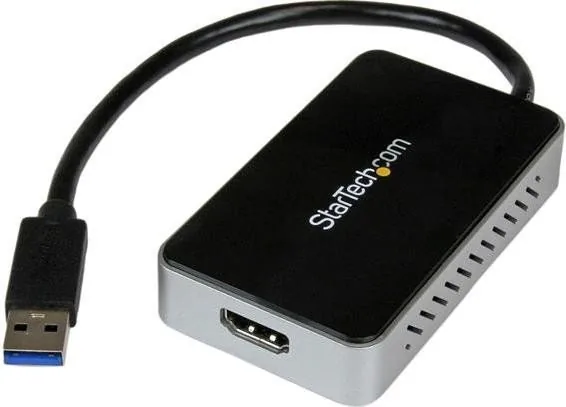
StarTech USB32HDEH Manual: USB 3.0 to HDMI Adapter with USB Hub
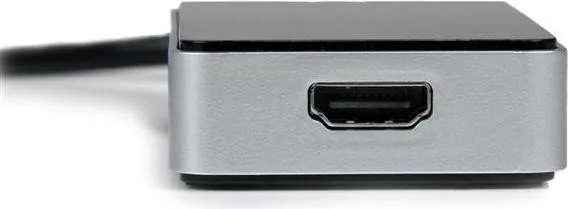
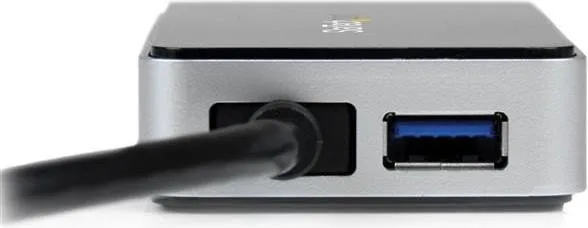
The StarTech USB32HDEH transforms a single USB 3.0 port into an HDMI output capable of 1920x1200 and 1080p video, while also restoring the used USB connection with a built-in 1-port USB 3.0 hub. Designed as an external graphics adapter, this device provides a simple, portable way to add an extra display to laptops and desktops, making it ideal for ultrabook users or systems with limited video outputs. It leverages SuperSpeed USB 3.0 bandwidth (5 Gbps) for smoother high-definition playback and supports backward compatibility with USB 2.0 for broader device support.
Key features and usage
The adapter functions as an external GPU alternative to add multi-monitor support: mirror the main desktop or extend it to increase workspace and productivity. It includes an HDMI-to-DVI adapter for legacy displays, and supports a wide range of resolutions including common widescreen and standard modes. StarTech recommends driver installation before plugging in the adapter to ensure proper setup. The device package typically includes the adapter, HDMI-to-DVI adapter, driver CD, and quick instructions.
Installation is straightforward: install drivers (from StarTech.com or the included CD), restart the computer, then connect the adapter and the HDMI display. Optional USB devices can be connected to the pass-through hub port; note hub speeds will be limited to USB 2.0 if the host port is USB 2.0. Multiple adapters can be added to the same PC (up to five on a single system) to expand displays further, with each additional adapter undergoing automatic driver installation when connected.
Software controls and management
Software utilities provide quick access to Windows Display Settings, monitor identification overlays, and a Multi-Display Control Panel that includes hotkeys to move active windows between displays. These tools simplify configuration, arrangement, and everyday multi-display tasks.
Backed by a two-year warranty and lifetime technical support at StarTech.com, the USB32HDEH targets users needing a portable, cost-effective method to add HDMI output and preserve a USB connection on systems with limited ports.
Notes
- Optimal performance requires a USB 3.0 port and a modern CPU (quad-core recommended) with 4GB+ RAM.
- Maximum supported resolution: 1920x1200 / 1080p.
- Up to five adapters may be used on one PC; driver updates should be obtained from StarTech.com.
- Warranty covers defects in materials and workmanship for two years; misuse and wear are excluded.
Search for 67,706 Manuals online


Type-in Brand or Model