
StarTech USB31000S Manual
PDF manual · 10 Pages
English



Quick check
Incorrect answer, please try again.
Chat with your StarTech USB31000S manual using AI
Get instant AI answers from your StarTech USB31000S manual
Ask anything about the StarTech USB31000S. Answers come from this manual, with the pages they are based on.
Ask a Question
Do you recommend USB31000S?
Yes NoFrequently Asked Questions
It adds a wired RJ-45 Ethernet connection to a computer through a USB-A port. It is useful for devices without a built-in Ethernet port or for adding another network interface.
Is this answer helpful?
The adapter supports 2.5Gbps NBase-T networking and can also link at 1Gbps, 100Mbps, or 10Mbps, depending on the connected network equipment and cable.
Is this answer helpful?
The RJ-45 port supports CAT5, CAT5e, CAT6, and CAT6a network cables. Network performance depends on the cable quality, cable length, and the capabilities of the connected equipment.
Is this answer helpful?
A solid blue LED indicates a 2.5Gbps network link. A solid green LED indicates a 1Gbps, 100Mbps, or 10Mbps link. Flashing indicates network activity, and no light indicates no connection.
Is this answer helpful?
Connect an Ethernet cable from the adapter to a network device, then plug the USB-A connector into the host computer. Drivers may install automatically. If needed, use the virtual CD prompt and run the compatible driver installer.
Is this answer helpful?
No. A 2.5Gbps link requires a compatible 2.5Gb network port on the connected device, appropriate cabling, and a host system capable of supporting the connection. Otherwise, it can negotiate a lower supported speed.
Is this answer helpful?
Advantages and Disadvantages
Advantages

- Supports 2.5Gb NBase-T Ethernet for faster wired networking on compatible equipment.
- Maintains compatibility with 1Gbps, 100Mbps, and 10Mbps network links.
- Uses a USB-A 3.0 plug, making it useful for computers without an RJ-45 port.
- Blue and green LED indicators show link speed, activity, and connection status.
- Works with CAT5, CAT5e, CAT6, and CAT6a Ethernet cables.
Disadvantages

- A 2.5Gbps connection depends on compatible network devices and suitable cabling.
- Driver installation may be required if the operating system does not install it automatically.
- Requires an available USB-A port on the host computer.
- The adapter provides wired Ethernet only and does not add Wi-Fi connectivity.
Product Specification
Type
LAN adapter
Form factor
1x external wired (connection cable not detachable)
Interface
1x USB-A 3.0 (plug via cable, 5 Gb/s, 5.91 in cable length)
Connection
1x RJ-45
Transfer
1x RJ-45 (10/100/1000/2.5GBase-T)
Power supply
Power supplied via interface only
Chipset
Realtek RTL8156 (LAN adapter, RJ-45)
Weight
1.41 oz
Housing color
silver
Compatibility
universal
Special features
VLAN, Wake on LAN
Manufacturer warranty
2 years
USB orientation
left
Product Description
StarTech LAN Adapter, RJ-45, USB-A 3.0 (plug) - Read, Download & Print Free
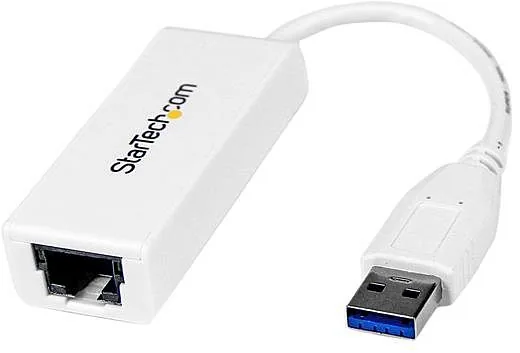
The StarTech LAN adapter, RJ-45, USB-A 3.0 (plug) is a practical wired networking accessory designed for computers that need a fast, stable Ethernet connection through a USB-A port. Identified as model US2GA30, this compact adapter connects a host computer to a network device using a standard RJ-45 Ethernet port and a CAT5, CAT5e, CAT6, or CAT6a cable.
Faster wired networking with 2.5Gb NBase-T
Built for 2.5Gb NBase-T networking, the adapter can provide a useful upgrade for compatible networks where Gigabit Ethernet is no longer enough. It also supports lower connection speeds, including 1Gbps, 100Mbps, and 10Mbps, helping it work with a broad range of existing routers, switches, and network infrastructure. This flexibility makes it suitable for office workstations, home offices, shared storage access, large downloads, and other tasks that benefit from dependable wired connectivity.
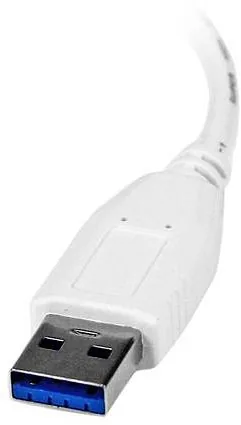
The USB-A 3.0 plug connects directly to an available USB-A port on the host computer. Once connected, the adapter provides a dedicated RJ-45 port for Ethernet access, offering an alternative when a computer has no built-in network port or when its existing Ethernet connection needs to be supplemented.
Clear connection status at a glance
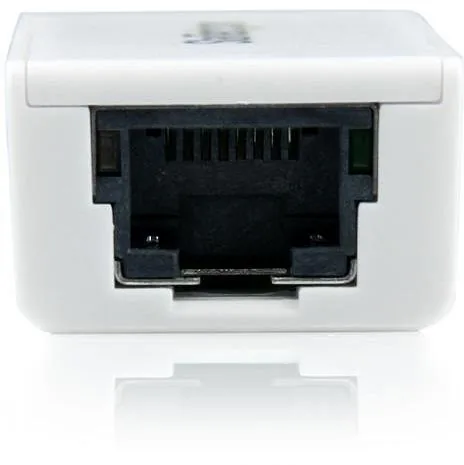
An integrated LED provides simple visual feedback about network status. A solid blue light indicates a 2.5Gbps link, while a solid green light shows a 1Gbps, 100Mbps, or 10Mbps connection. The LED flashes during network activity and remains off when no connection is detected. These indicators can help users quickly check cabling, link speed, and data transfer activity without opening network settings.
Straightforward setup
Installation starts by connecting an Ethernet cable between the adapter's RJ-45 port and a network device, then plugging the USB-A connector into the computer. Driver installation may happen automatically. If it does not, the adapter can present a virtual CD option containing the relevant driver installer for the host system. Selecting the compatible folder and running the RTK_NIC_DRIVER_INSTALLER begins the installation process.
Notes
- Use CAT5, CAT5e, CAT6, or CAT6a cabling for the Ethernet connection.
- A 2.5Gbps link requires compatible network equipment and cabling.
- The product is backed by a two-year warranty.
- Avoid touching an exposed circuit board while the device is powered.
Search for 67,706 Manuals online


Type-in Brand or Model