
StarTech USB2VGAPRO2 Manual
PDF manual · 8 Pages
English



Quick check
Incorrect answer, please try again.
Chat with your StarTech USB2VGAPRO2 manual using AI
Get instant AI answers from your StarTech USB2VGAPRO2 manual
Ask anything about the StarTech USB2VGAPRO2. Answers come from this manual, with the pages they are based on.
Ask a Question
Do you recommend USB2VGAPRO2?
Yes NoFrequently Asked Questions
It lets you add a VGA monitor through a USB 2.0 port. You can extend your desktop for more workspace or mirror your main display for sharing, presentations, and multitasking.
Is this answer helpful?
Yes. The adapter supports Microsoft Windows and Apple Mac OS X, so it can fit a range of desktop and laptop setups. Driver installation is required before use.
Is this answer helpful?
The adapter supports resolutions up to 1920x1200. That makes it a good fit for larger monitors and users who want a sharper, more usable extended display.
Is this answer helpful?
Yes. The manual recommends installing the driver and software before connecting the adapter to the computer. This helps the system recognize the device properly and complete setup smoothly.
Is this answer helpful?
Yes. The product can support multiple additional displays when used with more than one adapter, allowing a computer to power up to five extra displays in total under the stated setup.
Is this answer helpful?
The package includes the USB to VGA adapter, a driver CD, and an instruction manual. You may also download the latest drivers from StarTech.com for the newest software version.
Is this answer helpful?
Yes. The adapter includes a 2-year warranty and lifetime technical support from StarTech.com, which helps if you need setup guidance or troubleshooting assistance.
Is this answer helpful?
Advantages and Disadvantages
Advantages

- Turns one USB 2.0 port into a useful VGA display output for extra screen space.
- Supports Windows and Mac OS X, making it flexible for mixed-device environments.
- Can extend or mirror a desktop, which helps with productivity and presentations.
- Offers up to 1920x1200 resolution for clear output on larger monitors.
Disadvantages

- Requires driver installation before the adapter is plugged in, which adds setup steps.
- Some systems may need a reboot, and the screen can flash during installation.
- Uses VGA, so it is less future-proof than newer digital display standards.
- Performance depends on system requirements and DisplayLink software support.
Product Specification
Input
USB-A 2.0
Output
VGA
Resolution
max. 1920x1200@60Hz
Manufacturer's Warranty
two Years
Product Description
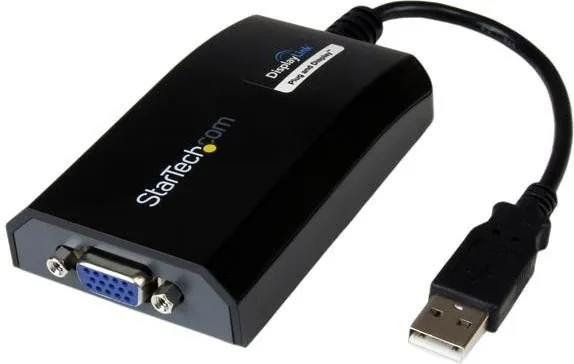
StarTech USB2VGAPRO2 USB 2.0 to VGA Adapter: Simple Multi-Monitor Expansion
The StarTech USB2VGAPRO2 USB 2.0 to VGA Adapter is designed for users who want more screen space without replacing their computer or opening the case. By turning a USB 2.0 port into an external VGA output, it gives laptops and desktops an easy path to dual-monitor or even multi-monitor setups. For work, study, or home office tasks, that extra display space can make a noticeable difference in productivity.
A Practical Way to Add Another Display
This adapter works as an external video card, letting you extend or mirror your desktop on a separate VGA monitor. It is especially useful for people who rely on spreadsheets, messaging apps, design tools, or reference materials while keeping their main screen free. The USB2VGAPRO2 supports Windows and Mac OS X, and it can reach resolutions up to 1920x1200, making it suitable for larger monitors and sharper visual work.
Built for Flexible Everyday Use
One of the strongest points of this adapter is flexibility. A single computer can support multiple extra displays when paired with additional units, which makes it a smart option for expanding a workstation over time. Since it connects through USB rather than internal hardware, installation stays simple and accessible for most users. The manual also highlights the use of DisplayLink software, which helps manage the adapter and display configuration once installed.
What to Expect During Setup
The StarTech USB2VGAPRO2 USB 2.0 to VGA Adapter Manual emphasizes a careful installation sequence: the software should be installed before the adapter is physically connected. During setup, the screen may flash or briefly go black, and some systems may require a reboot before the device is fully ready. Once installed, the adapter can be connected to a VGA monitor and used right away for extended desktop work or mirrored output.
Why It Stands Out
Beyond convenience, this adapter is backed by a 2-year warranty and free lifetime technical support, which adds peace of mind for long-term use. It is also supported by StarTech.com’s broader connectivity expertise, making it a dependable choice for users who need a straightforward bridge between modern USB ports and legacy VGA displays.
Notes
- Install the driver first for the smoothest setup.
- Best suited for users who still rely on VGA monitors.
- Ideal for productivity-focused multi-display workstations.
Search for 67,706 Manuals online


Type-in Brand or Model