

StarTech TB3DK2DPM2 Manual
PDF manual · 21 Pages
English



Quick check
Incorrect answer, please try again.
Chat with your StarTech TB3DK2DPM2 manual using AI
Get instant AI answers from your StarTech TB3DK2DPM2 manual
Ask anything about the StarTech TB3DK2DPM2. Answers come from this manual, with the pages they are based on.
Ask a Question
Do you recommend TB3DK2DPM2?
Yes NoFrequently Asked Questions
Yes—when connected to a Thunderbolt 3 host that supports dual 4K output, the dock can drive two 4K displays (4096x2160) at 60Hz via the DisplayPort and Thunderbolt 3 peripheral port, subject to host GPU and cable/adapter capabilities.
Is this answer helpful?
The dock supports an M-key NVMe PCIe 3.0 M.2 drive with a 22 x 80 mm (2280) form factor. Handle the SSD with ESD precautions, seat it at a 45° angle, then secure the holding screw before replacing the bottom panel.
Is this answer helpful?
The Thunderbolt 3 Host port can supply up to 85W of power delivery for charging compatible laptops, while the Thunderbolt 3 peripheral port supports up to 15W for connected devices. Front USB-A ports offer BC 1.2 fast-charge capability.
Is this answer helpful?
On modern Windows systems (7/8.1/10) drivers typically install automatically when the dock is connected and online. Ethernet drivers may be downloaded manually from the StarTech product support page if required. macOS support is compatible for display and basic I/O functions per OS version.
Is this answer helpful?
Yes. Thunderbolt allocates bandwidth to video first; when dual 4K displays are active, remaining bandwidth for USB and other I/O may be reduced, which can lower throughput for connected USB devices.
Is this answer helpful?
Often yes. The dock’s DisplayPort does not support multimode DP, so active adapters are required to convert to HDMI/DVI/VGA. Adapter limitations may affect maximum achievable resolutions.
Is this answer helpful?
The package includes the docking station, a Thunderbolt 3 cable, a universal power adapter, regional power cords (NA/JP, EU, UK, ANZ), and an instruction manual.
Is this answer helpful?
Advantages and Disadvantages
Advantages

- Dual 4K (4096x2160p) display support via Thunderbolt 3 and DisplayPort for high-resolution workflows.
- Built-in M.2 NVMe (M-key 2280) slot adds internal high-speed storage without external enclosures.
- Thunderbolt 3 Host port supplies up to 85W power delivery to charge compatible laptops.
- Comprehensive I/O: multiple USB-A/C ports, SD card reader, Gigabit Ethernet, audio in/out.
- Bundled Thunderbolt 3 cable and universal power adapter with regional cords and three-year warranty.
Disadvantages

- Front USB-C port (10Gbps) does not support DP Alt Mode or USB Power Delivery.
- Total bandwidth is shared; using dual 4K displays reduces available USB I/O throughput.
- May require active video adapters for HDMI/DVI/VGA connections; adapters can limit resolution.
- M.2 installation requires opening the chassis and ESD precautions — not fully tool-free for all users.
- Some driver features (Ethernet) may require manual driver download for older Windows versions.
Product Specification
Type
LAN adapter, USB hub, card reader, video adapter
Design
1x external wired
Interface
1x Thunderbolt 3 (female, 40Gb/s, USB-C with DisplayPort, USB PD max. 85W), 1x Thunderbolt 3 (male via cable, 40Gb/s, 19.69 in cable length)
Connections
1x RJ-45, 1x Thunderbolt 3 (female), 1x USB-C 3.1 (female), 2x USB-A 3.0 (female), 1x SD Card, 1x DisplayPort 1.2 (female), 1x M.2/M-Key (2280), 2x jack (female, 0.14 in)
Transmission
1x RJ-45 (10/100/1000Base-T), 1x Thunderbolt 3 (female, 40Gb/s, USB-C with DisplayPort, USB PD max. 15W, max. 2x 4096x2160p@30Hz or 1x 4096x2160p@60Hz), 1x USB-C 3.1 (female, 10Gb/s, 5V/3A/15W), 2x USB-A 3.0 (female, 5Gb/s, USB BC 1.2 5V/1.5A/7.5W), 1x SD Card (SD Card), 1x DisplayPort 1.2 (female, max. 2x 4096x2160p@30Hz or 1x 4096x2160p@30Hz), 1x M.2/M-Key (2280, PCIe 3.0 x4, NVMe), 2x jack (female, 0.14 in)
Power supply
Power not via connection, mains connection (1x barrel connector 20V), external power supply required and included (1x barrel connector 20V/7.5A/150W)
Chipset
Intel Alpine Ridge JHL6540 (Thunderbolt 3), Intel I210-AT (LAN adapter, RJ-45), ASMedia ASM1142 (USB hub), Realtek RTS5411 (USB hub, USB PD), Realtek RTS5329 (card reader)
Dimensions
3.74x0.98x0.94 in
Weight
1.72 lb
Housing color
black
Compatibility
universal
Special features
Metal housing, PXE Boot ROM, UASP
Manufacturer warranty
three years
Product Description
StarTech Dual-4K Thunderbolt 3 Dock with M.2 Slot, Thunderbolt 3 (Female) Manual
The StarTech Dual-4K Thunderbolt 3 Dock with M.2 Slot is a versatile, high-performance docking solution designed for professionals and power users who need extensive connectivity and expansion options. Built around Thunderbolt 3 technology, this dock supports dual 4K displays, fast data transfers, integrated networking, and the convenience of an internal M.2 NVMe SSD slot. It provides a single-cable hub for laptops that support Thunderbolt 3, simplifying workstation setup while delivering desktop-class I/O.
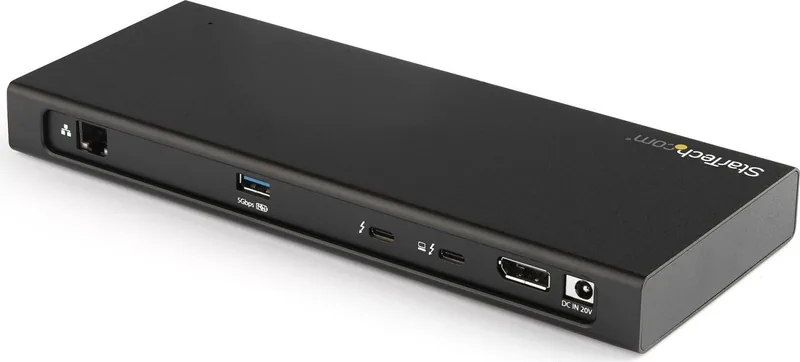
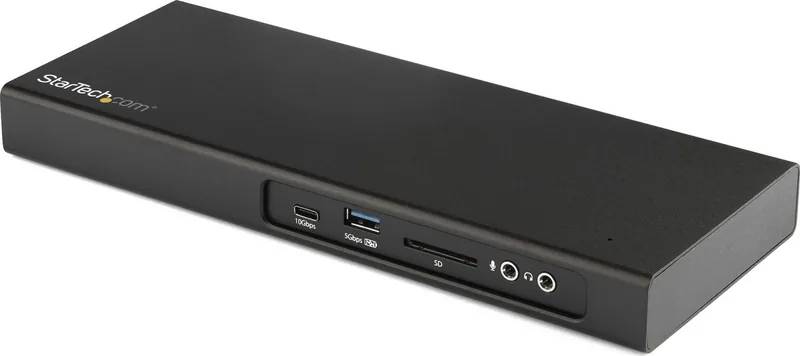
This dock features two Thunderbolt 3 USB-C ports (Host and Peripheral), a DisplayPort 1.2, multiple USB-A and USB-C ports (including a front USB-C 10Gbps port and several USB-A 5Gbps ports with BC 1.2 fast-charge capability), a Gigabit Ethernet port, SD card reader, and separate 3.5 mm audio input and output jacks. The Thunderbolt 3 Host port supplies up to 85W to charge compatible laptops, while the peripheral Thunderbolt 3 port supports DP Alt Mode and up to 15W charging for devices. Thunderbolt bandwidth is prioritized for video, enabling two independent 4K displays at 60Hz when used with compatible hardware.
A distinctive feature is the internal M.2 slot supporting M-key 2280 NVMe PCIe 3.0 drives. The dock lets users add high-speed internal storage to their setup for expanded capacity and improved workflow without requiring external drive enclosures. Installation is straightforward: power down, remove the bottom cover, seat the M.2 drive at a 45-degree angle, secure with the holding screw, and replace the panel.
StarTech provides bundled accessories including a Thunderbolt 3 cable, universal power adapter and regional power cords. Driver installation is largely automatic on modern Windows systems, with optional Ethernet drivers available for manual download. The dock’s LED indicates power status, and its power design and connectivity management reallocate bandwidth when multiple high-resolution displays are connected — trading some I/O throughput for video performance. Safety, compliance (FCC/Industry Canada), and a three-year warranty are included, along with lifetime technical support from StarTech.
Whether you need a clean single-cable workstation, dual-4K display outputs, or integrated NVMe storage, this dock is positioned as a robust multiport hub that keeps a laptop-based workstation compact, powerful, and flexible.
Notes
- The USB-C front port supports 10Gbps data but not DP Alt Mode or host power delivery; it can fast-charge when the dock is connected to the host.
- For some video adapters (HDMI/DVI/VGA) an active adapter may be required; video adapters can limit maximum resolution.
- Bandwidth allocation prioritizes video; heavy display usage can reduce available bandwidth for USB I/O.
- Follow antistatic precautions when installing an M.2 drive.
Search for 67,706 Manuals online


Type-in Brand or Model