

StarTech SV831DVIU Manual
PDF manual · 13 Pages
English



Quick check
Incorrect answer, please try again.
Chat with your StarTech SV831DVIU manual using AI
Get instant AI answers from your StarTech SV831DVIU manual
Ask anything about the StarTech SV831DVIU. Answers come from this manual, with the pages they are based on.
Ask a Question
Do you recommend SV831DVIU?
Yes NoFrequently Asked Questions
You need computers with DVI or HDMI video outputs and USB ports, a USB 104-key wired keyboard, a USB 3-button wired mouse, and a DVI/HDMI-capable monitor. DVI-to-HDMI adapters are available separately if your monitor uses HDMI.
Is this answer helpful?
Switch using the front-panel port buttons or keyboard hot-key sequences. Hot-key commands begin with two quick left CTRL presses followed by a number (1–8) to select a port or function keys for Auto Scan and Manual Scan modes.
Is this answer helpful?
Yes. The KVM supports up to 1920x1200. By default it outputs an EDID of 1024x768, but you can set a higher maximum resolution using the hot-key sequence (Left CTRL, Left CTRL, V, then a 4-digit resolution code). A host reboot or manual display setting adjustment may be required.
Is this answer helpful?
Auto Scan cycles through powered-on computers sequentially. Activate it with the hot-key (Left CTRL, Left CTRL, F1) or front-panel buttons 3+4; exit by pressing any port button. Scan time is set via Left CTRL, Left CTRL, F3 and cycles through predefined intervals.
Is this answer helpful?
The SV831DVIU does not support audio switching and it is not designed to be cascaded. It provides up to 8 direct ports in a single 1U chassis without expansion via cascading.
Is this answer helpful?
StarTech offers a three-year warranty covering parts and labor for defects in materials and workmanship. Lifetime technical support and downloads are available via the StarTech website for drivers, documentation, and troubleshooting resources.
Is this answer helpful?
Advantages and Disadvantages
Advantages

- Controls up to 8 DVI/HDMI-capable computers from one USB console
- Supports high resolutions up to 1920x1200 for modern displays
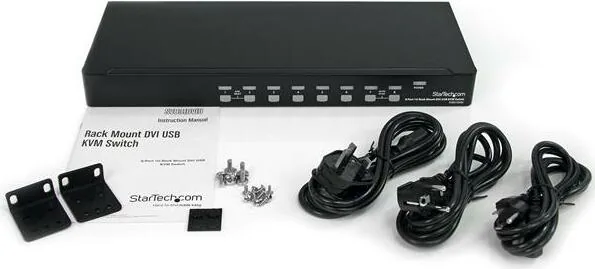
- 1U rackmount metal enclosure with included brackets and multi-region power cords
- Flexible switching via front-panel buttons or hot-key commands, plus Auto/Manual Scan
- Built-in power supply and DDC support for better display compatibility
Disadvantages

- No audio support for setups requiring sound switching
- No on-screen display (OSD) for visual menu navigation
- Requires DVI-to-HDMI adapters sold separately for HDMI-only cables
- Not cascadable—limited to the onboard 8 ports for expansion
- Default EDID is low (1024x768) and needs manual hot-key changes for higher resolutions
Product Specification
Ports
8
Monitor
DVI-I
Keyboard/Mouse
USB
Audio
N/A
LAN
N/A
Resolution
1,920x1,200
Product Description
StarTech SV831DVIU Manual: 8-Port 1U Rackmount DVI USB KVM Switch
The StarTech SV831DVIU is an 8-port 1U rackmount DVI USB KVM switch designed for server rooms, IT closets, and workplaces that require centralized control of multiple systems. With support for DVI (and HDMI via adapter) and USB peripherals, it lets a single keyboard, mouse, and monitor manage up to eight computers. The unit supports resolutions up to 1920x1200, enabling clear, high-resolution output suitable for modern displays and increased screen real estate.
Rugged and rack-ready, the SV831DVIU fits into a single U of rack space and includes rack-mount brackets and multi-region power cords. Console connections are USB-only for keyboard and mouse, and video is handled through a DVI-I console port. Each of the eight rear PC ports combines a DVI video connector with a USB type B connector for straightforward cabling to host PCs.
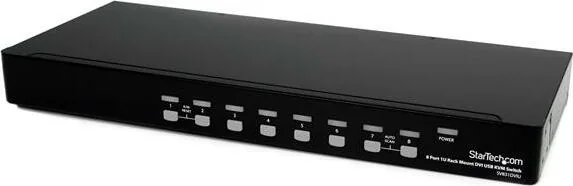
Operation is straightforward via front-panel push buttons or keyboard hot-key commands. LEDs indicate link and active selection status. Useful features include K/M Reset to reinitialize keyboard and mouse configurations, Auto Scan to cycle through powered computers on an adjustable interval, and Manual Scan for stepwise port selection. Hot-key sequences allow quick selection of ports, activation of scan modes, and setting of maximum video EDID resolutions through four-digit codes, enabling administrators to push higher resolution limits to connected hosts when needed.
Installation and operation emphasize best practices: power down devices before cabling, connect DVI and USB per port, power sequence the monitor, KVM, then hosts, and verify keyboard/mouse functionality as each system boots. The unit provides DDC support to help ensure proper display timing and resolution negotiation with host graphics adapters.
Built from metal enclosure with a built-in power supply, the SV831DVIU is a durable solution for environments requiring reliable multi-system access. StarTech backs the product with three-year warranty coverage and lifetime technical support resources, including downloads and documentation available online.
Notes
- Supports DVI-to-HDMI via adapters (sold separately).
- Default EDID max output is 1024x768; use hot-key commands to increase.
- Auto Scan intervals: selectable (3, 8, 15, 30 seconds) via hot-key.
- Requires standard USB wired keyboard (104-key) and 3-button USB mouse.
Search for 67,706 Manuals online


Type-in Brand or Model