
StarTech SV565UTPUL Manual
PDF manual · 20 Pages
English



Quick check
Incorrect answer, please try again.
Chat with your StarTech SV565UTPUL manual using AI
Get instant AI answers from your StarTech SV565UTPUL manual
Ask anything about the StarTech SV565UTPUL. Answers come from this manual, with the pages they are based on.
Ask a Question
Do you recommend SV565UTPUL?
Yes NoFrequently Asked Questions
The KVM extender supports a maximum range of 984 feet (300 meters) when using standard Category 5, 5e, or 6 unshielded twisted pair network cabling.
Is this answer helpful?
No, the UTP cables connecting the Host and Remote Units must not pass through any networking equipment such as routers or switches. They must connect directly.
Is this answer helpful?
Enter Video Calibration Mode by pressing left Ctrl, left Ctrl, then F11. You can adjust equalization, gain, and RGB skew using arrow keys to optimize image quality.
Is this answer helpful?
Yes, the StarTech SV565UTPUL supports both USB and PS/2 computer interfaces, allowing flexibility for different types of host computers.
Is this answer helpful?
If an invalid command is issued, the keyboard will emit a short beep followed by a long beep to indicate the error has been detected.
Is this answer helpful?
Yes, this product is backed by a three-year warranty covering defects in materials and workmanship from the date of purchase.
Is this answer helpful?
Advantages and Disadvantages
Advantages

- Supports remote control distances up to 984 feet using standard Cat5/5e/6 cabling
- Compatible with both PS/2 and USB computer interfaces for broad hardware support
- Includes Video Calibration features to optimize signal quality over long runs
- Offers flexible access modes including Auto, Local, and Remote control
- Uses industry-standard UTP cables avoiding the need for expensive fiber optics
Disadvantages

- Requires direct UTP cabling without passing through network switches or routers
- Image quality may degrade at maximum lengths if not properly calibrated
- Remote unit requires external power adapter which is included but adds clutter
- High resolution performance depends heavily on cable length and quality
- PS/2 cables are color-coded and specific versions must be selected correctly
Product Specification
Type
Extender (up to 984 ft)
Monitor
VGA
Keyboard/Mouse
2x USB 2.0
Audio
N/A
LAN
100Base-TX
Resolution
1920x1200
Product Description
Master Remote Control with the StarTech SV565UTPUL KVM Extender
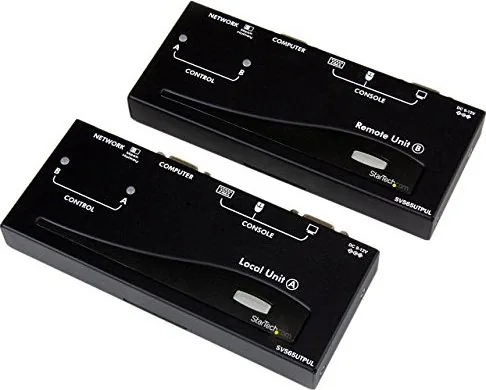
The StarTech SV565UTPUL KVM Extender VGA/USB, 100Base-TX transforms how IT professionals manage computer systems across large facilities. This powerful device allows a single user to control a host computer from a remote location up to 984 feet away using standard Category 5, 5e, or 6 network cabling. Whether you need to access servers in a distant basement or manage workstations in separate wings of an office building, this extender provides a seamless connection without requiring expensive fiber optic upgrades.
Designed for versatility, the system supports both PS/2 and USB interfaces, making it compatible with a wide range of legacy and modern hardware. The package includes integrated KVM cables that simplify the setup process by combining video and data transmission into a single cable run. Users can enjoy intuitive hotkey commands to switch between local and remote control modes instantly. The Host Unit offers three distinct operating modes: Auto, Local, and Remote, ensuring flexible access management for multiple users sharing the same resources.
One of the standout features is the advanced Video Calibration capability found on the Remote Unit. This function allows technicians to fine-tune equalization, gain, and RGB skew to optimize image quality over long cable distances. By adjusting these settings, users can maintain crisp visuals even at high resolutions like 1920x1200. Additionally, the Privacy Setting feature ensures that sensitive information remains secure by temporarily disabling video output when a user steps away from their console.
Installation is straightforward, utilizing existing UTP infrastructure. The units connect via RJ-45 ports, and the system works independently of network switches or routers, avoiding potential interference issues. For environments where a KVM switch is already in use, the Mask Hotkey switch prevents conflicts by disabling built-in hotkey detection. With a robust three-year warranty and lifetime technical support, the StarTech SV565UTPUL stands as a reliable solution for extending KVM control over significant distances.
Search for 67,706 Manuals online


Type-in Brand or Model