
StarTech SV441DUSBI Manual
PDF manual · 57 Pages
English



Quick check
Incorrect answer, please try again.
Chat with your StarTech SV441DUSBI manual using AI
Get instant AI answers from your StarTech SV441DUSBI manual
Ask anything about the StarTech SV441DUSBI. Answers come from this manual, with the pages they are based on.
Ask a Question
Do you recommend SV441DUSBI?
Yes NoFrequently Asked Questions
It supports a browser-based web interface with a Java VNC client, native VNC clients, and SSH (including SSH-tunneled VNC). Remote serial management is available via the integrated R-Port and optional daisy-chained serial modules.
Is this answer helpful?
Virtual media emulates a USB floppy (1.44MB), an 8MB RAM disk, or a CD-ROM. Floppy and RAM disk images are uploaded via the web interface; CD-ROM mode requires an externally hosted ISO accessible by the unit (web server must support byte ranges). These can be used for file transfers or remote boot if the host BIOS supports USB boot.
Is this answer helpful?
Yes. The unit supports HTTPS/SSL for web access, SSH for secure tunnels, RADIUS authentication for centralized user control, and configurable firewall options. VNC sessions can be SSL-tunneled for encrypted remote console traffic.
Is this answer helpful?
Use the R-Port on the rear panel to connect Serial Remote Control modules (RJ-14). Up to 16 modules can be daisy-chained. Serial devices are configured and accessed via the web interface or SSH shell; settings like baud and parity must match the device.
Is this answer helpful?
Disable mouse acceleration on managed hosts, then use the SV441DUSBI Mouse Resync command or the Resync button in the VNC Bribar. If alignment persists, use video positioning adjustments to correct display offsets.
Is this answer helpful?
Firmware can be manually uploaded via the web interface or the unit can auto self-upgrade by downloading the latest firmware over the Internet. If direct access is blocked, download the firmware locally and upload it manually. Do not power off during upgrades.
Is this answer helpful?
It supports DHCP or static IP assignment, DNS settings, dynamic DNS, configurable TCP service ports, and SNMP. Network settings are managed in the web interface; changes can be committed immediately or applied after restart.
Is this answer helpful?
Advantages and Disadvantages
Advantages

- BIOS-level remote access and virtual media enable full remote installs and recovery without on-site intervention.
- Multiple secure access options: SSL-encrypted web VNC, SSH tunneling, RADIUS and configurable firewall.
- Supports serial device management via integrated R-Port and daisy-chained serial modules for RS-232 consoles.
- Comprehensive web interface with firmware auto-upgrade, snapshots, file transfer and user account management.
- Advanced video tuning and noise-filter features help optimize display quality over constrained networks.
Disadvantages

- Virtual CD-ROM mode requires an externally hosted ISO and a web server that supports byte-range requests.
- Modem/PPP connections are low-bandwidth (grayscale VNC, limited performance) and require dedicated phone lines.
- Boot-from-USB depends on host BIOS compatibility; some systems may offer limited USB boot support.
- Java-based VNC client may need Java updates in browsers; certain special key sequences are restricted.
- Advanced configuration (video, R-Port, SSH) can be complex for non-technical users and may need admin access.
Product Specification
Type
IP-Switch
Ports
4
Monitor
VGA
Keyboard/Mouse
USB
Audio
N/A
LAN
1x 100Base-TX
Resolution
1920x1440
Product Description
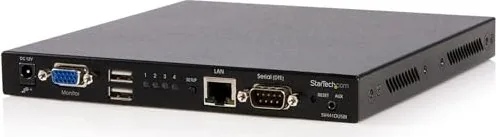
StarTech SV441DUSBI Manual: 4-Port USB VGA IP KVM Switch with Virtual Media
The StarTech SV441DUSBI is a rack-mountable 4-port USB VGA IP KVM switch designed for secure local and remote management of multiple computers and serial devices. It provides BIOS-level access, virtual media support for remote OS installs, and integrated security features like SSH, SSL, RADIUS and a configurable firewall. With two extra USB ports for peripheral sharing, the unit supports virtual floppy, RAM disk and CD-ROM emulation to simplify file transfers, firmware updates, and boot-from-USB tasks.
Key capabilities and use cases
The SV441DUSBI lets administrators connect up to four PCs (Windows, Mac, Linux, Sun) and control them over a LAN or the Internet via an integrated web interface or standard VNC clients. Its Java-based VNC client (or native VNC) supports encrypted sessions, while SSH tunneling adds another secure access option. The unit’s virtual media features let you upload ISO, floppy or RAM disk images and present them to hosts as USB storage or CD-ROM for remote installs and recovery. A dedicated R-Port supports serial consoles and daisy-chained Remote Control modules for managing routers, switches, PDUs and other RS-232 equipment.
Management and configuration
Initial setup is performed via a connected keyboard, mouse and monitor using the IP-OSD; network settings can be DHCP or static. The web interface organizes functions into Home, Preferences, Snapshots, VNC and Admin menus, enabling firmware upgrades (including auto self-upgrade), user account management (up to 32 users), SNMP, dynamic DNS, and detailed network configuration. On-screen and hotkey controls allow fast channel switching, scanning, locking and device naming. Advanced video tuning, noise filtering and sampling phase controls improve remote display quality over varying networks.
Reliability and deployment
Built in a 1U metal chassis with rack-mount options, the SV441DUSBI is suited for data center or remote-site management. It supports common video modes up to 1600x1200 and includes diagnostic and troubleshooting tools (serial terminal, modem PPP support, modem logs, and R-Port management). Regulatory certifications (FCC, CE, RoHS) and StarTech’s support/warranty policies back deployment in professional environments.
Notes
- Virtual media supports floppy (1.44MB), RAM disk (8MB) and CD-ROM via externally hosted ISO images (server must support byte ranges). Boot-from-USB depends on host BIOS support.
- Modem/PPP access is supported for out-of-band connections; PPP sessions default to IP 99.99.99.99 and grayscale VNC to conserve bandwidth.
- For best remote mouse behavior, disable OS mouse acceleration on managed hosts and use the mouse resync feature when needed.
Search for 67,706 Manuals online


Type-in Brand or Model